In this post, I’ll use the current blog as an example to show how to automate Hugo builds and deployments with Gitea in the homelab.
Why Hugo
- Fast builds, static HTML output, easy to deploy
- Markdown authoring, with themes and modular extensions
- Simple and efficient for a Homelab blog, with low maintenance overhead
Ways to Deploy Hugo
- Static files + Nginx
- Automatic builds and deployment to GitHub Pages with GitHub Actions
- Automated builds + image packaging + deployment to Kubernetes (the approach in this post)
Environment Preparation
The services and domains involved:
| Domain | Service | Description |
|---|---|---|
| mirrors.infra.plz.ac | nginx | Offline mirror site |
| harbor.infra.plz.ac | harbor | Offline image registry |
| git.infra.plz.ac | gitea | Git repository |
| blog.app.plz.ac | hugo | Hugo test site |
| cd.infra.plz.ac | argocd | Argo CD service used to deploy applications |
| auth.infra.plz.ac | authentik | homelab SSO |
| s3.infra.plz.ac | Ceph RGW | S3 storage |
| grafana.infra.plz.ac | grafana | Log viewing and service monitoring |
Docker registry mirrors are also used:
| fqdn | Upstream | Purpose | Notes |
|---|---|---|---|
| docker-proxy.plz.ac | docker.io | Speeds up Docker Hub image pulls | |
| ghcr.plz.ac | ghcr.io | Speeds up GitHub image pulls | |
| k8s-io.plz.ac | k8s.io | Kubernetes image registry mirror | |
| quay.plz.ac | quay.io | Quay registry mirror |
Kubernetes Cluster
I prepared 8 VMs as the actual nodes for this deployment. See the previous post Deploying Kubernetes Offline with Kubespray.
| name | role | desc |
|---|---|---|
| infra-master-1 | master | |
| infra-master-2 | master | |
| infra-master-3 | master | |
| infra-worker-1 | worker | |
| infra-worker-2 | worker | |
| infra-worker-3 | worker | |
| infra-worker-4 | worker | |
| infra-worker-5 | worker |
ingress-nginx, cert-manager and MetalLB are already deployed on the cluster. To issue certificates I also configured a cluster-issuer named cloudflare.
MetalLB uses two IPs here:
- 10.31.0.252 # IP used for DNS resolution
- 10.31.0.253 # IP used for the ingress load balancers
The configuration:
apiVersion: metallb.io/v1beta1
kind: IPAddressPool
metadata:
  name: default-pool
  namespace: metallb
spec:
  addresses:
  - 10.31.0.253/32
  - 10.31.0.252/32

---
apiVersion: metallb.io/v1beta1
kind: L2Advertisement
metadata:
  name: default-pool
  namespace: metallb
spec:
  ipAddressPools:
  - default-pool
To make sure later services can reach each other, I also deployed a separate etcd + coredns + externaldns stack for internal DNS resolution.
The deployment files:
etcd-values.yaml
global:
  security:
    allowInsecureImages: true
image:
  registry: docker-proxy.plz.ac

clusterDomain: infra.homelab
auth:
  rbac:
    enabled: false
    create: false
coredns-values.yaml
Because of network issues here, IPv6 has to be disabled at the DNS layer, otherwise all kinds of resolution problems show up.
image:
  repository: docker-proxy.plz.ac/coredns/coredns
serviceType: LoadBalancer
service:
  loadBalancerIP: 10.31.0.252
servers:
- zones:
  - zone: .
  port: 53
  # -- expose the service on a different port
  # servicePort: 5353
  # If serviceType is nodePort you can specify nodePort here
  # nodePort: 30053
  # hostPort: 53
  plugins:
  - name: errors
  # Serves a /health endpoint on :8080, required for livenessProbe
  - name: health
    configBlock: |-
      lameduck 10s
  # Serves a /ready endpoint on :8181, required for readinessProbe
  - name: ready
  # Required to query kubernetes API for data
  - name: kubernetes
    parameters: infra.homelab in-addr.arpa
    configBlock: |-
      pods insecure
      fallthrough in-addr.arpa
      ttl 30
  - name: template # use the template plugin
    parameters: ANY AAAA # match all AAAA queries
    configBlock: |-
      rcode NXDOMAIN # return NXDOMAIN, meaning no record of this type
  - name: etcd
    configBlock: |-
      endpoint http://etcd.dns.svc.infra.homelab:2379
      path /skydns
      fallthrough
  # Serves a /metrics endpoint on :9153, required for serviceMonitor
  - name: prometheus
    parameters: 0.0.0.0:9153
  - name: forward
    parameters: . 1.1.1.1 8.8.8.8
  - name: cache
    parameters: 30
  - name: loop
  - name: reload
  - name: loadbalance
external-dns-values.yaml
global:
  security:
    allowInsecureImages: true
image:
  registry: docker-proxy.plz.ac
provider: coredns
policy: upsert-only
txtOwnerId: "homelab"
extraEnvVars:
  - name: ETCD_URLS
    value: "http://etcd.dns.svc.infra.homelab:2379"
serviceAccount:
  create: true
  name: "external-dns"
ingressClassFilters:
  - nginx
Image Registry
This time the image registry is Harbor, deployed into the existing Kubernetes cluster with a Helm chart.
The deployment values.yaml:
expose:
  type: ingress
  ingress:
    hosts:
      core: harbor.infra.plz.ac
    className: nginx
    annotations:
      # note different ingress controllers may require a different ssl-redirect annotation
      # for Envoy, use ingress.kubernetes.io/force-ssl-redirect: "true" and remove the nginx lines below
      ingress.kubernetes.io/ssl-redirect: "true"
      ingress.kubernetes.io/proxy-body-size: "0"
      nginx.ingress.kubernetes.io/ssl-redirect: "true"
      nginx.ingress.kubernetes.io/proxy-body-size: "0"
      cert-manager.io/cluster-issuer: "cloudflare"
externalURL: https://harbor.infra.plz.ac
nginx:
  image:
    repository: docker-proxy.plz.ac/goharbor/nginx-photon
portal:
  image:
    repository: docker-proxy.plz.ac/goharbor/harbor-portal
core:
  image:
    repository: docker-proxy.plz.ac/goharbor/harbor-core
jobservice:
  image:
    repository: docker-proxy.plz.ac/goharbor/harbor-jobservice
registry:
  registry:
    image:
      repository: docker-proxy.plz.ac/goharbor/registry-photon
  controller:
    image:
      repository: docker-proxy.plz.ac/goharbor/harbor-registryctl
trivy:
  image:
    # repository the repository for Trivy adapter image
    repository: docker-proxy.plz.ac/goharbor/trivy-adapter-photon
database:
  internal:
    image:
      repository: docker-proxy.plz.ac/goharbor/harbor-db
redis:
  internal:
    image:
      repository: docker-proxy.plz.ac/goharbor/redis-photon
exporter:
  image:
    repository: docker-proxy.plz.ac/goharbor/harbor-exporter
After Harbor is deployed, create the following registries:
- act (public)
- slchris (private), used to deliver the internal Hugo site
Base Docker image for the Hugo service:
docker pull nginx
docker tag docker.io/library/nginx:latest harbor.infra.plz.ac/library/nginx
docker push harbor.infra.plz.ac/library/nginx
Mirrors Service
The mirrors service provides the files that later Gitea Actions runs need. Its deployment manifest:
---
apiVersion: v1
kind: ConfigMap
metadata:
  name: default-conf
data:
  default.conf: |
    server {
        listen       80;
        server_name  localhost;

        #access_log  /var/log/nginx/host.access.log  main;
        error_log /var/log/nginx/mirrors_error.log;
        access_log /var/log/nginx/mirrors_access.log;

        location / {
            autoindex on;
            autoindex_exact_size off;
            autoindex_localtime on;
            root   /usr/share/nginx/html;
            index  index.html index.htm;
        }
        location ^~ /debian/ {
            proxy_pass https://mirrors.tuna.tsinghua.edu.cn/debian/;
            proxy_ssl_server_name on;


            proxy_set_header Host mirrors.tuna.tsinghua.edu.cn;
            proxy_set_header X-Real-IP $remote_addr;
            proxy_set_header X-Forwarded-For $proxy_add_x_forwarded_for;
            proxy_set_header X-Forwarded-Proto $scheme;
        }
        location ^~ /debian-nonfree/ {
            proxy_pass https://mirrors.tuna.tsinghua.edu.cn/debian-nonfree/;
            proxy_ssl_server_name on;


            proxy_set_header Host mirrors.tuna.tsinghua.edu.cn;
            proxy_set_header X-Real-IP $remote_addr;
            proxy_set_header X-Forwarded-For $proxy_add_x_forwarded_for;
            proxy_set_header X-Forwarded-Proto $scheme;
        }
        location ^~ /debian-security/ {
            proxy_pass https://mirrors.tuna.tsinghua.edu.cn/debian-security/;
            proxy_ssl_server_name on;


            proxy_set_header Host mirrors.tuna.tsinghua.edu.cn;
            proxy_set_header X-Real-IP $remote_addr;
            proxy_set_header X-Forwarded-For $proxy_add_x_forwarded_for;
            proxy_set_header X-Forwarded-Proto $scheme;
        }
        location ^~ /docker-ce/ {
            proxy_pass https://mirrors.ustc.edu.cn/docker-ce/;
            proxy_ssl_server_name on;


            proxy_set_header Host mirrors.ustc.edu.cn;
            proxy_set_header X-Real-IP $remote_addr;
            proxy_set_header X-Forwarded-For $proxy_add_x_forwarded_for;
            proxy_set_header X-Forwarded-Proto $scheme;
        }

        location ^~ /ceph/ {
            proxy_pass https://mirrors.ustc.edu.cn/ceph/;
            proxy_ssl_server_name on;


            proxy_set_header Host mirrors.ustc.edu.cn;
            proxy_set_header X-Real-IP $remote_addr;
            proxy_set_header X-Forwarded-For $proxy_add_x_forwarded_for;
            proxy_set_header X-Forwarded-Proto $scheme;
        }

        location ^~ /elasticstack/ {
            proxy_pass https://mirrors.tuna.tsinghua.edu.cn/elasticstack/;
            proxy_ssl_server_name on;


            proxy_set_header Host mirrors.tuna.tsinghua.edu.cn;
            proxy_set_header X-Real-IP $remote_addr;
            proxy_set_header X-Forwarded-For $proxy_add_x_forwarded_for;
            proxy_set_header X-Forwarded-Proto $scheme;
        }

        location ^~ /mongodb/ {
            proxy_pass https://mirrors.tuna.tsinghua.edu.cn/mongodb/;
            proxy_ssl_server_name on;


            proxy_set_header Host mirrors.tuna.tsinghua.edu.cn;
            proxy_set_header X-Real-IP $remote_addr;
            proxy_set_header X-Forwarded-For $proxy_add_x_forwarded_for;
            proxy_set_header X-Forwarded-Proto $scheme;
        }

        location ^~ /gitlab-ce/ {
            proxy_pass https://mirrors.tuna.tsinghua.edu.cn/gitlab-ce/;
            proxy_ssl_server_name on;


            proxy_set_header Host mirrors.tuna.tsinghua.edu.cn;
            proxy_set_header X-Real-IP $remote_addr;
            proxy_set_header X-Forwarded-For $proxy_add_x_forwarded_for;
            proxy_set_header X-Forwarded-Proto $scheme;
        }

        location ^~ /gitlab-runner/ {
            proxy_pass https://mirrors.tuna.tsinghua.edu.cn/gitlab-runner/;
            proxy_ssl_server_name on;


            proxy_set_header Host mirrors.tuna.tsinghua.edu.cn;
            proxy_set_header X-Real-IP $remote_addr;
            proxy_set_header X-Forwarded-For $proxy_add_x_forwarded_for;
            proxy_set_header X-Forwarded-Proto $scheme;
        }


        location ^~ /fedora/ {
            proxy_pass https://mirrors.ustc.edu.cn/fedora/;
            proxy_ssl_server_name on;


            proxy_set_header Host mirrors.ustc.edu.cn;
            proxy_set_header X-Real-IP $remote_addr;
            proxy_set_header X-Forwarded-For $proxy_add_x_forwarded_for;
            proxy_set_header X-Forwarded-Proto $scheme;
        }

        location ^~ /jenkins/ {
            proxy_pass https://mirrors.ustc.edu.cn/jenkins/;
            proxy_ssl_server_name on;


            proxy_set_header Host mirrors.ustc.edu.cn;
            proxy_set_header X-Real-IP $remote_addr;
            proxy_set_header X-Forwarded-For $proxy_add_x_forwarded_for;
            proxy_set_header X-Forwarded-Proto $scheme;
        }

        location ^~ /percona/ {
            proxy_pass https://mirrors.ustc.edu.cn/percona/;
            proxy_ssl_server_name on;


            proxy_set_header Host mirrors.ustc.edu.cn;
            proxy_set_header X-Real-IP $remote_addr;
            proxy_set_header X-Forwarded-For $proxy_add_x_forwarded_for;
            proxy_set_header X-Forwarded-Proto $scheme;
        }


        location ^~ /proxmox/ {
            proxy_pass https://mirrors.ustc.edu.cn/proxmox/;
            proxy_ssl_server_name on;


            proxy_set_header Host mirrors.ustc.edu.cn;
            proxy_set_header X-Real-IP $remote_addr;
            proxy_set_header X-Forwarded-For $proxy_add_x_forwarded_for;
            proxy_set_header X-Forwarded-Proto $scheme;
        }


        location ^~ /pypi/ {
            proxy_pass https://mirrors.ustc.edu.cn/pypi/;
            proxy_ssl_server_name on;


            proxy_set_header Host mirrors.ustc.edu.cn;
            proxy_set_header X-Real-IP $remote_addr;
            proxy_set_header X-Forwarded-For $proxy_add_x_forwarded_for;
            proxy_set_header X-Forwarded-Proto $scheme;
        }


        location ^~ /alpine/ {
            proxy_pass https://mirrors.ustc.edu.cn/alpine/;
            proxy_ssl_server_name on;


            proxy_set_header Host mirrors.ustc.edu.cn;
            proxy_set_header X-Real-IP $remote_addr;
            proxy_set_header X-Forwarded-For $proxy_add_x_forwarded_for;
            proxy_set_header X-Forwarded-Proto $scheme;
        }

        location ^~ /openresty/ {
            proxy_pass https://mirrors.ustc.edu.cn/openresty/;
            proxy_ssl_server_name on;


            proxy_set_header Host mirrors.ustc.edu.cn;
            proxy_set_header X-Real-IP $remote_addr;
            proxy_set_header X-Forwarded-For $proxy_add_x_forwarded_for;
            proxy_set_header X-Forwarded-Proto $scheme;
        }


    }


---
apiVersion: v1
kind: PersistentVolumeClaim
metadata:
  name: mirrors-pvc
  namespace: default
spec:
  accessModes:
    - ReadWriteOnce
  storageClassName: csi-rbd-sc
  resources:
    requests:
      storage: 100Gi

---
apiVersion: apps/v1
kind: Deployment
metadata:
  name: mirrors-nginx
  namespace: default
spec:
  selector:
    matchLabels:
      app: mirrors-nginx
  template:
    metadata:
      labels:
        app: mirrors-nginx
    spec:
      containers:
      - name: mirrors-nginx
        image: docker-proxy.plz.ac/library/nginx
        resources:
          limits:
            memory: "128Mi"
            cpu: "500m"
        ports:
        - containerPort: 80
        volumeMounts:
        - name: mirrors-nginx
          mountPath: /usr/share/nginx/html
        - name: default-conf
          mountPath: /etc/nginx/conf.d
      volumes:
      - name: mirrors-nginx
        persistentVolumeClaim:
          claimName: mirrors-pvc
      - name: default-conf
        configMap:
          name: default-conf
          items:
            - key: default.conf
              path: default.conf


---
apiVersion: v1
kind: Service
metadata:
  name: mirrors-nginx
spec:
  selector:
    app: mirrors-nginx
  ports:
  - port: 80
    targetPort: 80
---
apiVersion: networking.k8s.io/v1
kind: Ingress
metadata:
  name: mirrors-nginx
  labels:
    name: mirrors-nginx
  annotations:
    cert-manager.io/cluster-issuer: "cloudflare"
    nginx.ingress.kubernetes.io/force-ssl-redirect: "true"
spec:
  ingressClassName: nginx
  rules:
  - host: mirrors.infra.plz.ac
    http:
      paths:
      - pathType: Prefix
        path: "/"
        backend:
          service:
            name: mirrors-nginx
            port:
              number: 80
  tls:
  - hosts:
    - mirrors.infra.plz.ac
    secretName: mirrors-nginx-tls
Once it is deployed, exec into the pod and upload the required artifacts, for example:
- Docker installation script
- kubectl binary
- Hugo binary
Gitea Server
Gitea is also deployed with a Helm chart:
global:
  imageRegistry: "docker-proxy.plz.ac"
  security:
    allowInsecureImages: true

persistence:
  enabled: true
  size: 100Gi

ingress:
  enabled: true
  hostname: git.infra.plz.ac
  tls:
    - hosts:
        - git.infra.plz.ac
      secretName: gitea-tls
  annotations:
    cert-manager.io/cluster-issuer: "cloudflare"
    nginx.ingress.kubernetes.io/force-ssl-redirect: "true"
    nginx.ingress.kubernetes.io/proxy-body-size: "1000m"
  ingressClassName: nginx

adminUsername: admin
adminPassword: "<gitea-admin-password>"
adminEmail: [email protected]
appName: VC-gitea
rootURL: "https://git.infra.plz.ac"
Gitea Actions
Deploying Gitea Actions directly with the Helm chart doesn’t work properly. Testing showed that a standalone VM connects to the existing Gitea server without problems, so for now I’m using a separate deployment.
I prepared a 4C/8G/60G VM for it.
First, install Docker on the node:
export DOWNLOAD_URL="https://mirrors.infra.plz.ac/docker-ce"
curl https://mirrors.infra.plz.ac/docker/install.sh | bash
Download act_runner.
wget -c https://gitea.com/gitea/act_runner/releases/download/v0.2.12/act_runner-0.2.12-linux-amd64
chmod +x act_runner-0.2.12-linux-amd64
mv act_runner-0.2.12-linux-amd64 act_runner
Configure act:
./act_runner generate-config
The public runner images also need to be pushed to the internal Harbor:
docker login harbor.infra.plz.ac
docker pull docker.gitea.com/runner-images:ubuntu-latest
docker tag docker.gitea.com/runner-images:ubuntu-latest harbor.infra.plz.ac/act/runner-images:ubuntu-latest
docker push  harbor.infra.plz.ac/act/runner-images:ubuntu-latest
docker pull docker.gitea.com/runner-images:ubuntu-22.04
docker tag  docker.gitea.com/runner-images:ubuntu-22.04 harbor.infra.plz.ac/act/runner-images:ubuntu-22.04
docker push harbor.infra.plz.ac/act/runner-images:ubuntu-22.04
docker pull docker.gitea.com/runner-images:ubuntu-20.04
docker tag docker.gitea.com/runner-images:ubuntu-20.04 harbor.infra.plz.ac/act/runner-images:ubuntu-20.04
docker push harbor.infra.plz.ac/act/runner-images:ubuntu-20.04
Update the matching configuration in vi config.yaml:
  labels:
    - "ubuntu-latest:docker://harbor.infra.plz.ac/act/runner-images:ubuntu-latest"
    - "ubuntu-22.04:docker://harbor.infra.plz.ac/act/runner-images:ubuntu-22.04"
    - "ubuntu-20.04:docker://harbor.infra.plz.ac/act/runner-images:ubuntu-20.04"
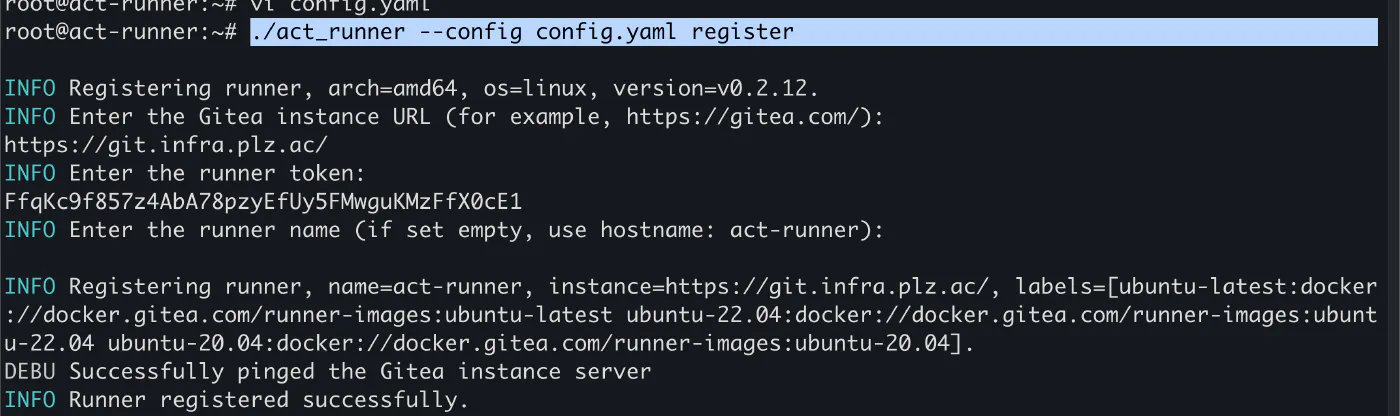
Register it with Gitea. You’ll be prompted for a runner token, which you can get from Admin Settings -> Action -> Runners -> Create New Runner:
./act_runner --config config.yaml register
Next, configure systemd to manage the service. For security, create a dedicated user to run it:
mkdir -pv /etc/act_runner/
mv act_runner /usr/local/bin/act_runner
mv config.yaml /etc/act_runner/config.yaml
useradd act_runner -m  -s /sbin/nologin
chown -R act_runner:act_runner /etc/act_runner
mkdir -pv /var/lib/act_runner
mv .runner /var/lib/act_runner
chown -R act_runner:act_runner /var/lib/act_runner
usermod -aG docker act_runner
Create the service unit file:
vi /etc/systemd/system/act_runner.service
Contents:
[Unit]
Description=Gitea Actions runner
Documentation=https://gitea.com/gitea/act_runner
After=docker.service

[Service]
ExecStart=/usr/local/bin/act_runner daemon --config /etc/act_runner/config.yaml
ExecReload=/bin/kill -s HUP $MAINPID
WorkingDirectory=/var/lib/act_runner
TimeoutSec=0
RestartSec=10
Restart=always
User=act_runner

[Install]
WantedBy=multi-user.target
Enable it at boot and start it:
systemctl daemon-reload
systemctl enable act_runner --now
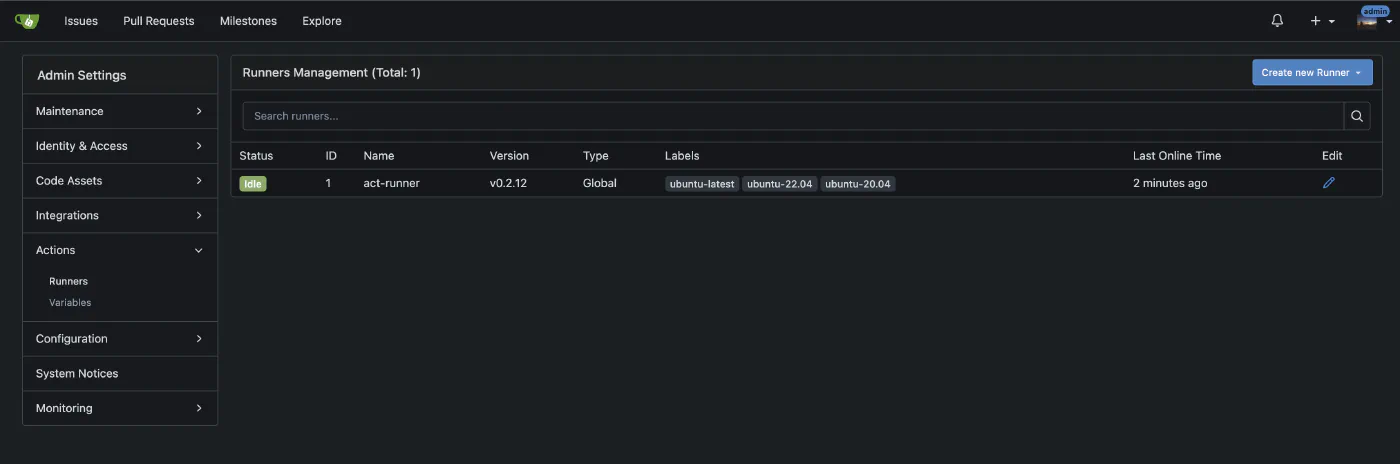
To check the service status, look under Admin Settings -> Action -> Runners:
Hugo Build and Packaging Pipeline
Building Hugo is actually very simple:
- Clone the repository
- Update the submodules
- Let Hugo generate the static files
- Package everything into an image with Docker
- Push to Harbor
Gitea is very similar to GitHub; GitHub Actions can be reused almost directly, but network restrictions may prevent downloads from succeeding.
I synced a local copy of the commonly used checkout action, so the workflow needs a small change. Here is an example from .gitea/workflows/build.yaml:
name: Build Hugo Site

on:
  push:
    branches:
    - mbp

jobs:
  build:
    name: Build Hugo Site
    # build agent
    runs-on: ubuntu-latest
    steps:
    - uses: https://git.infra.plz.ac/actions/checkout@releases/v4.0.0
    - name: Setup Hugo
      run: |
        wget -c https://mirrors.infra.plz.ac/bin/hugo/v0.147.9/hugo_extended_0.147.9_linux-amd64.tar.gz
        tar -xf hugo_extended_0.147.9_linux-amd64.tar.gz
        mv hugo /usr/local/bin
        hugo version
        rm -rf hugo_extended_0.147.9_linux-amd64.tar.gz

    # build site
    - name: Build Hugo Site
      run: |
        git submodule update --init
        hugo --minify

    - name: Set SHORT_SHA
      run: echo "SHORT_SHA=$(echo ${{ gitea.sha }} | cut -c1-8)" >> $GITHUB_ENV

    - name: Login to Harbor
      run: |
        echo "${{ secrets.REGISTRY_PASSWORD }}" | docker login harbor.infra.plz.ac -u "${{ secrets.REGISTRY_USERNAME }}" --password-stdin

    - name: Build and Push Hugo Images
      run: |
        docker build -t harbor.infra.plz.ac/slchris/blog:${SHORT_SHA} .
        docker push harbor.infra.plz.ac/slchris/blog:${SHORT_SHA}
A few things to note:
- checkout must be handled offline
- Every submodule the repository uses must be handled offline
- Configure the matching secrets on the Gitea runner, such as the Harbor username and password
- Images referenced by the Dockerfile also need to be handled offline.
I put the Dockerfile directly in the repository root:
# hugo dockerfiles
FROM harbor.infra.plz.ac/library/nginx
LABEL maintainer="[email protected]"

COPY public /usr/share/nginx/html
The workflow only triggers on pushes to a specific branch such as mbp. Once it finishes, the output shows the details:
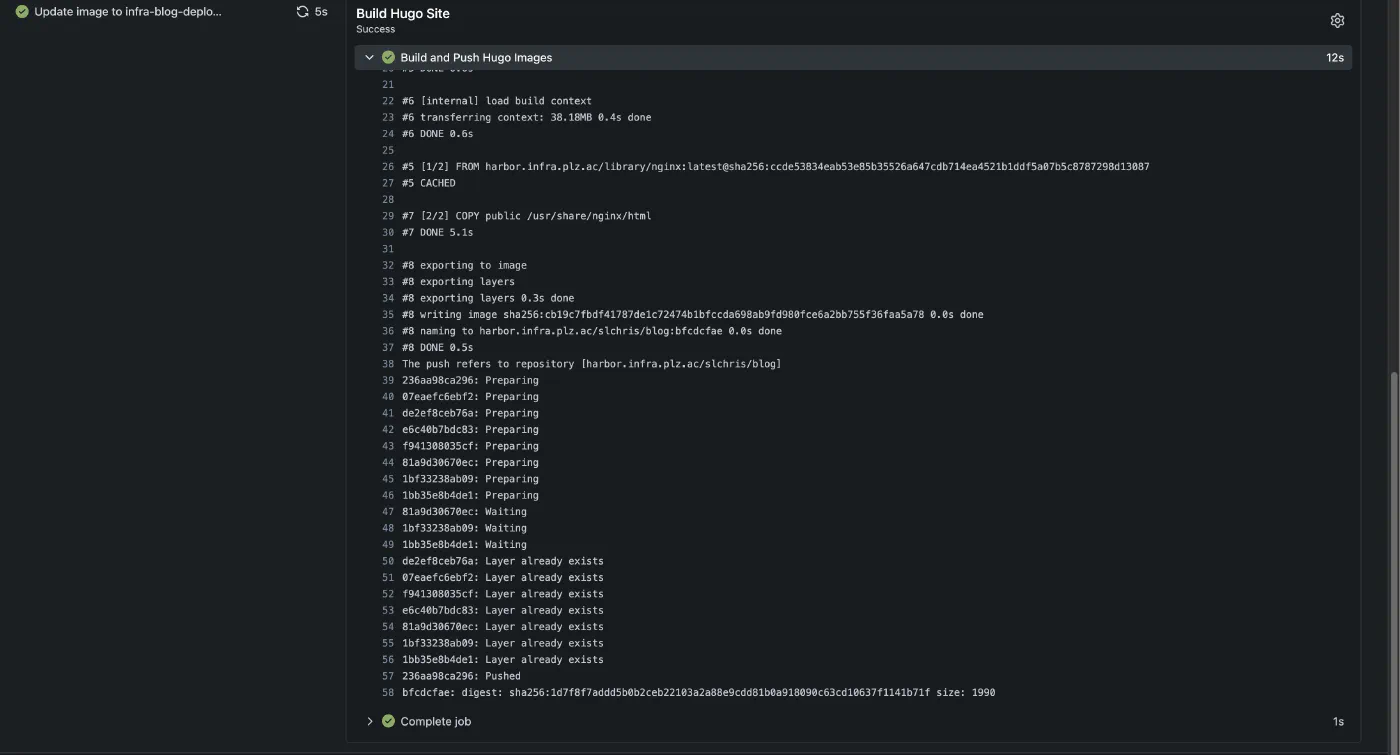
That covers building the Hugo image and pushing it to the Harbor repository.
Deploying to Kubernetes
To deploy to Kubernetes, I prepared this manifest:
apiVersion: apps/v1
kind: Deployment
metadata:
  name: hugo-web
  namespace: blog
spec:
  replicas: 1
  selector:
    matchLabels:
      app: hugo-web
  template:
    metadata:
      labels:
        app: hugo-web
    spec:
      imagePullSecrets:
        - name: harbor-cred
      containers:
        - name: hugo-web
          image: harbor.infra.plz.ac/slchris/blog:bba3776f
          ports:
            - containerPort: 80
          resources:
            limits:
              cpu: "500m"
              memory: "256Mi"
            requests:
              cpu: "100m"
              memory: "128Mi"

---

apiVersion: v1
kind: Service
metadata:
  name: hugo-web
  namespace: blog
spec:
  selector:
    app: hugo-web
  ports:
    - protocol: TCP
      port: 80
      targetPort: 80
  type: ClusterIP

---

apiVersion: networking.k8s.io/v1
kind: Ingress
metadata:
  name: hugo-web
  namespace: blog
  annotations:
    cert-manager.io/cluster-issuer: "cloudflare"
    nginx.ingress.kubernetes.io/force-ssl-redirect: "true"
spec:
  ingressClassName: nginx
  tls:
    - hosts:
        - blog.app.plz.ac
      secretName: hugo-web-tls
  rules:
    - host: blog.app.plz.ac
      http:
        paths:
          - path: /
            pathType: Prefix
            backend:
              service:
                name: hugo-web
                port:
                  number: 80
Create the namespace:
kubectl create ns blog
Create the imagePullSecret:
kubectl create secret docker-registry harbor-cred \
  --docker-server=harbor.infra.plz.ac \
  --docker-username=admin \
  --docker-password=<harbor-password> \
  -n blog
Apply it:
kubectl apply -f blog.yaml
The next problem is deploying the new image to the Kubernetes cluster after the Gitea Actions build finishes. Here is a very simple workflow:
name: Build and deploy Hugo Site

on:
  push:
    branches:
    - mbp

jobs:
  build:
    name: Build Hugo Site
    # build agent
    runs-on: ubuntu-latest
    steps:
    - uses: https://git.infra.plz.ac/actions/checkout@releases/v4.0.0
    - name: Setup Hugo
      run: |
        wget -c https://mirrors.infra.plz.ac/bin/hugo/v0.147.9/hugo_extended_0.147.9_linux-amd64.tar.gz
        tar -xf hugo_extended_0.147.9_linux-amd64.tar.gz
        mv hugo /usr/local/bin
        hugo version
        rm -rf hugo_extended_0.147.9_linux-amd64.tar.gz

    # build site
    - name: Build Hugo Site
      run: |
        git submodule update --init
        hugo --minify

    - name: Set SHORT_SHA
      run: echo "SHORT_SHA=$(echo ${{ gitea.sha }} | cut -c1-8)" >> $GITHUB_ENV

    - name: Login to Harbor
      run: |
        echo "${{ secrets.REGISTRY_PASSWORD }}" | docker login harbor.infra.plz.ac -u "${{ secrets.REGISTRY_USERNAME }}" --password-stdin

    - name: Build and Push Hugo Images
      run: |
        docker build -t harbor.infra.plz.ac/slchris/blog:${SHORT_SHA} .
        docker push harbor.infra.plz.ac/slchris/blog:${SHORT_SHA}

  deploy:
    name: Deploy to Kubernetes
    runs-on: ubuntu-latest
    needs: build
    steps:
    - name: Decode kubeconfig
      run: |
        echo "${{ secrets.KUBECONFIG_B64 }}" | base64 -d > kubeconfig
      env:
        KUBECONFIG_B64: ${{ secrets.KUBECONFIG_B64 }}
    - name: Set KUBECONFIG env
      run: |
        echo "KUBECONFIG=$PWD/kubeconfig" >> $GITHUB_ENV

    - name: Install kubectl command
      run: |
        wget -c https://mirrors.infra.plz.ac/k8s/dl.k8s.io/release/v1.32.5/bin/linux/amd64/kubectl
        chmod +x kubectl
        mv kubectl /usr/local/bin
        kubectl

    - name: Update Deployment Image
      run: |
        kubectl --kubeconfig=$PWD/kubeconfig -n blog set image deployment/hugo-web \
          hugo-web=harbor.infra.plz.ac/slchris/blog:${{ env.SHORT_SHA }}
Note that KUBECONFIG_B64 is a base64-encoded kubeconfig. By default it can’t be used as-is; its server address must be changed to one the Gitea Actions runner can reach.
Change the IP in the kubeconfig to an address that is actually reachable, otherwise it fails:
cat ~/.kube/config | base64 -w 0
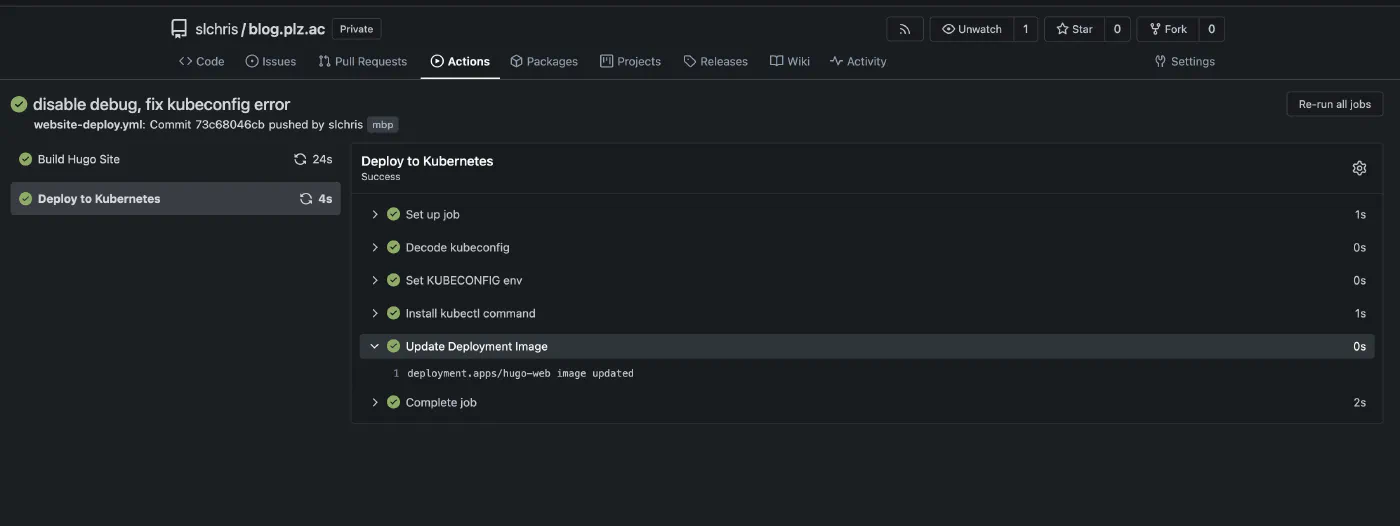
Once it’s pushed, you can see the image in the cluster has been updated:
This approach has problems too. A real environment may not be able to reach the Kubernetes cluster directly, and rollbacks mean manually looking up previous image IDs, which is very inconvenient.
Evolving to GitOps
To fix those problems I brought in Argo CD to make the setup more GitOps-like, with a release history that makes rollbacks much easier.
Deploying Argo CD
This is also deployed with a Helm chart:
global:
  domain: cd.infra.plz.ac
  image:
    repository: quay.plz.ac/argoproj/argocd
server:
  enabled: true
  service:
    type: ClusterIP  # or ClusterIP, depending on requirements
  ingress:
    ingressClassName: nginx
    enabled: true
    name: argocd-ingress
    path: /
    pathType: Prefix
    hosts:
      - host: cd.infra.plz.ac
        paths:
          - /
    annotations:
      nginx.ingress.kubernetes.io/force-ssl-redirect: "true"
      nginx.ingress.kubernetes.io/backend-protocol: "HTTPS"
      cert-manager.io/cluster-issuer: "cloudflare"
    tls:
      - hosts:
          - cd.infra.plz.ac
        secretName: argocd-tls

dex:
  image:
    repository: ghcr.plz.ac/dexidp/dex
configs:
  url: "https://cd.infra.plz.ac"  # Argo CD server URL
  cm:
    create: true  # create the argocd-cm ConfigMap
    annotations: {}  # annotations can be added
    dex.config: |  # add the dex.config content
      connectors:
        - type: oidc
          id: authentik
          name: authentik
          config:
            issuer: https://auth.infra.plz.ac/application/o/argocd/
            clientID: xxxx
            clientSecret: xxxx
            insecureEnableGroups: true
            scopes:
              - openid
              - profile
              - email
  rbac:
    policy.csv: |
      g, ArgoCD Admins, role:admin
      g, ArgoCD Viewers, role:readonly
One thing to note: when you use this later, create an ArgoCD Admins group in Authentik and add the users who manage Argo CD to it.
Argo CD Configuration
Install the Argo CD client locally:
brew install argocd
Log in to Argo CD:
argocd login cd.infra.plz.ac --sso --grpc-web
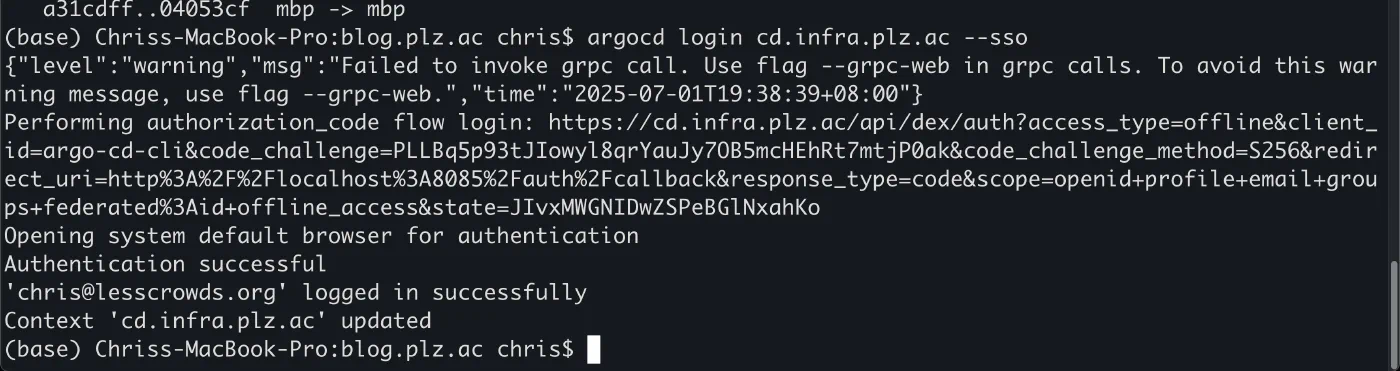
This opens the browser for authentication. Once it succeeds, you can close the page.

Check the current user info:
argocd account get-user-info --grpc-web
The output looks something like this:
Logged In: true
Username: [email protected]
Issuer: https://cd.infra.plz.ac/api/dex
Groups: authentik Admins,ArgoCD Admins
The Groups field must contain ArgoCD Admins, otherwise managing and creating resources returns 403.
Adding a Cluster to Argo CD
Next, add a Kubernetes cluster to Argo CD.
Check the current cluster contexts:
kubectl config get-contexts
Output:
CURRENT   NAME                             CLUSTER         AUTHINFO           NAMESPACE
*         [email protected]   infra.homelab   kubernetes-admin
Then add it like this:
argocd cluster add [email protected] --grpc-web
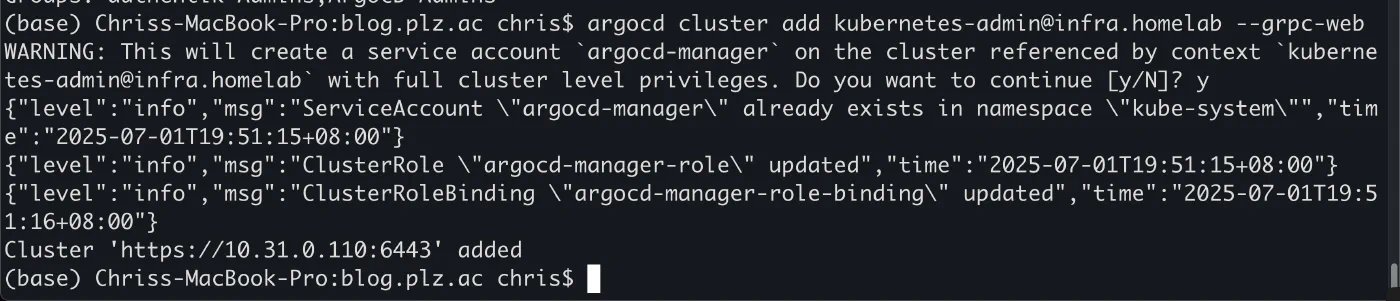
List the current clusters:
argocd cluster list --grpc-web
Output:
SERVER                          NAME                            VERSION  STATUS      MESSAGE                                                  PROJECT
https://10.31.0.110:6443        [email protected]  1.32     Successful
https://kubernetes.default.svc  in-cluster                               Unknown     Cluster has no applications and is not being monitored.
That completes adding the cluster.
infra-blog-deploy
Next, create a new repository to manage the manifests and image versions used for deployment:
git init infra-blog-deploy
Directory tree:
.
├── base
│   ├── deployment.yaml
│   ├── ingress.yaml
│   ├── kustomization.yaml
│   ├── namespace.yaml
│   └── service.yaml
├── overlays
│   └── prod
│       ├── image-patch.yaml
│       └── kustomization.yaml
└── readme.md
A copy of the code is on GitHub: slchris/infra-blog-deploy.
Also generate a separate token for Argo CD so it can pull the code:
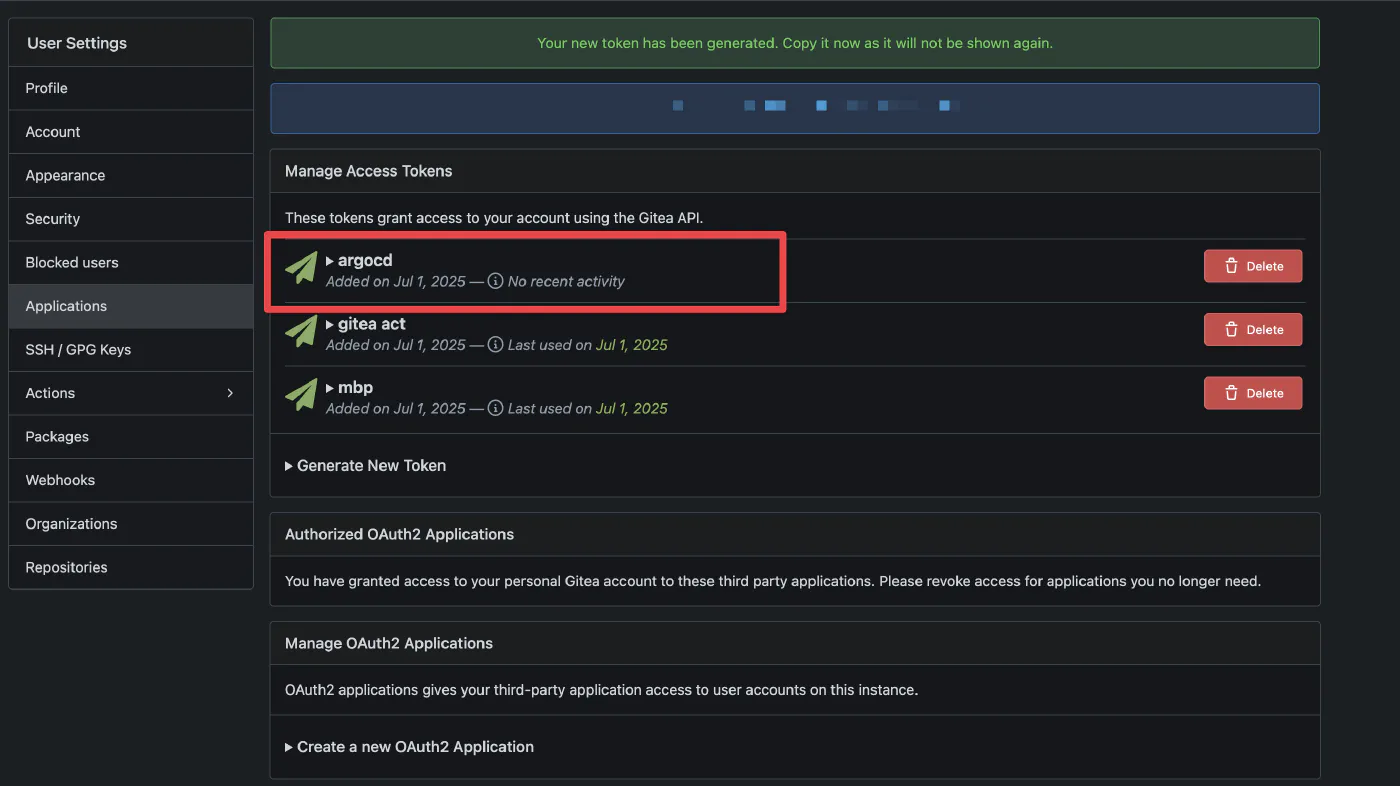
Add the token to Argo CD:
argocd repo add https://git.infra.plz.ac/slchris/infra-blog-deploy.git \
  --username token \
  --password xxxxxx \
  --name infra-blog
Next, modify the blog repository’s workflow: instead of updating the Kubernetes Deployment image directly, it updates the image version in the infra-blog-deploy repository, then commits and pushes:
# .gitea/workflows/website-deploy.yml
name: Deploy Hugo Site

on:
  push:
    branches:
    - mbp

jobs:
  build:
    name: Build Hugo Site
    # build agent
    runs-on: ubuntu-latest
    steps:
    - uses: https://git.infra.plz.ac/actions/checkout@releases/v4.0.0
    - name: Setup Hugo
      run: |
        wget -c https://mirrors.infra.plz.ac/bin/hugo/v0.147.9/hugo_extended_0.147.9_linux-amd64.tar.gz
        tar -xf hugo_extended_0.147.9_linux-amd64.tar.gz
        mv hugo /usr/local/bin
        hugo version
        rm -rf hugo_extended_0.147.9_linux-amd64.tar.gz

    # build site
    - name: Build Hugo Site
      run: |
        git submodule update --init
        hugo --minify

    - name: Set SHORT_SHA
      run: echo "SHORT_SHA=$(echo ${{ gitea.sha }} | cut -c1-8)" >> $GITHUB_ENV

    - name: Login to Harbor
      run: |
        echo "${{ secrets.REGISTRY_PASSWORD }}" | docker login harbor.infra.plz.ac -u "${{ secrets.REGISTRY_USERNAME }}" --password-stdin

    - name: Build and Push Hugo Images
      run: |
        docker build -t harbor.infra.plz.ac/slchris/blog:${SHORT_SHA} .
        docker push harbor.infra.plz.ac/slchris/blog:${SHORT_SHA}


  update:
    name: Update image to infra-blog-deploy repo
    runs-on: ubuntu-latest
    needs: build

    steps:
      - name: Set SHORT_SHA
        run: echo "SHORT_SHA=$(echo ${{ gitea.sha }} | cut -c1-8)" >> $GITHUB_ENV

      - name: Clone GitOps repo
        env:
          GIT_TOKEN: ${{ secrets.GITOPS_TOKEN }}
        run: |
          git clone https://token:${GIT_TOKEN}@git.infra.plz.ac/slchris/infra-blog-deploy.git
          cd infra-blog-deploy
          git config user.name "Gitea Bot"
          git config user.email "[email protected]"

      - name: Update image tag in image-patch.yaml
        run: |
          cd infra-blog-deploy/overlays/prod
          echo "🔧 Updating image to harbor.infra.plz.ac/slchris/blog:${SHORT_SHA}"
          sed -i "s|image: .*|image: harbor.infra.plz.ac/slchris/blog:${SHORT_SHA}|" image-patch.yaml

      - name: Commit and Push update
        env:
          GIT_TOKEN: ${{ secrets.GITOPS_TOKEN }}
        run: |
          cd infra-blog-deploy
          git add overlays/prod/image-patch.yaml
          git commit -m "update: hugo-web image to ${SHORT_SHA}"
          git push origin main
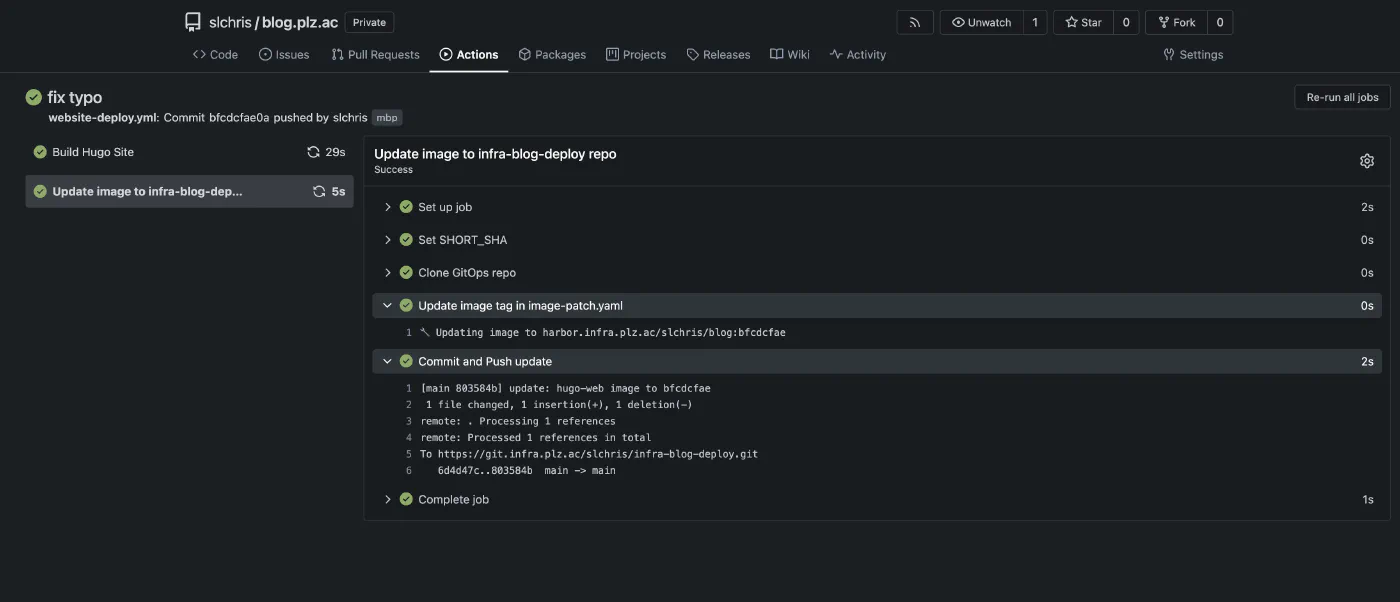
As you can see, I used another secret here. Create a new token in your profile with write access to the repository, and record it in Gitea Actions as GITOPS_TOKEN so the push to infra-blog-deploy doesn’t fail.
After pushing, you can see the build has been triggered and the update pushed to the repository:
Deploying the Application with Argo CD
Now add the application in Argo CD so it can sync automatically and update the service in the Kubernetes cluster:
argocd app create hugo-blog \
  --repo https://git.infra.plz.ac/slchris/infra-blog-deploy.git \
  --path overlays/prod \
  --dest-server https://10.31.0.110:6443 \
  --dest-namespace blog \
  --sync-policy automated \
  --self-heal \
  --nameprefix hugo-
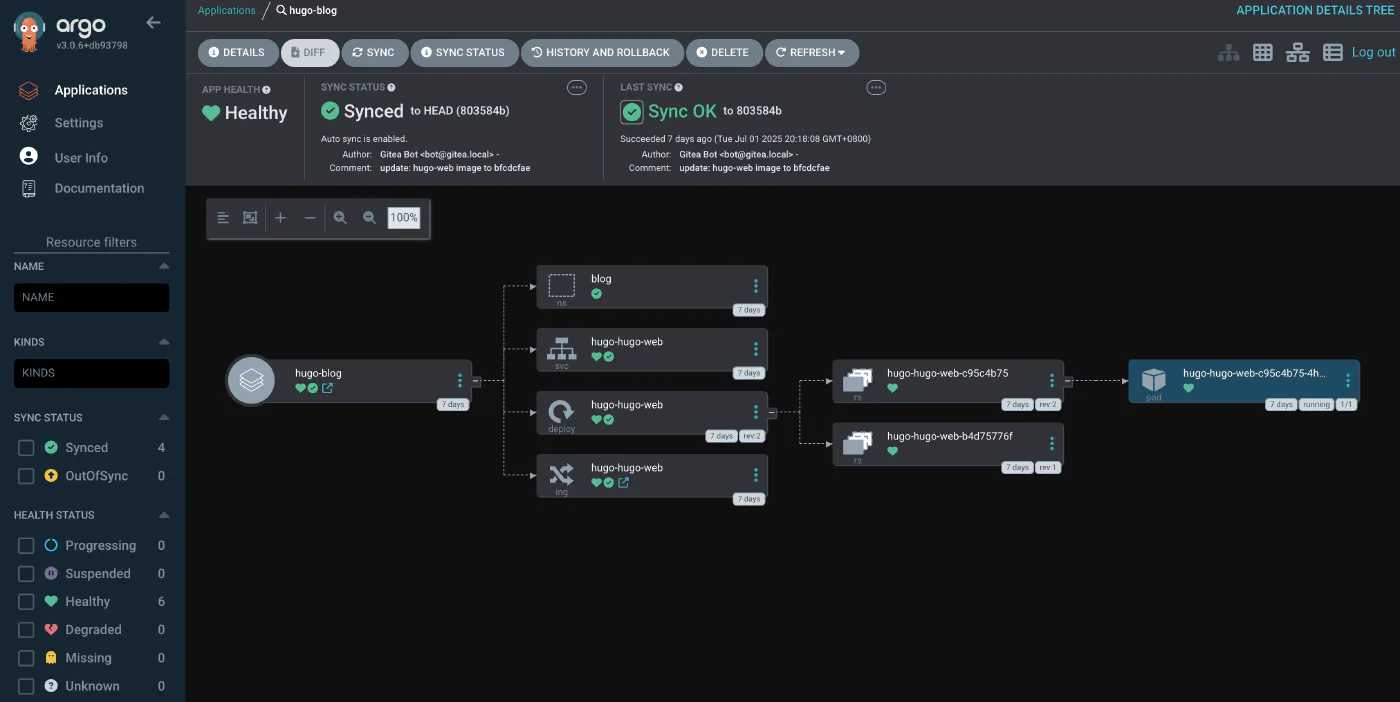
Check the application status:
argocd app list
Output:
NAME               CLUSTER                   NAMESPACE  PROJECT  STATUS  HEALTH   SYNCPOLICY  CONDITIONS  REPO                                                    PATH           TARGET
argo-cd/hugo-blog  https://10.31.0.110:6443  blog       default  Synced  Healthy  Auto        <none>      https://git.infra.plz.ac/slchris/infra-blog-deploy.git  overlays/prod
You can also check it in the web UI:
Release Strategy
Right now I publish to the internal site first to check the rendering and catch errors. Once everything is correct, I push to GitHub for deployment.
This is done with two different Git remotes; the branch that ends up deploying is always main.
Evolving to ChatOps
Production delivery is frequent, so it’s not practical to check these pages after every update. Most events are reported through bot or email notifications.
So set up the corresponding notification channels: there is a notification whenever an image build succeeds. The Argo CD notification plugin also notifies on the following events:
- Application sync succeeded
- Application sync failed
- Application rollback
- Application sync started
Notifications also raise the question of forwarding when the network is unreachable, which means deploying an HTTP proxy service that accesses the relevant APIs for us.
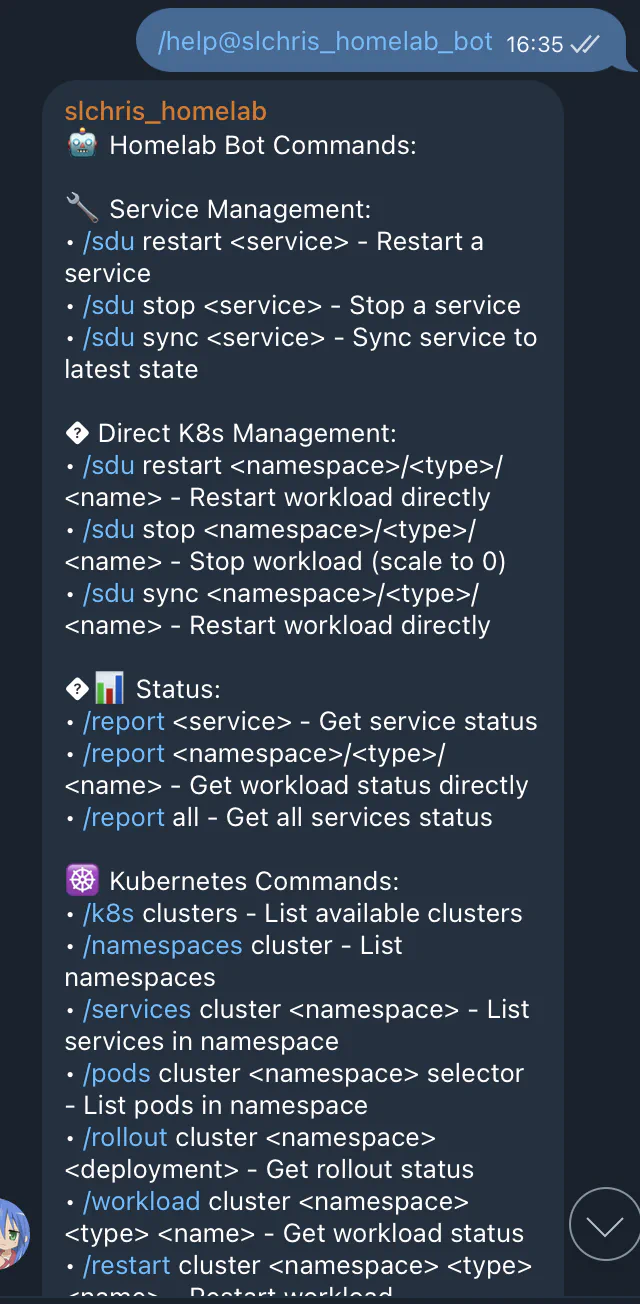
This is only the notification side; there is also the operations side:
- Update the service
- Roll back the service
- Restart the service
- Check the failure reason, etc.
I wrote a basic bot that implements these functions.
Building Observability
Uptime Kuma
Use Uptime Kuma to monitor whether the site is up. First pull the image into the internal Harbor:
docker pull docker-proxy.plz.ac/louislam/uptime-kuma:1
docker tag docker-proxy.plz.ac/louislam/uptime-kuma:1 harbor.infra.plz.ac/louislam/uptime-kuma:1
docker push harbor.infra.plz.ac/louislam/uptime-kuma:1
The deployment manifest:
apiVersion: v1
kind: Namespace
metadata:
  name: uptime-kuma
---
apiVersion: v1
kind: Service
metadata:
  name: uptime-kuma
  namespace: uptime-kuma
spec:
  ports:
  - name: web-ui
    protocol: TCP
    port: 3001
    targetPort: 3001
  clusterIP: None
  selector:
    app: uptime-kuma
---
apiVersion: v1
kind: PersistentVolumeClaim
metadata:
  name: uptime-kuma-pvc
  namespace: uptime-kuma
spec:
  accessModes:
    - ReadWriteOnce
  storageClassName: csi-rbd-sc
  resources:
    requests:
      storage: 128Mi
---
apiVersion: apps/v1
kind: Deployment
metadata:
  name: uptime-kuma
  namespace: uptime-kuma
spec:
  selector:
    matchLabels:
      app: uptime-kuma
  replicas: 1
  strategy:
    type: RollingUpdate
    rollingUpdate:
      maxSurge: 1
      maxUnavailable: 1
  template:
    metadata:
      labels:
        app: uptime-kuma
    spec:
      containers:
      - name: uptime-kuma
        image: harbor.infra.plz.ac/louislam/uptime-kuma:1
        imagePullPolicy: IfNotPresent
        env:
        # only need to set PUID and PGUI because of NFS server
        - name: PUID
          value: "1000"
        - name: PGID
          value: "1000"
        ports:
        - containerPort: 3001
          name: web-ui
        resources:
          limits:
            cpu: 200m
            memory: 512Mi
          requests:
            cpu: 50m
            memory: 128Mi
        livenessProbe:
          tcpSocket:
            port: web-ui
          initialDelaySeconds: 60
          periodSeconds: 10
        readinessProbe:
          httpGet:
            scheme: HTTP
            path: /
            port: web-ui
          initialDelaySeconds: 30
          periodSeconds: 10
        volumeMounts:
        - name: data
          mountPath: /app/data
      volumes:
      - name: data
        persistentVolumeClaim:
          claimName: uptime-kuma-pvc
---
apiVersion: networking.k8s.io/v1
kind: Ingress
metadata:
  name: uptime-kuma-ingress
  namespace: uptime-kuma
  annotations:
    nginx.ingress.kubernetes.io/rewrite-target: /
    cert-manager.io/cluster-issuer: cloudflare
    nginx.ingress.kubernetes.io/force-ssl-redirect: "true"
spec:
  ingressClassName: nginx
  rules:
  - host: uptime.app.plz.ac
    http:
      paths:
      - path: /
        pathType: Prefix
        backend:
          service:
            name: uptime-kuma
            port:
              number: 3001
  tls:
  - hosts:
    - uptime.app.plz.ac
    secretName: uptime-kuma-tls
Apply it:
kubectl apply -f uptime-kuma.yaml
Visit: https://uptime.app.plz.ac
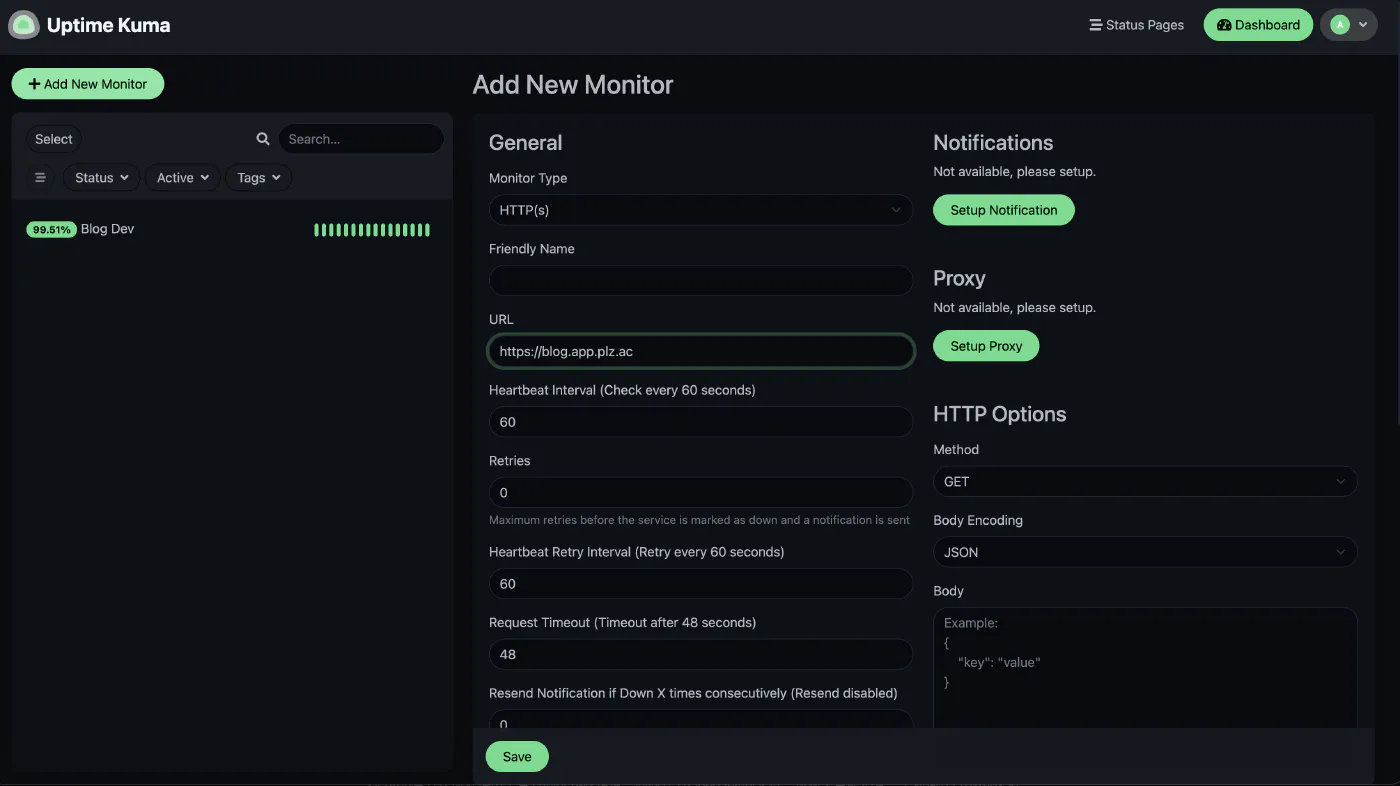
Add the site:
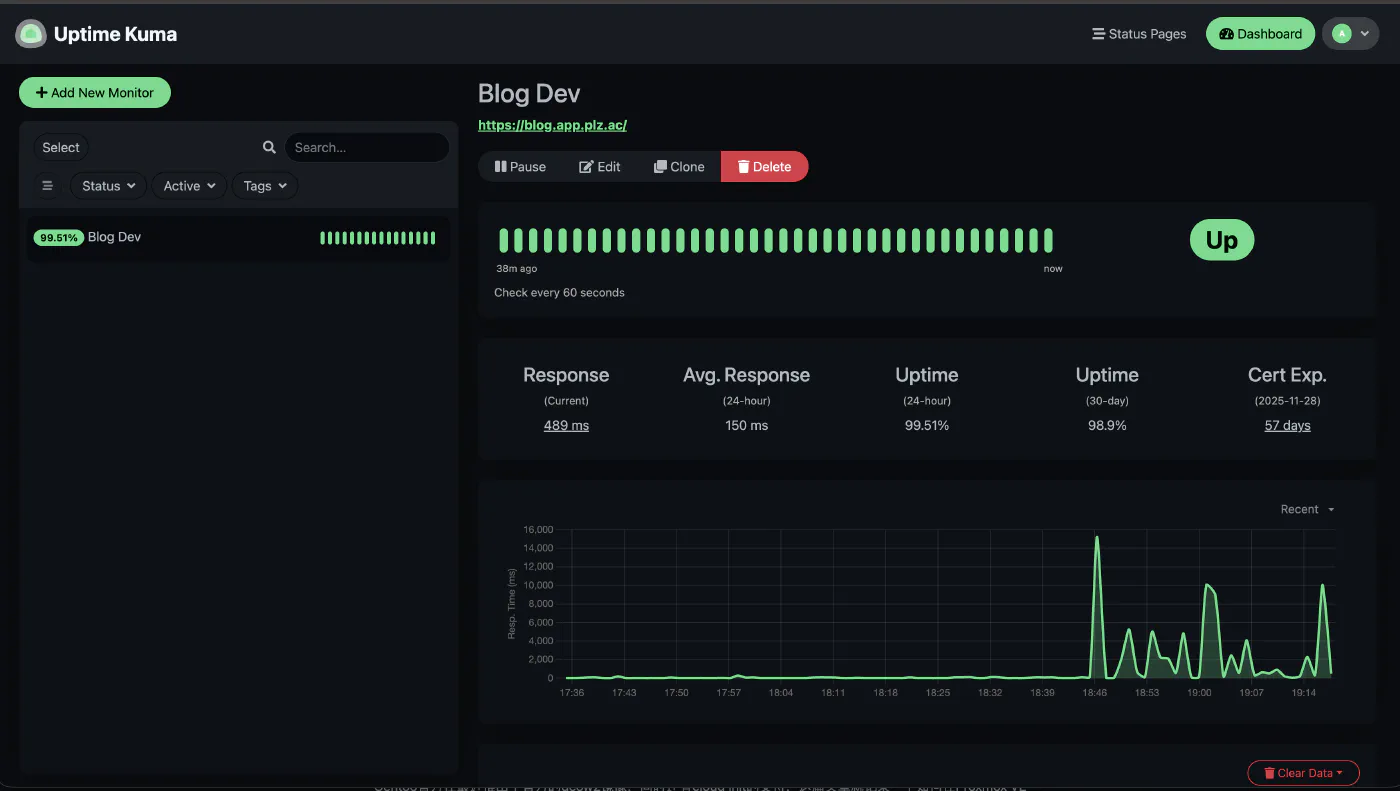
Check the uptime status:
Istio Tracing
This is just a simple static site, so I used Istio for tracing. Traffic doesn’t go through the Istio gateway here; the two paths are different.
Generate the YAML:
istioctl manifest generate  > istio-manifest.yaml
grep 'image:' istio-demo-manifest.yaml | awk '{print $2}' | sed 's/"//g' | sort -u > image-list.txt
cat image-list.txt
Pull all the images locally:
docker pull hub.infra.plz.ac/library/busybox:1.28
docker tag hub.infra.plz.ac/library/busybox:1.28 harbor.infra.plz.ac/library/busybox:1.28
docker push harbor.infra.plz.ac/library/busybox:1.28
docker pull hub.infra.plz.ac/istio/proxyv2:1.26.0
docker tag hub.infra.plz.ac/istio/proxyv2:1.26.0 harbor.infra.plz.ac/istio/proxyv2:1.26.0
docker push harbor.infra.plz.ac/istio/proxyv2:1.26.0
docker pull hub.infra.plz.ac/istio/pilot:1.26.0
docker tag hub.infra.plz.ac/istio/pilot:1.26.0 harbor.infra.plz.ac/istio/pilot:1.26.0
docker push harbor.infra.plz.ac/istio/pilot:1.26.0
Change every image in istio-demo-manifest.yaml to the internal Harbor registry, then deploy:
kubectl apply -f istio-demo-manifest.yaml
Enable injection:
kubectl label namespace blog istio-injection=enabled
Restart:
kubectl rollout restart deployment hugo-hugo-web -n blog
Check the status:
kubectl get pods -n blog
You can see it is now 2/2 instead of 1/1:
NAME                             READY   STATUS    RESTARTS   AGE
hugo-hugo-web-848967b77f-szs56   2/2     Running   0          11s
Deploy the jaeger all-in-one for testing; this setup is not recommended for production.
First pull the image into the local Harbor:
docker pull hub.infra.plz.ac/jaegertracing/all-in-one:1.70.0
docker tag hub.infra.plz.ac/jaegertracing/all-in-one:1.70.0 harbor.infra.plz.ac/jaegertracing/all-in-one:1.70.0
docker push harbor.infra.plz.ac/jaegertracing/all-in-one:1.70.0
The YAML:
apiVersion: apps/v1
kind: Deployment
metadata:
  name: jaeger
  namespace: istio-system
  labels:
    app: jaeger
spec:
  selector:
    matchLabels:
      app: jaeger
  template:
    metadata:
      labels:
        app: jaeger
        sidecar.istio.io/inject: "false"
      annotations:
        prometheus.io/scrape: "true"
        prometheus.io/port: "14269"
    spec:
      containers:
        - name: jaeger
          image: "harbor.infra.plz.ac/jaegertracing/all-in-one:1.70.0"
          env:
            - name: BADGER_EPHEMERAL
              value: "false"
            - name: SPAN_STORAGE_TYPE
              value: "badger"
            - name: BADGER_DIRECTORY_VALUE
              value: "/badger/data"
            - name: BADGER_DIRECTORY_KEY
              value: "/badger/key"
            - name: COLLECTOR_ZIPKIN_HOST_PORT
              value: ":9411"
            - name: MEMORY_MAX_TRACES
              value: "50000"
            - name: QUERY_BASE_PATH
              value: /jaeger
          livenessProbe:
            httpGet:
              path: /
              port: 14269
          readinessProbe:
            httpGet:
              path: /
              port: 14269
          volumeMounts:
            - name: data
              mountPath: /badger
          resources:
            requests:
              cpu: 10m
      volumes:
        - name: data
          emptyDir: {}
---
apiVersion: v1
kind: Service
metadata:
  name: tracing
  namespace: istio-system
  labels:
    app: jaeger
spec:
  type: ClusterIP
  ports:
    - name: http-query
      port: 80
      protocol: TCP
      targetPort: 16686
    # Note: Change port name if you add '--query.grpc.tls.enabled=true'
    - name: grpc-query
      port: 16685
      protocol: TCP
      targetPort: 16685
  selector:
    app: jaeger
---
# Jaeger implements the Zipkin API. To support swapping out the tracing backend, we use a Service named Zipkin.
apiVersion: v1
kind: Service
metadata:
  labels:
    name: zipkin
  name: zipkin
  namespace: istio-system
spec:
  ports:
    - port: 9411
      targetPort: 9411
      name: http-query
  selector:
    app: jaeger
---
apiVersion: v1
kind: Service
metadata:
  name: jaeger-collector
  namespace: istio-system
  labels:
    app: jaeger
spec:
  type: ClusterIP
  ports:
  - name: jaeger-collector-http
    port: 14268
    targetPort: 14268
    protocol: TCP
  - name: jaeger-collector-grpc
    port: 14250
    targetPort: 14250
    protocol: TCP
  - port: 9411
    targetPort: 9411
    name: http-zipkin
  - port: 4317
    name: grpc-otel
  - port: 4318
    name: http-otel
  selector:
    app: jaeger
---
apiVersion: networking.k8s.io/v1
kind: Ingress
metadata:
  name: jaeger-ingress
  namespace: istio-system
spec:
  ingressClassName: nginx
  rules:
  - host: jaeger.infra.plz.ac
    http:
      paths:
      - path: /
        pathType: Prefix
        backend:
          service:
            name: tracing
            port:
              number: 80
Apply it:
kubectl create -f jaeger.yaml
The Istio configuration also needs a change:
kubectl edit configmap istio -n istio-system
Add the following under defaultProviders:
    defaultProviders:
      metrics:
      - prometheus
      tracing:
      - jaeger
Save and exit, then restart the Hugo site:
kubectl rollout restart deployment hugo-hugo-web -n blog
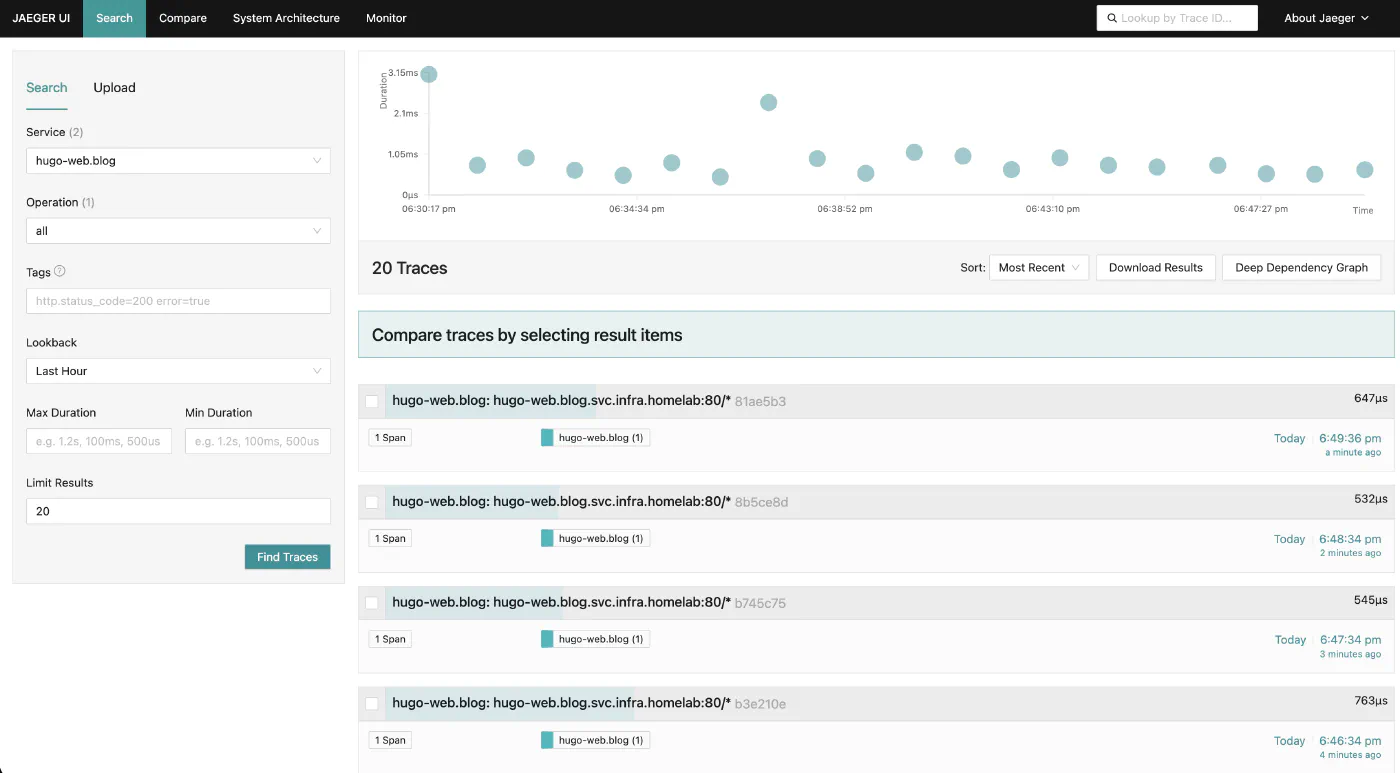
Once it restarts, open http://jaeger.infra.plz.ac and check whether traces from the Hugo service show up:
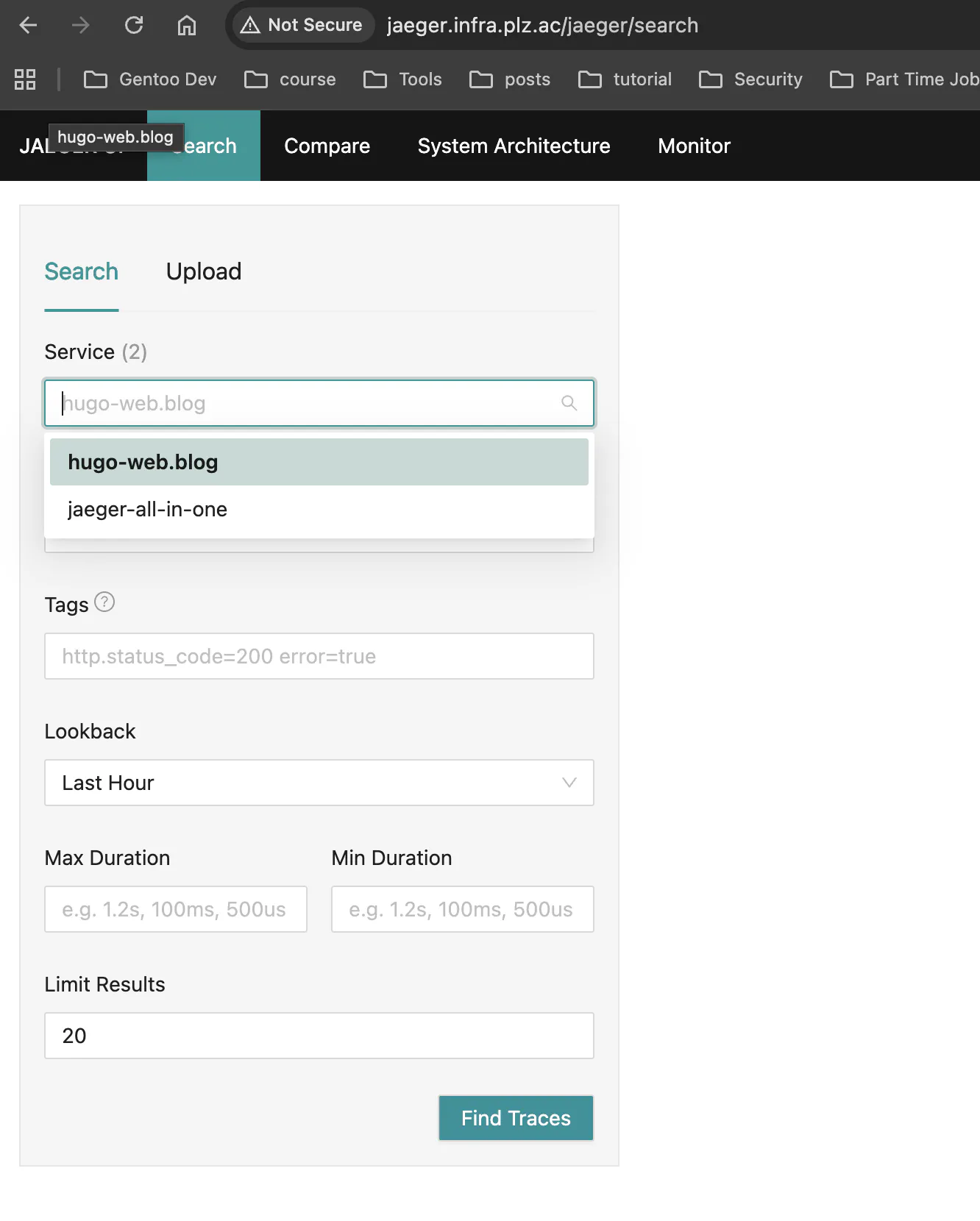
Inspect the trace:
Logs
Normalize the Nginx log format to JSON -> collect with Loki
The Nginx configuration changes:
user  nginx;
worker_processes  auto;

error_log  /var/log/nginx/error.log notice;
pid        /run/nginx.pid;


events {
    worker_connections  1024;
}


http {
    include       /etc/nginx/mime.types;
    default_type  application/octet-stream;

    log_format logfmt 'ip=$remote_addr xff=$http_x_forwarded_for '
                    'method=$request_method '
                    'uri=$request_uri '
                    'status=$status '
                    'referer=$http_referer '
                    'ua="$http_user_agent" '
                    'rt=$request_time '
                    'upstream_time=$upstream_response_time '
                    'bytes_sent=$body_bytes_sent';
    access_log  /var/log/nginx/access.log  logfmt;

    sendfile        on;
    #tcp_nopush     on;

    keepalive_timeout  65;
    server_tokens off;
    # real ip
    real_ip_header X-Forwarded-For;
    set_real_ip_from 0.0.0.0/0;
    real_ip_recursive on;
    # gzip
    gzip on;
    gzip_types text/plain text/css application/json application/javascript text/xml application/xml application/xml+rss text/javascript;
    gzip_min_length 1024;

    include /etc/nginx/conf.d/*.conf;
}
Then update the Dockerfile:
# hugo dockerfiles
FROM harbor.infra.plz.ac/library/nginx
LABEL maintainer="[email protected]"

COPY public /usr/share/nginx/html
COPY nginx.conf /etc/nginx/nginx.conf
COPY default.conf /etc/nginx/conf.d/default.conf
Trigger the pipeline again.
Deploying Loki
Create the bucket:
s3cmd mb s3://loki
The corresponding values.yaml:
global:
  clusterDomain: infra.homelab
  dnsService: "kube-dns"
  image:
    registry: docker-proxy.plz.ac


loki:
  image:
    registry: docker-proxy.plz.ac
  storage:
    type: s3
    bucketNames:
      chunks: loki
      ruler: loki
      admin: loki
    s3:
      endpoint: s3.infra.plz.ac
      region: us-east-1
      accessKeyId: QF43E82P74MW66KMK16X
      secretAccessKey: J5F9AWZ7DgtY8f9qCU8DyxVcd8sQCLHdeGWmPPCS
      s3ForcePathStyle: true
      insecure: false
  schemaConfig:
    configs:
      - from: 2024-01-01
        store: tsdb
        object_store: s3
        schema: v13
        index:
          prefix: index_
          period: 24h

gateway:
  enabled: false

lokiCanary:
  image:
    registry: docker-proxy.plz.ac

memcached:
  image:
    repository: docker-proxy.plz.ac/library/memcached
chunksCache:
  resources:
    requests:
      cpu: 1000m
      memory: 256Mi
    limits:
      cpu: 2000m
      memory: 2048Mi
memcachedExporter:
  image:
    repository: docker-proxy.plz.ac/prom/memcached-exporter

sidecar:
  image:
    repository: docker-proxy.plz.ac/kiwigrid/k8s-sidecar
Deploy:
kubectl create ns loki
helm install loki grafana/loki -f values.yaml -n loki
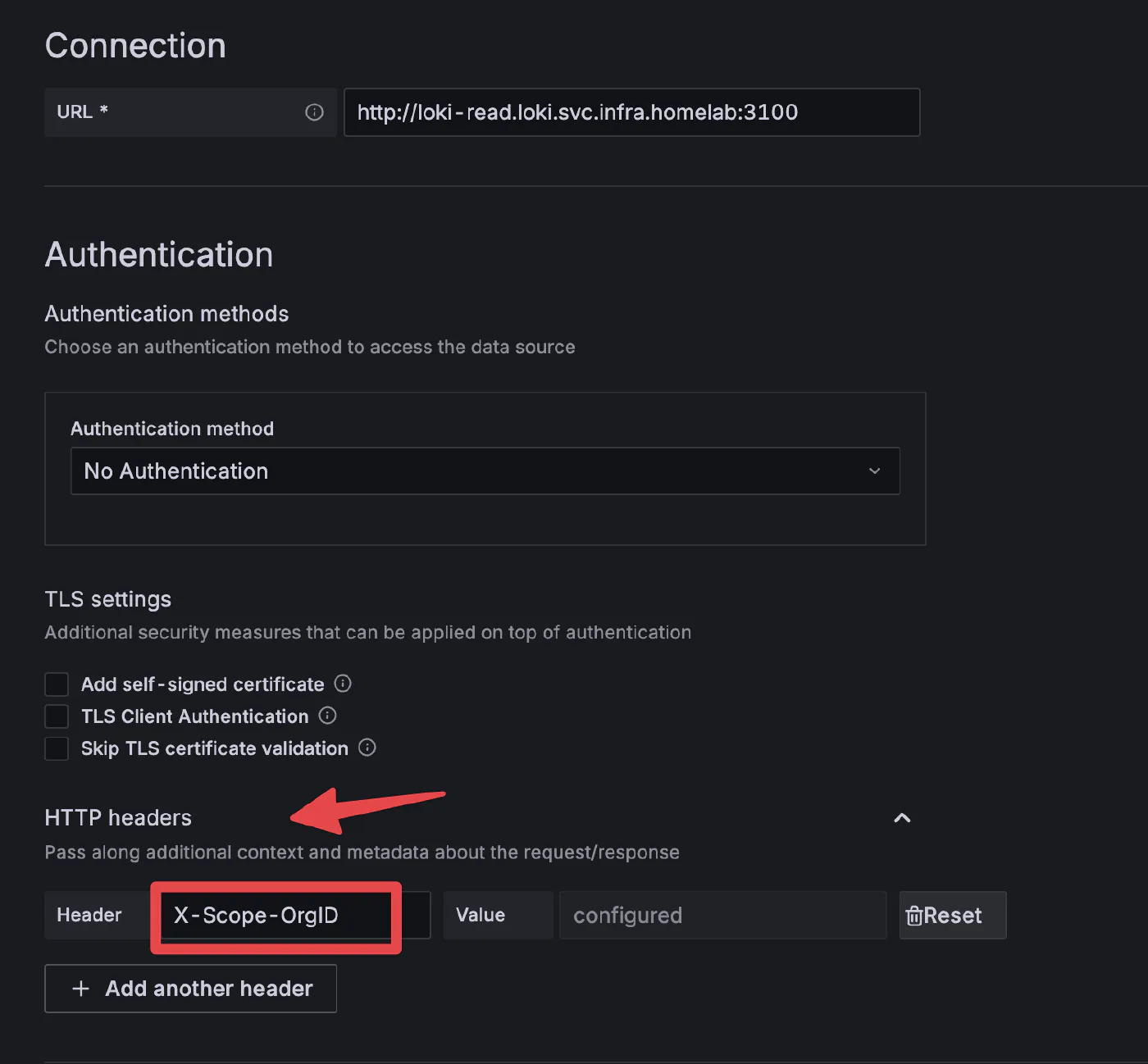
When adding Loki in Grafana, I found it also needs a special header:
X-Scope-OrgID : 1
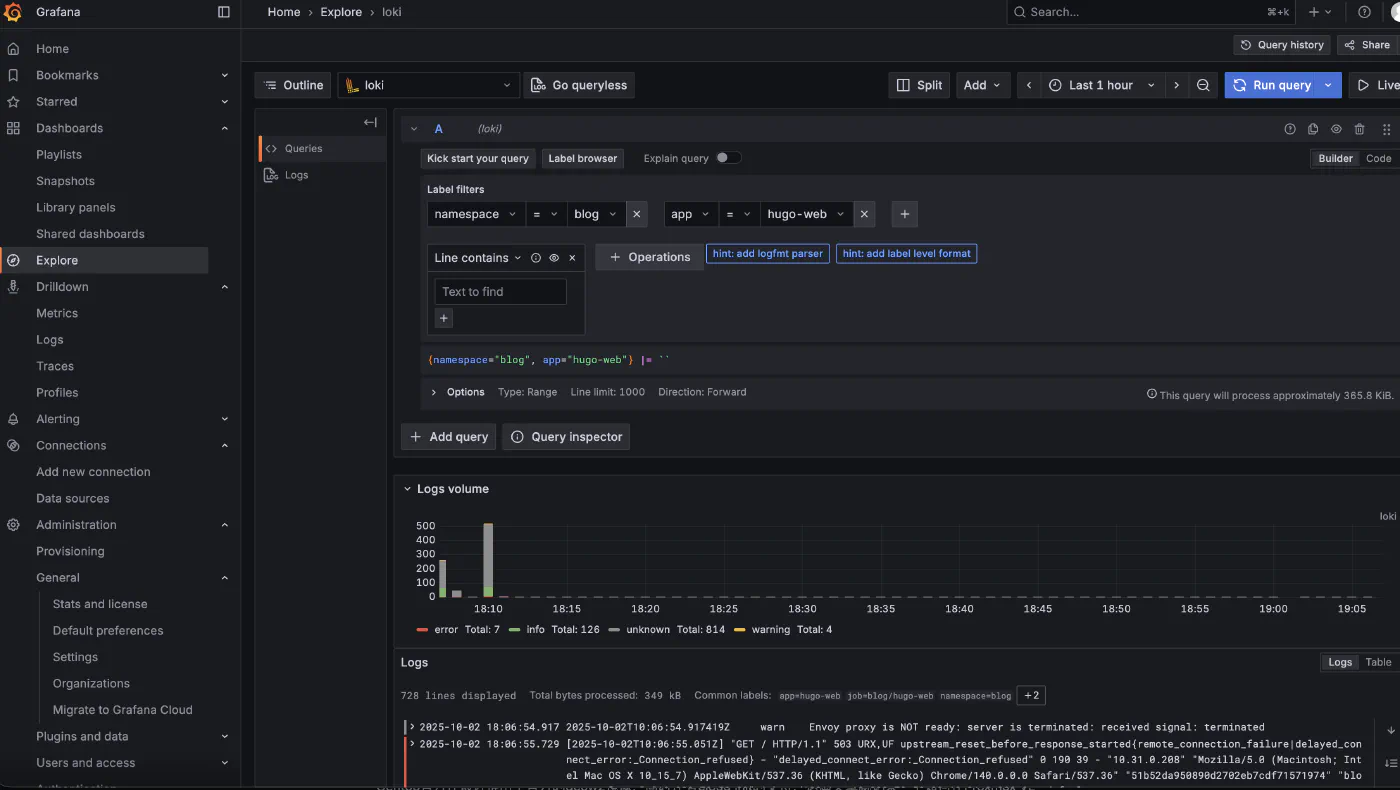
The stats showed the IP wasn’t the real client IP, so nginx.conf and the ingress configuration needed adjusting.
kubectl patch svc ingress-nginx -n ingress-nginx -p '{"spec":{"externalTrafficPolicy":"Local"}}'
View the access logs:
What’s Next
- Cluster policy: OPA or Kyverno
- Image signing and admission control
- Wire the notification bot and the Argo CD rollback flow together
Conclusion
Starting from a simple Hugo build, we gradually evolved a complete CI/CD system that supports rollback, notifications and monitoring. This works not only for a Homelab, but also as a reliable reference architecture for small teams or private environments.
Comments