This post is for engineers with some Linux / Docker / Kubernetes background. Using Fabric 2.5 LTS as the baseline, it walks from architecture principles to reproducible deployment commands, then monitoring, upgrades, security and a production Kubernetes rollout — an end-to-end practice guide. The local Docker network, peer CLI, chaincode lifecycle and Prometheus/Grafana monitoring were verified on Fabric v2.5.16 / CA v1.5.22 (Debian 12 VM; macOS Apple Silicon was not retested this time); the K8s part ran 3 Raft orderers, CouchDB, a channel and CaaS chaincode on a 3-node k3s cluster, and verified cross-node leader failover; cross-AZ / network partitions still need a multi-datacenter environment; the Gateway SDK example is a code pattern and was not separately run on this VM.
1. What Is Hyperledger Fabric
Hyperledger Fabric is an enterprise permissioned blockchain framework hosted by the Linux Foundation. Unlike public chains, participants in a Fabric network must authenticate before joining, which suits scenarios where multiple organizations need trusted data sharing but don’t want the data on the public internet.
Its core design philosophy is modularity and pluggability:
| Module | Description |
|---|---|
| Consensus (Ordering) | Raft (built in, recommended for production); ordering is decoupled from execution |
| Channel | Multiple logical chains can exist in one physical network, isolating data and policies |
| Endorsement | A transaction must be signed by peers of the designated organizations before it can be ordered and committed |
| Chaincode | Smart contracts in Go / Node.js / Java; external chaincode (CaaS) is recommended |
| Membership Service (MSP) | Organization and identity management based on X.509 certificates; supports Node OUs and CRLs |
| Private Data | Field-level data visibility control by collection within a channel |
| State database | LevelDB (default, KV) or CouchDB (rich JSON queries) |
1.1 Core Roles
graph LR
    Client["Client<br/>(SDK / CLI)"]
    Peer["Peer<br/>(Endorse + Commit)"]
    Orderer["Orderer<br/>(Raft ordering)"]
    CA["CA<br/>(Certificate issuance)"]
    Ledger["Ledger<br/>(Blockchain + world state)"]

    Client -->|1. Send transaction proposal| Peer
    Peer -->|2. Simulate and sign| Client
    Client -->|3. Submit endorsed transaction| Orderer
    Orderer -->|4. Order and package into blocks| Peer
    Peer --> Ledger
    CA -.->|Issue identity/TLS certs| Client
    CA -.->|Issue identity/TLS certs| Peer
    CA -.->|Issue identity/TLS certs| Orderer
- Client – builds transaction proposals, collects endorsements and submits to the Orderer (handled by the SDK or CLI).
- Peer – maintains the ledger copy and state database; executes chaincode simulations (endorser); validates and commits blocks (committer). Each organization deploys at least one peer.
- Orderer – imposes a total order on transactions and packages them into blocks broadcast to peers on each channel. Production uses a Raft cluster for high availability.
- CA – issues MSP identity certificates and TLS certificates. You can use Fabric-CA or integrate an external PKI/CA.
1.2 Transaction Lifecycle
Understanding the transaction flow is the basis for troubleshooting and performance tuning:
sequenceDiagram
    autonumber
    participant C as Client (SDK/CLI)
    participant E as Endorsing Peer
    participant O as Orderer (Raft)
    participant P as Committing Peer

    C->>E: Send TransactionProposal (chaincode name, args, client signature)
    E->>E: Verify signature + ACL<br/>execute chaincode (simulate, produce read-write set RWSet)
    E-->>C: Return ProposalResponse (RWSet + endorsement signatures)
    Note over C: Collect the signature set that satisfies the endorsement policy
    C->>O: Submit Transaction (Envelope: Proposal + all endorsement signatures)
    O->>O: Order per channel, package blocks<br/>(BatchTimeout / MaxMessageCount)
    O-->>P: Broadcast Block
    O-->>E: Broadcast Block
    P->>P: Verify endorsement policy + MVCC version check
    P->>P: Valid transactions update world state; block appended to ledger
    P-->>C: Commit events (BlockEvent / ChaincodeEvent)
Key details:
- In step 2, chaincode execution is a “simulation” rather than a ledger write; the resulting read-write set (RWSet) records the version numbers of the keys read and the key-value pairs written.
- In step 6, the Orderer cuts blocks based on
BatchTimeout(default 2s) andMaxMessageCount(default 500). - In step 8, the MVCC (Multi-Version Concurrency Control) check ensures the key versions read during simulation haven’t been modified by other transactions at commit time; on conflict the transaction is marked invalid (
MVCC_READ_CONFLICT), does not update the world state, but is still written into the block.
2. What Hyperledger Fabric Solves
| Pain point | How Fabric solves it |
|---|---|
| No shared trust anchor across organizations | MSP + Policy establish trust boundaries at the organization level; each organization manages its own CA and identities |
| Data privacy and compliance | Channel isolation + private data collections minimize data sharing on demand |
| Transaction throughput | Endorsement (execution) is decoupled from ordering (consensus); peer endorsement capacity scales horizontally |
| On-chain governance | Policies (endorsement/write/lifecycle/anchor peer) can be upgraded on-chain via configuration transactions, with no centralized control |
| Smart contract isolation | External chaincode (CaaS) runs contracts in separate containers/processes with clear resource and security boundaries |
Typical use cases: supply chain provenance, trade finance, judicial evidence preservation, inter-institution loyalty settlement, carbon emission data sharing, trusted exchange of medical data.
3. Local Docker Development Network (Reproducible)
This section uses the official fabric-samples test-network and gives reproducible end-to-end steps. It works on Mac (including Apple Silicon) and Linux; the images are multi-architecture (amd64/arm64).
3.1 Prerequisites
| Dependency | Minimum version | Verification command |
|---|---|---|
| Docker Engine | 24.0+ | docker version |
| Docker Compose plugin | v2.20+ | docker compose version |
| Git | 2.x | git --version |
| curl | any | curl --version |
| jq | 1.6+ | jq --version |
| Go (needed to package/compile chaincode) | 1.21+ | go version |
peer lifecycle chaincode packagecallsgo listto normalize the chaincode path; even if you’re only packaging and not compiling chaincode,gomust be on PATH.
3.2 Version Baseline
This post uses the versions below; you can substitute the latest patch of any 2.5.x / 1.5.x:
- Fabric binaries + Docker images: v2.5.16
- Fabric CA: v1.5.22
The reproduction environment was a Debian 12 VM on PVE 9.2.10: 4 vCPU, 6GB RAM, 80GB disk, Docker 29.9.3 + Compose v5.7.1. Fabric binaries and images are 2.5.16, CA is 1.5.22, and fabric-samples is pinned at 137f365 (the last 2.5-era commit before the Fabric 3.0 release). The container status, chaincode query, Prometheus and Grafana screenshots below all come from this VM.
3.3 Getting the Source and Toolchain
# fabric-samples has no v2.5.x tag, so pin to the last main commit before Fabric 3.0
# test-network at this version still targets Fabric 2.5; later main has moved to 3.x
git clone https://github.com/hyperledger/fabric-samples.git
cd fabric-samples
git checkout 137f365ec9a5093b1224427be2b7d9e851d41167

# Download the Fabric binary tools and Docker images
curl -sSLO https://raw.githubusercontent.com/hyperledger/fabric/release-2.5/scripts/install-fabric.sh
chmod +x install-fabric.sh
./install-fabric.sh --fabric-version 2.5.16 --ca-version 1.5.22 binary docker

# Add the binaries to PATH
export PATH="${PWD}/bin:${PATH}"

# Verify
peer version
# Expected output: peer: Version: 2.5.16 ...
orderer version
# Expected output: orderer: Version: 2.5.16 ...
Note:
install-fabric.shis the upstream unified installer (replacing the oldbootstrap.sh); it puts binaries in./bin/, config in./config/, and pulls the matching images. If Docker Hub is unreachable, you can pullhyperledger/fabric-*:2.5.16andfabric-ca:1.5.22from an internal mirror first, then add the:latestand:2.5tags; the test-network compose files use:latestby default, and the peer also referencesfabric-ccenv:2.5when building chaincode.
3.4 Starting the Test Network and Creating a Channel
cd test-network

# Start the network: 2 orgs (Org1, Org2) with 1 peer each + 1 Raft orderer
# -ca uses Fabric-CA to issue certificates (instead of cryptogen)
# -c specifies the channel name
./network.sh up createChannel -ca -c mychannel

# Confirm all containers are running
docker ps --format 'table {{.Names}}\t{{.Image}}\t{{.Status}}'
The expected output should include these containers:
| Container name | Role |
|---|---|
peer0.org1.example.com |
Org1 peer |
peer0.org2.example.com |
Org2 peer |
orderer.example.com |
Raft orderer |
ca_org1 |
Org1 Fabric-CA |
ca_org2 |
Org2 Fabric-CA |
ca_orderer |
Orderer Fabric-CA |
This is the container state after startup on the Debian 12 VM (Fabric 2.5.16 + CA 1.5.22):

3.5 Deploying Chaincode
Take the official asset-transfer-basic (Go version) as an example:
./network.sh deployCC \
  -c mychannel \
  -ccn basic \
  -ccl go \
  -ccp ../asset-transfer-basic/chaincode-go
The script runs the whole Package -> Install -> Approve (Org1) -> Approve (Org2) -> Commit flow automatically.
Verify the chaincode is ready:
# Query the committed chaincode definition (load Org1's peer environment first)
export FABRIC_CFG_PATH=${PWD}/../config
source scripts/envVar.sh
setGlobals 1
peer lifecycle chaincode querycommitted -C mychannel -n basic
Results from this run:
| Item | Result |
|---|---|
| Fabric / Fabric CA | 2.5.16 / 1.5.22 |
| Network topology | 1 peer each for Org1 and Org2 + 1 Raft orderer + 3 Fabric-CAs |
| Chaincode definition | basic 1.0, sequence 1, approved by both Org1 and Org2 |
| Invocation test | CreateAsset succeeded, ReadAsset returned the asset JSON |
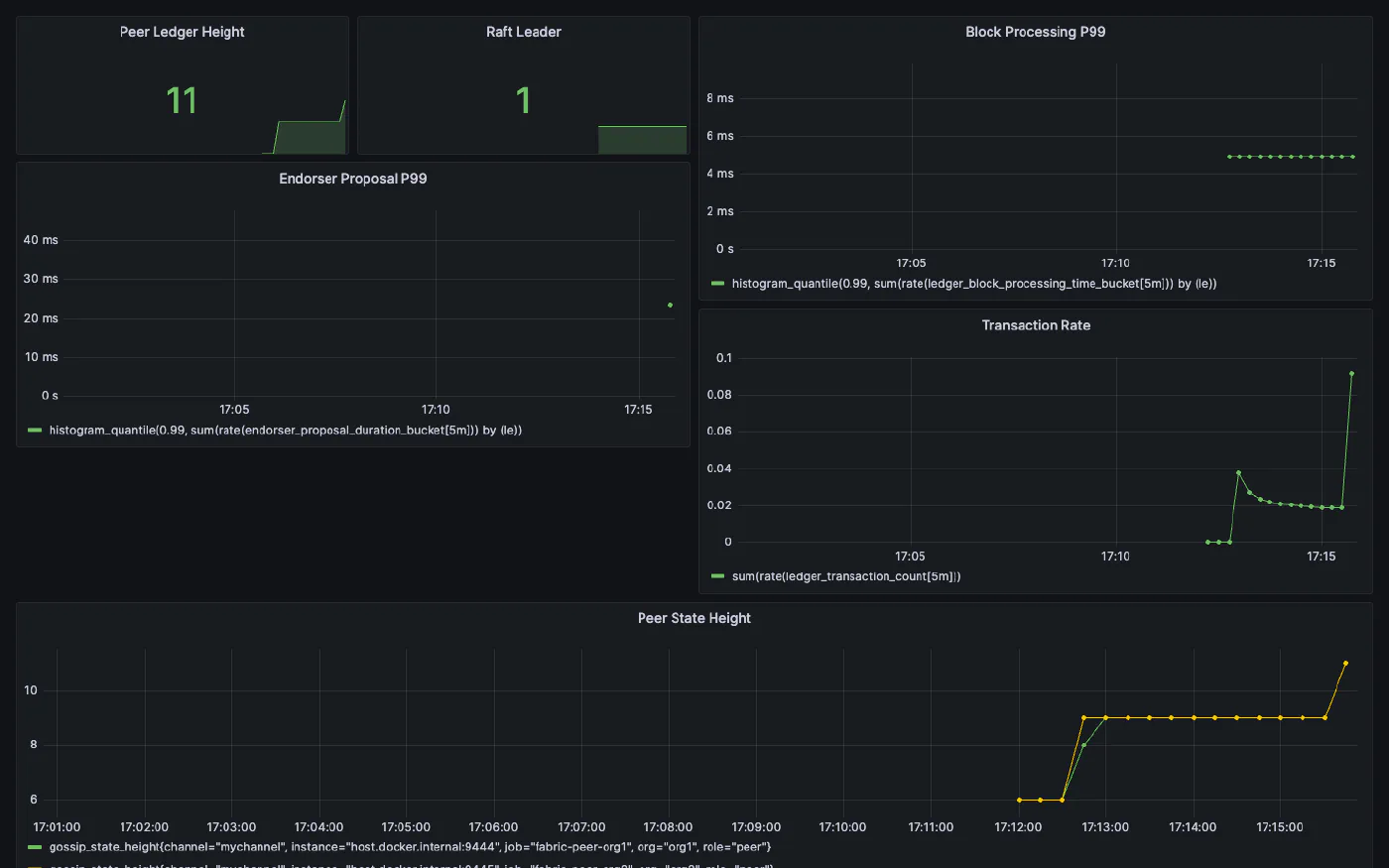
| Channel height | 11 |
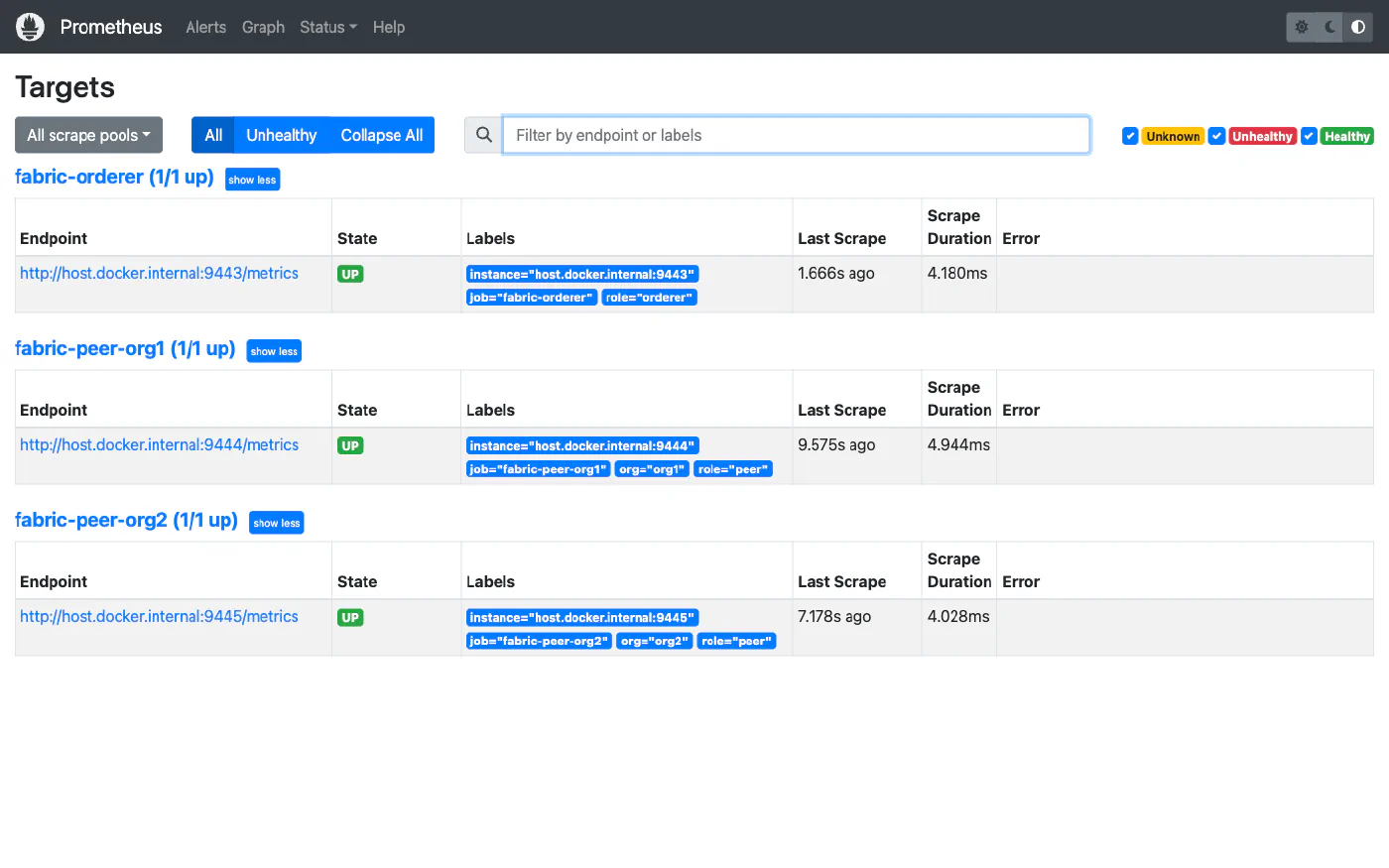
| Monitoring | All three Prometheus targets (peer0.org1, peer0.org2, orderer) are UP |
3.6 Directory Structure and Key Configuration
test-network/
  organizations/          # MSP, TLS certificates and connection profiles for each org
    ordererOrganizations/
    peerOrganizations/
  configtx/               # configtx.yaml -- channel configuration templates
  compose/                # Docker Compose files and overrides
    docker/
      docker-compose-test-net.yaml
      docker-compose-ca.yaml
      docker-compose-couch.yaml
  scripts/                # helper scripts (envVar.sh, createChannel.sh, etc.)
  network.sh              # entry-point script
Key configuration files (paths inside the containers):
/etc/hyperledger/fabric/core.yaml– main peer config (Gossip, StateDB, Operations, Metrics)/etc/hyperledger/fabric/orderer.yaml– main orderer config (Raft parameters, BatchSize, BatchTimeout)
4. Using Hyperledger Fabric (CLI and SDK)
4.1 Using the peer CLI
As an Org1 admin on the host:
cd fabric-samples/test-network

# Load environment variables (peer needs core.yaml, pointing at fabric-samples/config)
export FABRIC_CFG_PATH=${PWD}/../config
source scripts/envVar.sh
setGlobals 1

# --- Query ---
# Get all assets from chaincode initialization
peer chaincode query -C mychannel -n basic \
  -c '{"Args":["GetAllAssets"]}'

# --- Invoke (write) ---
# Create a new asset
peer chaincode invoke \
  -o localhost:7050 \
  --ordererTLSHostnameOverride orderer.example.com \
  --tls --cafile "${ORDERER_CA}" \
  -C mychannel -n basic \
  --peerAddresses localhost:7051 --tlsRootCertFiles "${PEER0_ORG1_CA}" \
  --peerAddresses localhost:9051 --tlsRootCertFiles "${PEER0_ORG2_CA}" \
  -c '{"Args":["CreateAsset","asset100","blue","20","Tom","300"]}'

# --- Verify ---
peer chaincode query -C mychannel -n basic \
  -c '{"Args":["ReadAsset","asset100"]}'
The asset JSON actually returned by ReadAsset (example asset asset35):

Key point:
invokemust specify every peer address that satisfies the endorsement policy (--peerAddresses); the CLI sends the proposal to each, collects endorsements and submits them together to the Orderer. Miss one organization’s peer and the transaction is rejected for failing the endorsement policy.
Environment variable quick reference (set by envVar.sh):
| Variable | Meaning |
|---|---|
CORE_PEER_LOCALMSPID |
Organization the current identity belongs to (e.g. Org1MSP) |
CORE_PEER_MSPCONFIGPATH |
MSP directory of the Admin user |
CORE_PEER_ADDRESS |
Target peer address (e.g. localhost:7051) |
CORE_PEER_TLS_ROOTCERT_FILE |
Peer TLS CA certificate |
ORDERER_CA |
Orderer TLS CA certificate |
4.2 Chaincode Lifecycle in Detail
The “new lifecycle” introduced in Fabric 2.x moves chaincode management from centralized to decentralized multi-organization approval:
flowchart LR
    A["1. Package<br/>peer lifecycle chaincode package"] --> B["2. Install<br/>peer lifecycle chaincode install"]
    B --> C["3. Approve<br/>peer lifecycle chaincode<br/>approveformyorg<br/>(run independently per org)"]
    C --> D{"Satisfies LifecycleEndorsement<br/>policy?<br/>(default: majority of orgs)"}
    D -- yes --> E["4. Commit<br/>peer lifecycle chaincode commit"]
    D -- no --> C
    E --> F["Chaincode available"]
Running the full flow manually (Org1 as the example):
# 1) Package
peer lifecycle chaincode package basic.tar.gz \
  --path ../asset-transfer-basic/chaincode-go \
  --lang golang \
  --label basic_1.0

# 2) Install on Org1's peer
peer lifecycle chaincode install basic.tar.gz

# Record the returned Package ID (filter by label so you don't pick the wrong one when several chaincodes are installed)
export CC_PACKAGE_ID=$(peer lifecycle chaincode queryinstalled \
  --output json | jq -r '.installed_chaincodes[] | select(.label=="basic_1.0") | .package_id')

# 3) Org1 approves
peer lifecycle chaincode approveformyorg \
  -o localhost:7050 \
  --ordererTLSHostnameOverride orderer.example.com \
  --tls --cafile "${ORDERER_CA}" \
  --channelID mychannel \
  --name basic \
  --version 1.0 \
  --package-id "${CC_PACKAGE_ID}" \
  --sequence 1

# Switch to Org2 and repeat install and approve
setGlobals 2
peer lifecycle chaincode install basic.tar.gz
peer lifecycle chaincode approveformyorg \
  -o localhost:7050 \
  --ordererTLSHostnameOverride orderer.example.com \
  --tls --cafile "${ORDERER_CA}" \
  --channelID mychannel \
  --name basic \
  --version 1.0 \
  --package-id "${CC_PACKAGE_ID}" \
  --sequence 1

# 4) Check readiness
peer lifecycle chaincode checkcommitreadiness \
  --channelID mychannel --name basic --version 1.0 --sequence 1

# 5) Commit
peer lifecycle chaincode commit \
  -o localhost:7050 \
  --ordererTLSHostnameOverride orderer.example.com \
  --tls --cafile "${ORDERER_CA}" \
  --channelID mychannel \
  --name basic \
  --version 1.0 \
  --sequence 1 \
  --peerAddresses localhost:7051 --tlsRootCertFiles "${PEER0_ORG1_CA}" \
  --peerAddresses localhost:9051 --tlsRootCertFiles "${PEER0_ORG2_CA}"
4.3 Gateway SDK (Recommended for Application Integration)
The Gateway API introduced in Fabric 2.4+ is the officially recommended way for applications to connect; it hides endorsing peer selection and submission details:
| SDK | Package / repository |
|---|---|
| Go | github.com/hyperledger/fabric-gateway |
| Node.js | @hyperledger/fabric-gateway |
| Java | org.hyperledger.fabric:fabric-gateway-java |
Core code pattern in Go:
// Establish a gRPC connection (with TLS)
clientConnection, _ := grpc.NewClient(peerEndpoint, grpc.WithTransportCredentials(tlsCreds))

// Create the Gateway
gw, _ := client.Connect(
    identity,          // X.509 certificate
    client.WithSign(sign),   // signing function (corresponds to the private key)
    client.WithClientConnection(clientConnection),
)
defer gw.Close()

// Get network -> contract
network := gw.GetNetwork("mychannel")
contract := network.GetContract("basic")

// Query
result, _ := contract.EvaluateTransaction("GetAllAssets")

// Submit
_, _ = contract.SubmitTransaction("CreateAsset", "asset200", "red", "10", "Alice", "500")
5. Monitoring Hyperledger Fabric (Operations + Prometheus + Grafana)
Fabric nodes include an Operations Service exposing /healthz (health check) and /metrics (Prometheus-format metrics) endpoints.
5.1 Overall Monitoring Architecture
flowchart LR
    subgraph Fabric["Fabric Network"]
        P1["Peer0-Org1<br/>:9444/metrics"]
        P2["Peer0-Org2<br/>:9445/metrics"]
        O1["Orderer<br/>:9443/metrics"]
    end

    subgraph Monitoring["Monitoring Stack"]
        Prom["Prometheus<br/>:9090"]
        Graf["Grafana<br/>:3000"]
        AM["Alertmanager<br/>(optional)"]
    end

    P1 --> Prom
    P2 --> Prom
    O1 --> Prom
    Prom --> Graf
    Prom --> AM
Alerting rules can feed an existing Alertmanager; the compose here starts only Prometheus and Grafana, and Alertmanager is optional.
5.2 Enabling Operations and Metrics
Key configuration (as environment variables, mapped to core.yaml / orderer.yaml):
| Role | Environment variable | Example value |
|---|---|---|
| Peer | CORE_OPERATIONS_LISTENADDRESS |
0.0.0.0:9444 |
| Peer | CORE_METRICS_PROVIDER |
prometheus |
| Orderer | ORDERER_OPERATIONS_LISTENADDRESS |
0.0.0.0:9443 |
| Orderer | ORDERER_METRICS_PROVIDER |
prometheus |
The fabric-samples 2.5 test-network already enables Operations for all three nodes in compose/compose-test-net.yaml: peer0.org1 is 9444, peer0.org2 is 9445, orderer is 9443; the metrics provider is also set to prometheus. No extra operations override file is needed.
For custom networks, configure the same environment variables and port mappings, but make sure host ports don’t collide. Also, do not recreate the containers with a compose override that modifies Peer/Orderer after channels and chaincode are deployed: the test-network peer ledger lives in the container’s writable layer, not in a named volume, so recreating loses both channels and chaincode definitions.
5.3 Prometheus + Grafana Deployment
# compose/docker-compose-monitoring.yaml
services:
  prometheus:
    image: prom/prometheus:v2.54.1
    volumes:
      - ./prometheus.yml:/etc/prometheus/prometheus.yml:ro
    ports:
      - "9090:9090"
    extra_hosts:
      - "host.docker.internal:host-gateway"

  grafana:
    image: grafana/grafana:11.1.4
    environment:
      - GF_SECURITY_ADMIN_PASSWORD=<grafana-admin-password>
    ports:
      - "3000:3000"
    volumes:
      - grafana-data:/var/lib/grafana

volumes:
  grafana-data:
The example pins Prometheus v2.54.1 / Grafana 11.1.4; monitoring component versions don’t affect the metric format Fabric exposes. This reproduction used existing internal images at v2.43.0/9.4.7, so the Grafana version in the screenshot is 9.4.7.
Prometheus scrape configuration:
# compose/prometheus.yml
global:
  scrape_interval: 15s
  evaluation_interval: 15s

scrape_configs:
  - job_name: "fabric-peer-org1"
    static_configs:
      - targets: ["host.docker.internal:9444"]
        labels:
          org: "org1"
          role: "peer"

  - job_name: "fabric-peer-org2"
    static_configs:
      - targets: ["host.docker.internal:9445"]
        labels:
          org: "org2"
          role: "peer"

  - job_name: "fabric-orderer"
    static_configs:
      - targets: ["host.docker.internal:9443"]
        labels:
          role: "orderer"
Layer monitoring on top once the network is up:
cd fabric-samples/test-network

# Start the network and channel first; test-network has Operations built in
./network.sh up createChannel -ca -c mychannel

# Add only monitoring, without touching Peer/Orderer
export DOCKER_SOCK=/var/run/docker.sock
docker compose \
  -f compose/compose-test-net.yaml \
  -f compose/docker/docker-compose-test-net.yaml \
  -f compose/docker-compose-monitoring.yaml \
  up -d

# Verify the metrics endpoints
curl -s http://localhost:9444/metrics | head -20
curl -s http://localhost:9445/metrics | head -20
curl -s http://localhost:9443/metrics | head -20
The Prometheus targets page should show fabric-peer-org1, fabric-peer-org2 and fabric-orderer all UP:
In Grafana you can see peer block height, Raft leader, block processing P99, endorsement proposal P99 and transaction rate:
5.4 Key Metrics and Alerting Rules
| Metric | Type | Meaning | Suggested alert threshold |
|---|---|---|---|
endorser_proposal_duration |
Histogram | Endorsement proposal processing time | P99 > 5s |
ledger_transaction_count |
Counter | Valid/invalid transaction count | Invalid rate > 10% |
ledger_block_processing_time |
Histogram | Block processing (validation + commit) time | P99 > 10s |
broadcast_validate_duration |
Histogram | Orderer transaction validation time on receipt | P99 > 2s |
consensus_etcdraft_leader_changes |
Counter | Raft leader changes | > 3 in 5min |
consensus_etcdraft_is_leader |
Gauge | Whether the current node is leader | All nodes at 0 |
gossip_state_height |
Gauge | Current peer block height | Spread within an org > 10 |
grpc_server_stream_messages_received |
Counter | gRPC message volume | Track with the throughput trend |
Metric names follow the actual
/metricsoutput of Fabric 2.5.16; different patch versions or metrics provider configurations may vary slightly. If data is missing, first confirm the metric exists withcurl -s http://localhost:9444/metrics | grep <metric-name>.
Example Prometheus alerting rules:
# prometheus-rules.yml
groups:
  - name: fabric
    rules:
      - alert: FabricRaftNoLeader
        expr: sum(consensus_etcdraft_is_leader) == 0
        for: 1m
        labels:
          severity: critical
        annotations:
          summary: "No Raft leader; the ordering service is unavailable"

      - alert: FabricHighMVCCConflict
        expr: >
          rate(ledger_transaction_count{validation_code="MVCC_READ_CONFLICT"}[5m])
          / rate(ledger_transaction_count[5m]) > 0.1
        for: 5m
        labels:
          severity: warning
        annotations:
          summary: "MVCC read-conflict rate above 10%; check concurrent write logic"

      - alert: FabricPeerBlockLag
        expr: >
          max(gossip_state_height) - min(gossip_state_height) > 10
        for: 3m
        labels:
          severity: warning
        annotations:
          summary: "Peer block-height spread above 10; check Gossip or the network"
6. Upgrading Hyperledger Fabric
Upgrades fall into three independent dimensions and must be done in the right order:
flowchart TD
    A["1. Node binary upgrade<br/>(Orderer -> Peer -> CA)"] --> B["2. Channel capability upgrade<br/>(Channel/Orderer/Application Capabilities)"]
    B --> C["3. Chaincode upgrade<br/>(sequence increment)"]

    style A fill:#e1f5fe
    style B fill:#f3e5f5
    style C fill:#e8f5e9
6.1 Rolling Node Upgrade (2.5.x Minor Versions)
The order is strictly: Orderer cluster -> each organization’s peers -> CA. Upgrade one node at a time and confirm health before continuing.
# Orderer as the example (Docker environment)
# 1) Stop the current node
docker stop orderer.example.com

# 2) Change the image tag in compose to hyperledger/fabric-orderer:2.5.16, then recreate the container (data volumes unchanged)
export DOCKER_SOCK=/var/run/docker.sock
docker compose \
  -f compose/compose-test-net.yaml \
  -f compose/docker/docker-compose-test-net.yaml \
  up -d --force-recreate orderer.example.com

# 3) Verify health
curl -s http://localhost:9443/healthz | jq .
# Expected: {"status":"OK","time":"..."}

# 4) Confirm block height is continuous
peer channel getinfo -c mychannel
Checklist:
- No
ERRO/CRITlevel messages in the logs - Operations
/healthzreturnsOK - Block height continues from before the upgrade, with no gaps
- Raft leader election works (upgrading the leader triggers one election)
- Chaincode invocations respond normally
6.2 Channel Capability Upgrade
Fabric gates new functionality behind Capabilities. Capability upgrades are irreversible; before running one, confirm every organization’s node versions meet the minimum requirements.
Full steps:
# 1) Fetch the current channel config
peer channel fetch config config_block.pb \
  -o localhost:7050 \
  --ordererTLSHostnameOverride orderer.example.com \
  --tls --cafile "${ORDERER_CA}" \
  -c mychannel

# 2) Convert protobuf to JSON
configtxlator proto_decode --input config_block.pb \
  --type common.Block --output config_block.json

# Extract the config section
jq '.data.data[0].payload.data.config' config_block.json > config.json

# 3) Modify the capability (example: confirm Application V2_0)
jq '.channel_group.groups.Application.values.Capabilities.value.capabilities = {"V2_0": {}}' \
  config.json > modified_config.json

# 4) Compute the difference and encode
configtxlator proto_encode --input config.json \
  --type common.Config --output config.pb
configtxlator proto_encode --input modified_config.json \
  --type common.Config --output modified_config.pb
configtxlator compute_update --channel_id mychannel \
  --original config.pb --updated modified_config.pb \
  --output update.pb

# 5) Wrap as an update transaction
echo '{"payload":{"header":{"channel_header":{"channel_id":"mychannel","type":2}},"data":{"config_update":'$(configtxlator proto_decode --input update.pb --type common.ConfigUpdate)'}}}'  \
  | jq . | configtxlator proto_encode --type common.Envelope --output update_envelope.pb

# 6) Get signatures from organizations and submit (needs the signature count required by the mod policy)
peer channel signconfigtx -f update_envelope.pb    # Org1 signs
# After switching to the Org2 identity:
peer channel update -f update_envelope.pb \
  -o localhost:7050 \
  --ordererTLSHostnameOverride orderer.example.com \
  --tls --cafile "${ORDERER_CA}" \
  -c mychannel
6.3 Chaincode Upgrade (Sequence Increment)
# 1) Repackage (new version code)
peer lifecycle chaincode package basic_v2.tar.gz \
  --path ../asset-transfer-basic/chaincode-go \
  --lang golang \
  --label basic_2.0

# 2) Install on all relevant peers (repeat after switching to the Org2 identity)
peer lifecycle chaincode install basic_v2.tar.gz
export NEW_CC_PACKAGE_ID=$(peer lifecycle chaincode queryinstalled \
  --output json | jq -r '.installed_chaincodes[] | select(.label=="basic_2.0") | .package_id')

# 3) Each organization approves (sequence increments to 2)
peer lifecycle chaincode approveformyorg \
  -o localhost:7050 \
  --ordererTLSHostnameOverride orderer.example.com \
  --tls --cafile "${ORDERER_CA}" \
  --channelID mychannel \
  --name basic \
  --version 2.0 \
  --package-id "${NEW_CC_PACKAGE_ID}" \
  --sequence 2

# 4) Commit the new definition
peer lifecycle chaincode commit \
  -o localhost:7050 \
  --ordererTLSHostnameOverride orderer.example.com \
  --tls --cafile "${ORDERER_CA}" \
  --channelID mychannel \
  --name basic \
  --version 2.0 \
  --sequence 2 \
  --peerAddresses localhost:7051 --tlsRootCertFiles "${PEER0_ORG1_CA}" \
  --peerAddresses localhost:9051 --tlsRootCertFiles "${PEER0_ORG2_CA}"
When upgrading chaincode, watch compatibility with existing data in the world state. If the new version changes data structures, implement version detection and data migration in the chaincode, or switch over in stages behind a feature flag.
7. Security Best Practices
7.1 Security Architecture Overview
flowchart TB
    subgraph Identity["Identity and certificates"]
        CA["Fabric CA<br/>(Root / Intermediate)"]
        MSP["MSP<br/>(X.509 + Node OU)"]
        CRL["CRL revocation list"]
        HSM["HSM / PKCS#11"]
    end

    subgraph Transport["Transport security"]
        TLS["Mutual TLS<br/>(Peer/Orderer/CA)"]
        GRPC["gRPC mTLS"]
    end

    subgraph Data["Data protection"]
        PD["Private Data Collection"]
        BTL["BlockToLive expiry purge"]
        Hash["Only hashes on-chain"]
    end

    subgraph Governance["Governance and audit"]
        EP["Endorsement policy (AND/OR)"]
        WP["Channel write policy"]
        LOG["Centralized logs + on-chain event audit"]
    end

    CA --> MSP
    MSP --> TLS
    CA --> CRL
    HSM -.-> CA
    TLS --> GRPC
    PD --> BTL
    PD --> Hash
    EP --> WP
7.2 Security Hardening Checklist
| Area | Measure | Priority |
|---|---|---|
| TLS | Enable TLS end to end (Peer/Orderer/CA/Operations); enable mTLS on the Orderer Raft cluster | P0 |
| MSP and Node OU | Enable NodeOUs and strictly separate client/peer/admin/orderer roles |
P0 |
| Certificate lifecycle | Rotate TLS/enrollment certificates regularly; revoke abnormal identities with CRLs | P0 |
| Private data | Use collections for sensitive fields; set BlockToLive to limit retention |
P1 |
| CouchDB | Enable auth and TLS; never expose the Fauxton UI externally; minimize MountPath permissions | P1 |
| Chaincode isolation | Prefer external chaincode (CaaS) in separate containers; runAsNonRoot + read-only root filesystem |
P1 |
| Policy governance | Match endorsement policies to business risk controls (e.g. AND('Org1MSP.peer','Org2MSP.peer')); limit admin scope |
P1 |
| HSM | Integrate hardware security modules via BCCSP PKCS#11 so private keys never touch disk | P2 |
| Logging and audit | Collect node logs centrally (EFK/Loki); use ChaincodeEvent for business-level audit |
P1 |
| Network isolation | Custom Docker networks; NetworkPolicy in K8s to restrict traffic |
P1 |
7.3 MSP Directory Structure
Understanding the MSP directory structure is essential for troubleshooting certificate problems:
msp/
  cacerts/           # organization root CA certificates
  intermediatecerts/  # intermediate CA certificates (optional)
  keystore/          # private keys (held locally by Admin/User only)
  signcerts/         # signing certificate
  tlscacerts/        # TLS root CA certificate
  config.yaml        # Node OU configuration
  crls/              # certificate revocation lists (optional)
config.yaml (with Node OUs enabled):
NodeOUs:
  Enable: true
  ClientOUIdentifier:
    Certificate: cacerts/ca.org1.example.com-cert.pem
    OrganizationalUnitIdentifier: client
  PeerOUIdentifier:
    Certificate: cacerts/ca.org1.example.com-cert.pem
    OrganizationalUnitIdentifier: peer
  AdminOUIdentifier:
    Certificate: cacerts/ca.org1.example.com-cert.pem
    OrganizationalUnitIdentifier: admin
  OrdererOUIdentifier:
    Certificate: cacerts/ca.org1.example.com-cert.pem
    OrganizationalUnitIdentifier: orderer
8. Performance Tuning
8.1 Orderer Block Parameters
The Orderer’s block-cutting policy directly affects throughput and latency. The core parameters are under Orderer in configtx.yaml:
| Parameter | Default | Description | Tuning direction |
|---|---|---|---|
BatchTimeout |
2s | Cut a block when the timeout is reached | Drop to 0.5-1s for low latency; increase for high throughput so more transactions fit in one block |
MaxMessageCount |
500 | Cut a block when the message count is reached | Tune based on the expected TPS |
AbsoluteMaxBytes |
10 MB | Maximum block size | Usually no change needed |
PreferredMaxBytes |
512 KB | Preferred block size for cutting | Increase when message bodies are large |
8.2 Peer Performance Settings
# Key core.yaml parameters
peer:
  gossip:
    # Block dissemination concurrency
    dialTimeout: 3s
    connTimeout: 2s
    election:
      leaderAliveThreshold: 10s
  # Concurrent endorsement (Go runtime parameter)
  # GOMAXPROCS already defaults to the CPU core count, no need to set it

ledger:
  state:
    # LevelDB needs no extra configuration
    # CouchDB tuning parameters
    couchDBConfig:
      maxRetries: 3
      maxRetriesOnStartup: 20
      requestTimeout: 35s
      # Query result limit (avoid full-table scans)
      queryLimit: 10000
      # Documents per batched read
      internalQueryLimit: 1000
8.3 CouchDB Index Optimization
When CouchDB is the state database, you must create indexes for rich queries, otherwise full-table scans cause a sharp performance drop.
Index definitions go in the chaincode source under META-INF/statedb/couchdb/indexes/:
{
  "index": {
    "fields": ["docType", "owner"]
  },
  "ddoc": "indexOwnerDoc",
  "name": "indexOwner",
  "type": "json"
}
Verifying the index is in effect:
# Query CouchDB directly (CouchDB ports in test-network are usually 5984/7984)
curl -s http://admin:<couchdb-password>@localhost:5984/mychannel_basic/_index | jq .
8.4 Choosing a State Database
| Dimension | LevelDB | CouchDB |
|---|---|---|
| Query capability | KV only (GetState/PutState) | Rich JSON queries (Mango) |
| Performance | High (embedded, no network overhead) | Medium (HTTP API, requires network communication) |
| Operational complexity | Low (no separate process) | High (separate deployment, index management, backups) |
| Suitable for | Scenarios where KV lookups are enough | Scenarios that need filtering by field conditions |
Recommendation: if the business only needs lookups by key, prefer LevelDB. Adding CouchDB brings a separate database process, index management and backups, and state reads/writes pay an extra HTTP hop.
9. Troubleshooting Guide
9.1 Common Issues Quick Reference
| Symptom | Likely cause | Diagnostic command |
|---|---|---|
MVCC_READ_CONFLICT |
Concurrent transactions modify the same key | Check the chaincode logic and reduce contention on hot keys |
ENDORSEMENT_POLICY_FAILURE |
Endorsement signatures don’t satisfy the policy | peer lifecycle chaincode querycommitted to confirm the policy; check --peerAddresses |
| Peer out of sync (height lagging) | Gossip network broken or overloaded | Check the gossip_state_height metric; look for Gossip errors in peer logs |
| Orderer has no leader | Raft cluster nodes lost contact | If consensus_etcdraft_is_leader is all 0 there is no leader; check for network partitions |
| Chaincode container fails to start | Image pull failure or insufficient resources | docker logs <chaincode-container>; check the Docker daemon logs |
| TLS handshake failure | Expired certificate or CA mismatch | openssl s_client -connect <host>:<port> to inspect the certificate chain |
access denied |
MSP identity or policy mismatch | Confirm CORE_PEER_LOCALMSPID and CORE_PEER_MSPCONFIGPATH are correct |
9.2 Adjusting Log Levels
Change at runtime (no restart needed):
# Show the current log level (the Operations port for peer0.org1 in test-network is 9444)
curl -s http://localhost:9444/logspec | jq .

# Set a specific module to DEBUG (temporary troubleshooting)
curl -s -X PUT -d '{"spec":"gossip=debug:info"}' \
  http://localhost:9444/logspec

# Restore after troubleshooting
curl -s -X PUT -d '{"spec":"info"}' \
  http://localhost:9444/logspec
9.3 Ledger Inspection Tools
# Show channel info (block height and so on)
peer channel getinfo -c mychannel

# Fetch a specific block and decode it
peer channel fetch 5 block_5.pb -c mychannel \
  -o localhost:7050 \
  --ordererTLSHostnameOverride orderer.example.com \
  --tls --cafile "${ORDERER_CA}"

configtxlator proto_decode --input block_5.pb \
  --type common.Block | jq '.data.data[].payload.header'

# Show installed chaincode
peer lifecycle chaincode queryinstalled

# Show committed chaincode definitions
peer lifecycle chaincode querycommitted -C mychannel
10. Production Kubernetes Deployment
This section focuses on a production-ready Kubernetes deployment (HA / security / observability / upgradability).
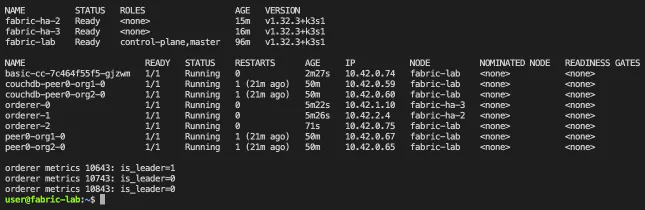
The PVE environment had 3 Debian 12 VMs forming a k3s v1.32.3 cluster: fabric-lab as server and fabric-ha-2, fabric-ha-3 as agents, spread across 3 PVE nodes. The deployment ran 3 orderers (Raft), one peer each for Org1/Org2, 2 CouchDB instances and CaaS chaincode; channel xchannel reached height 9. Orderers were spread across 3 nodes with required podAntiAffinity and topologyKey: kubernetes.io/hostname; after deleting the leader orderer-2, orderer-0 took over at term 4 and transactions kept committing. Cross-node HA is verified; cross-AZ / network partitions still need a multi-datacenter environment.
The experiment added one DNS step: OrdererEndpoints and anchor peer addresses in the channel config are ordererN.example.com, peer0.orgN.example.com, while the K8s Service names are orderer-N.orderer, peer0-orgN. Without handling this, peers never receive new blocks and approveformyorg waits until it times out. Here CoreDNS rewrite name exact maps the config domain names to Service DNS; Pod hostAliases does the same thing.
10.1 Production Topology
flowchart TB
    subgraph AZ1["Availability Zone A"]
        O1["Orderer-0<br/>Raft"]
        P1["Peer0-Org1"]
        C1["CouchDB<br/>(Peer0-Org1)"]
        CC1["Chaincode<br/>(CaaS)"]
    end

    subgraph AZ2["Availability Zone B"]
        O2["Orderer-1<br/>Raft"]
        P2["Peer0-Org2"]
        C2["CouchDB<br/>(Peer0-Org2)"]
        CC2["Chaincode<br/>(CaaS)"]
    end

    subgraph AZ3["Availability Zone C"]
        O3["Orderer-2<br/>Raft"]
        P3["Peer1-Org1"]
        C3["CouchDB<br/>(Peer1-Org1)"]
    end

    subgraph Infra["Infrastructure"]
        LB["TCP Load Balancer<br/>(NLB / MetalLB)"]
        CA1["Fabric-CA<br/>(Org1)"]
        CA2["Fabric-CA<br/>(Org2)"]
        Vault["HashiCorp Vault<br/>(secret management)"]
    end

    subgraph Monitor["Observability"]
        Prom["Prometheus<br/>+ Alertmanager"]
        Graf["Grafana"]
        Loki["Loki<br/>(logs)"]
    end

    LB --> O1 & O2 & O3
    LB --> P1 & P2 & P3
    P1 --> C1
    P2 --> C2
    P3 --> C3
    P1 --> CC1
    P2 --> CC2
    CA1 --> P1 & P3
    CA2 --> P2
    O1 <--> O2 <--> O3
    Vault -.-> CA1 & CA2
    P1 & P2 & P3 & O1 & O2 & O3 --> Prom
    Prom --> Graf
10.2 Versions and Resource Planning
The image column omits the hyperledger/ prefix.
| Component | Image | Type | Replicas | CPU req/lim | Mem req/lim |
|---|---|---|---|---|---|
| Orderer | fabric-orderer:2.5.16 |
StatefulSet | 3/5 | 500m/2 | 512Mi/2Gi |
| Peer | fabric-peer:2.5.16 |
StatefulSet | >=2/org | 500m/2 | 1Gi/4Gi |
| CouchDB | couchdb:3.4 |
StatefulSet (1:1) | 1/peer | 250m/1 | 512Mi/2Gi |
| Fabric-CA | fabric-ca:1.5.22 |
Deployment+PVC | 1/org | 100m/500m | 256Mi/512Mi |
| Chaincode (CaaS) | self-built image | Deployment | >=2 | 200m/1 | 256Mi/1Gi |
Storage: 200Gi each for Orderer/Peer, 100Gi for CouchDB, 10Gi for Fabric-CA, all SSD PVCs; CaaS has no persistent volume.
Cross-node results:
| Item | Result |
|---|---|
| Cluster | k3s v1.32.3, 3 nodes (1 server + 2 agents) |
| Nodes | fabric-lab, fabric-ha-2, fabric-ha-3 |
| Pods | orderer-0 (fabric-ha-3), orderer-1 (fabric-ha-2), orderer-2 (fabric-lab), two peers, two CouchDBs, basic-cc |
| Channel | xchannel, height 9 |
| Chaincode | basic 1.0, sequence 2, CaaS external chaincode |
| Storage | local-path PVC, CouchDB |
Failover test: the initial leader was orderer-2 (fabric-lab); after deleting that pod, orderer-0 (fabric-ha-3) was elected leader at term 4, CreateAsset / ReadAsset kept succeeding, and the channel reached height 9. In the screenshot orderer-2’s AGE is clearly lower than the other two — it is the recreated old leader.

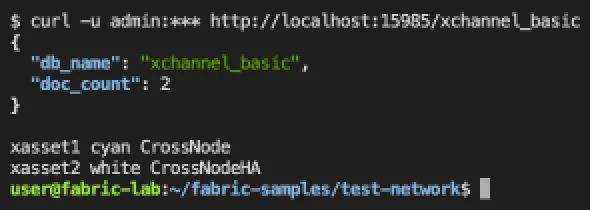
The CouchDB view shows the xchannel_basic database and two asset documents:
10.3 Peer StatefulSet
apiVersion: apps/v1
kind: StatefulSet
metadata:
  name: peer0-org1
  namespace: fabric
  labels:
    app.kubernetes.io/name: peer
    app.kubernetes.io/instance: org1
spec:
  serviceName: peer0-org1
  replicas: 1
  selector:
    matchLabels:
      app.kubernetes.io/name: peer
      app.kubernetes.io/instance: org1
  template:
    metadata:
      labels:
        app.kubernetes.io/name: peer
        app.kubernetes.io/instance: org1
    spec:
      securityContext:
        runAsNonRoot: true
        runAsUser: 1000
        fsGroup: 1000
      affinity:
        podAntiAffinity:
          preferredDuringSchedulingIgnoredDuringExecution:
            - weight: 100
              podAffinityTerm:
                labelSelector:
                  matchLabels:
                    app.kubernetes.io/name: peer
                topologyKey: topology.kubernetes.io/zone
      containers:
        - name: peer
          image: hyperledger/fabric-peer:2.5.16
          env:
            - name: CORE_PEER_ID
              value: peer0.org1.example.com
            - name: CORE_PEER_ADDRESS
              value: peer0-org1:7051
            - name: CORE_PEER_LISTENADDRESS
              value: 0.0.0.0:7051
            - name: CORE_PEER_CHAINCODEADDRESS
              value: peer0-org1:7052
            - name: CORE_PEER_CHAINCODELISTENADDRESS
              value: 0.0.0.0:7052
            - name: CORE_PEER_GOSSIP_EXTERNALENDPOINT
              value: peer0-org1:7051  # change to an externally reachable address when networking across clusters
            - name: CORE_PEER_GOSSIP_BOOTSTRAP
              value: peer0-org1:7051  # with multiple replicas, change to another peer in the same org
            - name: CORE_PEER_LOCALMSPID
              value: Org1MSP
            - name: CORE_PEER_TLS_ENABLED
              value: "true"
            - name: CORE_PEER_TLS_CERT_FILE
              value: /etc/hyperledger/fabric/tls/server.crt
            - name: CORE_PEER_TLS_KEY_FILE
              value: /etc/hyperledger/fabric/tls/server.key
            - name: CORE_PEER_TLS_ROOTCERT_FILE
              value: /etc/hyperledger/fabric/tls/ca.crt
            - name: CORE_PEER_MSPCONFIGPATH
              value: /etc/hyperledger/fabric/msp
            - name: CORE_OPERATIONS_LISTENADDRESS
              value: 0.0.0.0:9443
            - name: CORE_METRICS_PROVIDER
              value: prometheus
            - name: CORE_LEDGER_STATE_STATEDATABASE
              value: CouchDB
            - name: CORE_LEDGER_STATE_COUCHDBCONFIG_COUCHDBADDRESS
              value: couchdb-peer0-org1:5984
            - name: CORE_LEDGER_STATE_COUCHDBCONFIG_USERNAME
              valueFrom:
                secretKeyRef:
                  name: couchdb-credentials
                  key: username
            - name: CORE_LEDGER_STATE_COUCHDBCONFIG_PASSWORD
              valueFrom:
                secretKeyRef:
                  name: couchdb-credentials
                  key: password
            - name: FABRIC_LOGGING_SPEC
              value: "info"
          ports:
            - name: peer
              containerPort: 7051
            - name: chaincode
              containerPort: 7052
            - name: operations
              containerPort: 9443
          resources:
            requests:
              cpu: 500m
              memory: 1Gi
            limits:
              cpu: "2"
              memory: 4Gi
          livenessProbe:
            httpGet:
              path: /healthz
              port: 9443
            initialDelaySeconds: 30
            periodSeconds: 10
          readinessProbe:
            httpGet:
              path: /healthz
              port: 9443
            initialDelaySeconds: 10
            periodSeconds: 5
          volumeMounts:
            - name: data
              mountPath: /var/hyperledger/production
            - name: msp
              mountPath: /etc/hyperledger/fabric/msp
              readOnly: true
            - name: tls
              mountPath: /etc/hyperledger/fabric/tls
              readOnly: true
      volumes:
        - name: msp
          secret:
            secretName: org1-peer0-msp
        - name: tls
          secret:
            secretName: org1-peer0-tls
  volumeClaimTemplates:
    - metadata:
        name: data
      spec:
        accessModes: ["ReadWriteOnce"]
        storageClassName: ssd
        resources:
          requests:
            storage: 200Gi
The peer also needs a Service for stable DNS; both the StatefulSet’s serviceName and CORE_PEER_ADDRESS reference it:
apiVersion: v1
kind: Service
metadata:
  name: peer0-org1
  namespace: fabric
  labels:
    app.kubernetes.io/name: peer
    app.kubernetes.io/instance: org1
spec:
  selector:
    app.kubernetes.io/name: peer
    app.kubernetes.io/instance: org1
  ports:
    - name: peer
      port: 7051
      targetPort: 7051
    - name: chaincode
      port: 7052
      targetPort: 7052
This is an example with a single peer0 replica. With multiple replicas, create a separate Service for each peer and an additional headless Service for the StatefulSet pod DNS.
Note: Secret keys can’t contain
/, and the Fabric MSP directory contains subdirectories such ascacerts/,signcerts/andkeystore/. In practice an initContainer usually restores the MSP directory structure from a Secret or archive, then mounts it into the Peer / Orderer; the manifest above omits that step to keep the peer configuration in focus. The TLS Secret’sca.crt,server.crtandserver.keyare flat files and can be created directly with--from-file. In this k3s experiment, the MSP was packed asmsp.tar.gzinto a Secret, unpacked by a busybox initContainer andchowned to UID 1000, and the main container ran as non-root.
10.4 Orderer Raft Cluster
apiVersion: v1
kind: Service
metadata:
  name: orderer
  namespace: fabric
  labels:
    app.kubernetes.io/name: orderer
spec:
  clusterIP: None  # Headless Service, provides stable DNS for each pod
  selector:
    app.kubernetes.io/name: orderer
  ports:
    - name: orderer
      port: 7050
      targetPort: 7050
    - name: admin
      port: 7053
      targetPort: 7053
    - name: operations
      port: 9643
      targetPort: 9643
---
apiVersion: apps/v1
kind: StatefulSet
metadata:
  name: orderer
  namespace: fabric
spec:
  serviceName: orderer
  replicas: 3
  selector:
    matchLabels:
      app.kubernetes.io/name: orderer
  template:
    metadata:
      labels:
        app.kubernetes.io/name: orderer
    spec:
      securityContext:
        runAsNonRoot: true
        runAsUser: 1000
        fsGroup: 1000
      affinity:
        podAntiAffinity:
          requiredDuringSchedulingIgnoredDuringExecution:
            - labelSelector:
                matchLabels:
                  app.kubernetes.io/name: orderer
              topologyKey: topology.kubernetes.io/zone
      containers:
        - name: orderer
          image: hyperledger/fabric-orderer:2.5.16
          env:
            - name: ORDERER_GENERAL_LISTENADDRESS
              value: "0.0.0.0"
            - name: ORDERER_GENERAL_LISTENPORT
              value: "7050"
            - name: ORDERER_GENERAL_LOCALMSPID
              value: OrdererMSP
            - name: ORDERER_GENERAL_LOCALMSPDIR
              value: /etc/hyperledger/fabric/msp
            - name: ORDERER_GENERAL_BOOTSTRAPMETHOD
              value: none  # use the Channel Participation API, don't load a system channel genesis block
            - name: ORDERER_GENERAL_TLS_ENABLED
              value: "true"
            - name: ORDERER_GENERAL_TLS_PRIVATEKEY
              value: /etc/hyperledger/fabric/tls/server.key
            - name: ORDERER_GENERAL_TLS_CERTIFICATE
              value: /etc/hyperledger/fabric/tls/server.crt
            - name: ORDERER_GENERAL_TLS_ROOTCAS
              value: "[/etc/hyperledger/fabric/tls/ca.crt]"
            - name: ORDERER_GENERAL_TLS_CLIENTROOTCAS
              value: "[/etc/hyperledger/fabric/tls/ca.crt]"
            - name: ORDERER_GENERAL_CLUSTER_CLIENTCERTIFICATE
              value: /etc/hyperledger/fabric/tls/server.crt
            - name: ORDERER_GENERAL_CLUSTER_CLIENTPRIVATEKEY
              value: /etc/hyperledger/fabric/tls/server.key
            - name: ORDERER_GENERAL_CLUSTER_ROOTCAS
              value: "[/etc/hyperledger/fabric/tls/ca.crt]"
            - name: ORDERER_CHANNELPARTICIPATION_ENABLED
              value: "true"
            - name: ORDERER_ADMIN_LISTENADDRESS
              value: "0.0.0.0:7053"
            - name: ORDERER_ADMIN_TLS_ENABLED
              value: "true"
            - name: ORDERER_ADMIN_TLS_CERTIFICATE
              value: /etc/hyperledger/fabric/tls/server.crt
            - name: ORDERER_ADMIN_TLS_PRIVATEKEY
              value: /etc/hyperledger/fabric/tls/server.key
            - name: ORDERER_ADMIN_TLS_CLIENTROOTCAS
              value: "[/etc/hyperledger/fabric/tls/ca.crt]"
            - name: ORDERER_OPERATIONS_LISTENADDRESS
              value: "0.0.0.0:9643"
            - name: ORDERER_METRICS_PROVIDER
              value: prometheus
            - name: FABRIC_LOGGING_SPEC
              value: "info"
          ports:
            - name: orderer
              containerPort: 7050
            - name: admin
              containerPort: 7053
            - name: operations
              containerPort: 9643
          resources:
            requests:
              cpu: 500m
              memory: 512Mi
            limits:
              cpu: "2"
              memory: 2Gi
          livenessProbe:
            httpGet:
              path: /healthz
              port: 9643
            initialDelaySeconds: 30
            periodSeconds: 10
          readinessProbe:
            httpGet:
              path: /healthz
              port: 9643
            initialDelaySeconds: 10
            periodSeconds: 5
          volumeMounts:
            - name: data
              mountPath: /var/hyperledger/production/orderer
            - name: msp
              mountPath: /etc/hyperledger/fabric/msp
              readOnly: true
            - name: tls
              mountPath: /etc/hyperledger/fabric/tls
              readOnly: true
      volumes:
        - name: msp
          secret:
            secretName: orderer-msp
        - name: tls
          secret:
            secretName: orderer-tls
  volumeClaimTemplates:
    - metadata:
        name: data
      spec:
        accessModes: ["ReadWriteOnce"]
        storageClassName: ssd
        resources:
          requests:
            storage: 200Gi
---
apiVersion: policy/v1
kind: PodDisruptionBudget
metadata:
  name: orderer-pdb
  namespace: fabric
spec:
  minAvailable: 2   # a 3-node Raft cluster needs at least 2 alive (quorum)
  selector:
    matchLabels:
      app.kubernetes.io/name: orderer
Orderer clusters talk mTLS. Besides
ORDERER_GENERAL_TLS_ROOTCAS, configureORDERER_GENERAL_TLS_CLIENTROOTCASon the server to verify other orderers’ client certificates. Don’t casually setORDERER_GENERAL_TLS_CLIENTAUTHREQUIREDtotrue, or the peer CLI will also be asked for a client TLS certificate and transaction submission will time out. This combination came up in the 3-orderer test.
For brevity the above shows a single
orderer-msp/orderer-tls. In a 3-replica Raft cluster, each orderer’s MSP and TLS certificates must be independent — three pods can’t share one server certificate. In practice you can use three Secretsorderer-0/1/2, selected and restored by an initContainer based on the pod ordinal; this k3s experiment put all three MSPs and TLS pairs in a combined Secret, and the initContainer picked the matching files by the ordinal inHOSTNAME.
Cluster bootstrap notes (Fabric 2.3+ recommends the Channel Participation API, with no system channel):
- Deploy 3 orderer pods, none joined to any channel.
- Use
osnadmin channel jointo add each orderer to the application channel’s consenter set. - Spread pods across availability zones; use a
PodDisruptionBudgetto preserve Raft quorum. - For external exposure, prefer a TCP LoadBalancer (e.g. AWS NLB), with a separate Service per orderer instance.
10.5 CouchDB Deployment (1:1 with Peers)
Fabric officially recommends binding one dedicated CouchDB instance to each peer (rather than a shared cluster), because the state database is a local derivative of the peer and can be fully rebuilt by replaying blocks.
Option one: sidecar (recommended, same pod)
Append to the peer StatefulSet’s containers:
- name: couchdb
  image: couchdb:3.4
  ports:
    - name: http
      containerPort: 5984
  env:
    - name: COUCHDB_USER
      valueFrom:
        secretKeyRef:
          name: couchdb-credentials
          key: username
    - name: COUCHDB_PASSWORD
      valueFrom:
        secretKeyRef:
          name: couchdb-credentials
          key: password
  resources:
    requests:
      cpu: 250m
      memory: 512Mi
    limits:
      cpu: "1"
      memory: 2Gi
  volumeMounts:
    - name: couchdb-data
      mountPath: /opt/couchdb/data
Then change COUCHDB_ADDRESS in the peer environment variables to localhost:5984, and add a couchdb-data volume to volumeClaimTemplates.
Option two: separate StatefulSet
apiVersion: apps/v1
kind: StatefulSet
metadata:
  name: couchdb-peer0-org1
  namespace: fabric
spec:
  serviceName: couchdb-peer0-org1
  replicas: 1
  selector:
    matchLabels:
      app: couchdb
      peer: peer0-org1
  template:
    metadata:
      labels:
        app: couchdb
        peer: peer0-org1
    spec:
      securityContext:
        runAsUser: 5984
        fsGroup: 5984
      containers:
        - name: couchdb
          image: couchdb:3.4
          env:
            - name: COUCHDB_USER
              valueFrom:
                secretKeyRef:
                  name: couchdb-credentials
                  key: username
            - name: COUCHDB_PASSWORD
              valueFrom:
                secretKeyRef:
                  name: couchdb-credentials
                  key: password
          ports:
            - name: http
              containerPort: 5984
          resources:
            requests:
              cpu: 250m
              memory: 512Mi
            limits:
              cpu: "1"
              memory: 2Gi
          livenessProbe:
            httpGet:
              path: /_up
              port: 5984
            initialDelaySeconds: 15
            periodSeconds: 10
          volumeMounts:
            - name: data
              mountPath: /opt/couchdb/data
  volumeClaimTemplates:
    - metadata:
        name: data
      spec:
        accessModes: ["ReadWriteOnce"]
        storageClassName: ssd
        resources:
          requests:
            storage: 100Gi
---
apiVersion: v1
kind: Service
metadata:
  name: couchdb-peer0-org1
  namespace: fabric
spec:
  selector:
    app: couchdb
    peer: peer0-org1
  ports:
    - name: http
      port: 5984
      targetPort: 5984
10.6 Network Exposure (gRPC + mTLS)
Fabric’s external interface is gRPC, and most scenarios need mutual TLS. There are three typical approaches in K8s:
| Approach | Pros | Cons |
|---|---|---|
| TCP LoadBalancer (NLB) | Simplest configuration, end-to-end TLS | Each node needs its own LB |
| NGINX Ingress + ssl-passthrough | Unified ingress management | Requires --enable-ssl-passthrough, some performance loss |
| Istio Gateway + TLS PASSTHROUGH | Native service-mesh approach, good observability | Adds Istio complexity |
Recommendation: in production, prefer a TCP LoadBalancer — the path is simple and there is no certificate mismatch caused by TLS termination.
NGINX Ingress example (TLS passthrough):
apiVersion: networking.k8s.io/v1
kind: Ingress
metadata:
  name: peer0-org1
  namespace: fabric
  annotations:
    nginx.ingress.kubernetes.io/backend-protocol: "GRPC"
    nginx.ingress.kubernetes.io/ssl-passthrough: "true"
spec:
  ingressClassName: nginx
  rules:
    - host: peer0-org1.example.com
      http:
        paths:
          - path: /
            pathType: Prefix
            backend:
              service:
                name: peer0-org1
                port:
                  number: 7051
Istio Gateway example (TLS PASSTHROUGH, SNI routing):
apiVersion: networking.istio.io/v1beta1
kind: Gateway
metadata:
  name: fabric-gw
  namespace: fabric
spec:
  selector:
    istio: ingressgateway
  servers:
    - port:
        number: 443
        name: grpc-fabric
        protocol: TLS
      tls:
        mode: PASSTHROUGH
      hosts:
        - "peer0-org1.example.com"
        - "orderer0.example.com"
---
apiVersion: networking.istio.io/v1beta1
kind: VirtualService
metadata:
  name: peer0-org1
  namespace: fabric
spec:
  hosts:
    - "peer0-org1.example.com"
  gateways:
    - fabric-gw
  tls:
    - match:
        - sniHosts:
            - "peer0-org1.example.com"
      route:
        - destination:
            host: peer0-org1.fabric.svc.cluster.local
            port:
              number: 7051
10.7 External Chaincode (Chaincode-as-a-Service)
Deploying chaincode as an independent microservice is the recommended production approach:
flowchart LR
    subgraph K8s["Kubernetes Cluster"]
        P["Peer Pod"]
        CC["Chaincode Deployment<br/>(replicas: 2+)"]
        SVC["ClusterIP Service<br/>basic-cc:9999"]
    end

    P -->|gRPC + TLS| SVC
    SVC --> CC
Chaincode Deployment:
apiVersion: apps/v1
kind: Deployment
metadata:
  name: basic-cc
  namespace: fabric
spec:
  replicas: 2
  selector:
    matchLabels:
      app: basic-cc
  template:
    metadata:
      labels:
        app: basic-cc
    spec:
      securityContext:
        runAsNonRoot: true
        runAsUser: 1000
        fsGroup: 1000
      containers:
        - name: chaincode
          image: ghcr.io/your-org/asset-basic-cc:1.0.0
          ports:
            - containerPort: 9999
              name: chaincode
          env:
            - name: CHAINCODE_SERVER_ADDRESS
              value: "0.0.0.0:9999"
            - name: CHAINCODE_ID
              value: "<package-id>"  # matches the Package ID at install time
            - name: CORE_CHAINCODE_TLS_DISABLED
              value: "true"  # can be disabled inside the cluster, relying on the service mesh or NetworkPolicy
          resources:
            requests:
              cpu: 200m
              memory: 256Mi
            limits:
              cpu: "1"
              memory: 1Gi
          securityContext:
            allowPrivilegeEscalation: false
            readOnlyRootFilesystem: true
          volumeMounts:
            - name: tmp
              mountPath: /tmp
      volumes:
        - name: tmp
          emptyDir: {}
---
apiVersion: v1
kind: Service
metadata:
  name: basic-cc
  namespace: fabric
spec:
  selector:
    app: basic-cc
  ports:
    - name: chaincode
      port: 9999
      targetPort: 9999
External chaincode’s connection.json (embedded in the .tar.gz when packaging):
{
  "address": "basic-cc.fabric.svc.cluster.local:9999",
  "dial_timeout": "10s",
  "tls_required": false
}
Fabric 2.5’s peer image ships a ccaas_builder, but peer lifecycle chaincode package --lang ccaas doesn’t recognize this language, so you have to assemble the package by hand:
mkdir -p ccaas/code
cp connection.json ccaas/code/

tar -czf ccaas/code.tar.gz -C ccaas/code .
cat > ccaas/metadata.json <<'EOF'
{"path":"","type":"ccaas","label":"basic_1.0"}
EOF

tar -czf basic-ccaas.tar.gz -C ccaas metadata.json code.tar.gz
peer lifecycle chaincode install basic-ccaas.tar.gz
metadata.json’s type must be ccaas. After the peer’s external builder detect runs, it reads connection.json from code.tar.gz. Install first to get the Package ID, then fill it into the Chaincode Deployment’s CHAINCODE_ID; in the reverse order the chaincode service can’t connect to the peer. With a custom peer image, also confirm chaincode.externalBuilders in core.yaml points at the ccaas builder.
If you need TLS between chaincode and peer, configure the certificate fields in
connection.jsonand mount the corresponding certificates into the chaincode container.
10.8 Observability (Prometheus Operator)
apiVersion: v1
kind: Service
metadata:
  name: peer0-org1-metrics
  namespace: fabric
  labels:
    app.kubernetes.io/name: peer
    app.kubernetes.io/instance: org1
    app.kubernetes.io/component: metrics
spec:
  selector:
    app.kubernetes.io/name: peer
    app.kubernetes.io/instance: org1
  ports:
    - name: operations
      port: 9443
      targetPort: 9443
---
apiVersion: monitoring.coreos.com/v1
kind: ServiceMonitor
metadata:
  name: fabric-peers
  namespace: fabric
spec:
  selector:
    matchLabels:
      app.kubernetes.io/name: peer
      app.kubernetes.io/component: metrics
  endpoints:
    - port: operations
      interval: 15s
      path: /metrics
      scheme: http   # when Operations has no TLS enabled
---
apiVersion: monitoring.coreos.com/v1
kind: ServiceMonitor
metadata:
  name: fabric-orderers
  namespace: fabric
spec:
  selector:
    matchLabels:
      app.kubernetes.io/name: orderer
  endpoints:
    - port: operations
      interval: 15s
      path: /metrics
      scheme: http
10.9 Certificate Management and Rotation
Recommended workflow for managing Fabric certificates in Kubernetes:
flowchart TD
    A["Fabric-CA / external CA<br/>issues MSP + TLS certificates"] --> B["Store as a K8s Secret"]
    B --> C["Mount into the Pod"]
    C --> D{"Certificate expiring soon?"}
    D -- yes --> E["Reissue the certificate"]
    E --> F["Update the K8s Secret"]
    F --> G["Rolling restart the Pod"]
    G --> D
    D -- no --> H["Continuous monitoring<br/>(cert-manager / custom CronJob)"]
    H --> D
Key points:
- Manage MSP signing certificates and TLS certificates separately, each with its own lifecycle.
- Use
cert-managerfor automatic TLS certificate renewal (e.g. when integrating with an external CA). - MSP enrollment certificates are renewed with Fabric-CA’s
reenrollcommand. - Always validate in a test environment before rotation, so services stay up during the transition between old and new certificates.
- Guard the Root CA private key; store it in an HSM or Vault.
10.10 Backup and Disaster Recovery
| Backup target | Method | Frequency | Recovery method |
|---|---|---|---|
| Orderer data volume | PVC snapshot (CSI Snapshot) | Daily + before changes | Restore the PVC from the snapshot and start the pod |
| Peer data volume | PVC snapshot | Daily | Restore the PVC from the snapshot; or rebuild by replaying blocks |
| CouchDB data | PVC snapshot | Daily | Restore from snapshot; or delete the data and let the peer rebuild it |
| Channel config (config block) | peer channel fetch config |
After every config change | Used to rebuild channels in a disaster |
| MSP / CA root certificates | Offline archive + Vault | On change | Core material for disaster recovery |
| Channel genesis block / config block | The block file used by osnadmin channel join --config-block |
When creating the channel | Rejoin the channel or rebuild the orderers |
Fabric 2.4+ supports peer ledger snapshots:
# Create a snapshot at a given block height
peer snapshot submitrequest \
  -c mychannel \
  -b 1000 \
  --peerAddress peer0-org1:7051 \
  --tlsRootCertFile /path/to/tlsca.pem

# A new node starts syncing from the snapshot at that block height (no replay from genesis)
peer snapshot joinbysnapshot \
  --snapshotpath /path/to/snapshot
10.11 Security Baseline
# NetworkPolicy example: only allow communication between Fabric components
apiVersion: networking.k8s.io/v1
kind: NetworkPolicy
metadata:
  name: fabric-default-deny
  namespace: fabric
spec:
  podSelector: {}
  policyTypes:
    - Ingress
    - Egress
  ingress: []
  egress: []
---
apiVersion: networking.k8s.io/v1
kind: NetworkPolicy
metadata:
  name: fabric-allow-internal
  namespace: fabric
spec:
  podSelector: {}
  policyTypes:
    - Ingress
    - Egress
  ingress:
    - from:
        - namespaceSelector:
            matchLabels:
              kubernetes.io/metadata.name: fabric
      ports:
        - port: 7050    # Orderer
        - port: 7051    # Peer
        - port: 7052    # Chaincode
        - port: 7053    # Orderer Admin (osnadmin)
        - port: 9443    # Peer Operations
        - port: 9643    # Orderer Operations
        - port: 5984    # CouchDB
        - port: 9999    # Chaincode CaaS
  egress:
    - to:
        - namespaceSelector:
            matchLabels:
              kubernetes.io/metadata.name: fabric
    - to:   # allow DNS resolution
        - namespaceSelector: {}
      ports:
        - port: 53
          protocol: UDP
        - port: 53
          protocol: TCP
If peers/orderers are exposed through an Ingress or LoadBalancer, also allow 7051/7050 from the ingress controller’s namespace; if the Prometheus Operator lives in a separate namespace, also allow 9443/9643. The policy above only covers traffic between Fabric components.
Security checklist:
- Pods use
runAsNonRoot: true - Chaincode containers use
readOnlyRootFilesystem: true+allowPrivilegeEscalation: false - Images use fixed tags + digests, a private registry, and regular scanning
- Secrets are not committed in plaintext; use Sealed Secrets / External Secrets + Vault
- NetworkPolicy follows the principle of least privilege
- HSM (PKCS#11) protects CA private keys (at least the Root CA)
10.12 Common Pitfalls and Field Notes
| Problem | Cause | Solution |
|---|---|---|
| Ingress gRPC connections time out frequently | ssl-passthrough performance loss or misconfiguration | Switch to a TCP LB exposing the port directly |
| Orderer Raft election storms | Insufficient storage IOPS causes heartbeat delays | Use SSD PVCs; tune ElectionTick/HeartbeatTick |
| Peer sync is slow | Improper Gossip configuration or slow pod DNS resolution | Check CORE_PEER_GOSSIP_EXTERNALENDPOINT; confirm headless Service DNS works |
| CouchDB index rebuilds take too long | Many documents + complex indexes | Improve the index design; use high-IOPS storage |
| Certificate expiry takes down the whole network | No rotation automation in place | Build certificate monitoring alerts + an auto-renewal process before going live |
| Old transactions fail after a chaincode upgrade | Incompatible state data structure | Implement version detection + data migration in the chaincode |
| approve/commit times out in K8s | orderer.example.com, peer0.orgX.example.com from the channel config don’t resolve inside the cluster |
Map them to Service DNS with CoreDNS rewrite or pod hostAliases |
| High Raft latency across availability zones | Network RTT > HeartbeatTick * TickInterval |
Increase HeartbeatTick appropriately (default 1, TickInterval 500ms) |
11. Further Reading
| Resource | Link |
|---|---|
| Official docs (2.5 LTS) | hyperledger-fabric.readthedocs.io |
| Fabric CA docs | hyperledger-fabric-ca.readthedocs.io |
| fabric-samples | hyperledger/fabric-samples |
| test-network-k8s | fabric-samples/test-network-k8s |
| Gateway SDK (Go) | hyperledger/fabric-gateway |
| Gateway SDK (Node.js) | fabric-gateway/node |
| Gateway SDK (Java) | hyperledger/fabric-gateway-java |
| Fabric RFC collection | hyperledger/fabric-rfcs |
| Fabric Operations Guide | operations_service.html |
12. Conclusion
Using Fabric 2.5 LTS as the baseline, this post covered architecture principles, local development deployment, monitoring, performance tuning, security hardening and a production Kubernetes rollout — the full lifecycle of a consortium blockchain network from PoC to production.
A few core recommendations:
- Get the whole flow working on test-network first, and understand the transaction lifecycle and chaincode lifecycle before customizing anything.
- Set up monitoring from day one; Operations + Prometheus are the first line of defense when troubleshooting.
- Certificate management is the biggest operational risk, so complete a certificate rotation drill before going live.
- External chaincode (CaaS) is the production best practice, avoiding the security and resource isolation problems of peers building and managing chaincode containers directly.
- Prefer LevelDB, and only add CouchDB when the business genuinely needs rich queries.
- K8s is not mandatory, but as organizations and nodes grow, K8s scheduling, rolling upgrades and observability will greatly reduce operational cost.
Comments