The most annoying part of running your own Kubernetes is that Service type=LoadBalancer has no cloud provider handing out a VIP. MetalLB fills the gap with L2/BGP advertisement, but its data plane still runs through the kernel network stack. LoxiLB takes a different angle: forwarding logic goes into eBPF, and kube-loxilb watches Services and EndpointSlices and pushes rules down to LoxiLB.
This post runs through in-cluster mode on a single-node k3s: VIP allocation, NodePort and PodIP endpoint modes, round-robin distribution, endpoint scaling, and finally BIRD as a BGP peer to verify that the VIP prefix is advertised and withdrawn.
Tested: k3s v1.32.3 single node, in-cluster mode, LoxiLB 0.9.8.8, kube-loxilb (the latest image as of 2026-11-16), LoadBalancer VIP, NodePort backend + onearm, PodIP backend + default, round-robin distribution, endpoint scaling, BGP advertisement and withdrawal, eBPF tc program attachment.
Not tested: External mode, multi-node HA, BFD, DSR mode, actual VyOS peering, fault injection for active probes. PodIP backends with onearm/fullnat failed external access in this single-node environment; the cause wasn’t identified, and the post records it as observed.
Why a Self-Hosted Cluster Needs a LoadBalancer
Without a cloud provider’s managed LB, you usually run into three problems:
- No external IP: a
type: LoadBalancerService staysPendingforever, and you can only fall back to NodePort. - VIP unreachable: even once an address is allocated, the upstream network doesn’t know where it is; ARP or BGP has to advertise it.
- Too many components: MetalLB manages the VIP, kube-proxy handles forwarding, health checks add another layer, and troubleshooting means correlating logs across several components.
LoxiLB folds these into one binary: the eBPF data plane handles NAT and scheduling, built-in goBGP handles route advertisement, and kube-loxilb translates Kubernetes Services into LoxiLB rules.
LoxiLB Components
| Layer | Component | Responsibility |
|---|---|---|
| Data plane | eBPF programs | Connection tracking, NAT, endpoint selection, session persistence, health probes |
| Control plane | LoxiLB process | Loads eBPF rules, maintains the session table, embeds goBGP, exposes a REST API (port 11111) |
| K8s integration | kube-loxilb | Watches Service/EndpointSlice, does IPAM and policy calculation, pushes rules via the REST API |
In this deployment the k3s logs show tc: bpf attach OK for ens18, meaning the eBPF program is attached to the tc hook, not XDP. The exact attachment point depends on the version and deployment mode, so checking the logs after deploying is the safest approach.
From creating a Service to forwarding packets, the path looks roughly like this:
sequenceDiagram
    participant User as kubectl
    participant API as K8s API Server
    participant KL as kube-loxilb
    participant LB as LoxiLB control plane
    participant DP as eBPF data plane
    participant BGP as goBGP
    participant Peer as BGP peer

    User->>API: Create Service(type=LoadBalancer)<br/>loadBalancerClass: loxilb.io/loxilb
    API-->>KL: Watch Service / EndpointSlice
    KL->>KL: IPAM allocates a VIP<br/>parses lbmode, usepodnetwork and other annotations
    KL->>LB: Push LB rules over the REST API
    LB->>DP: Update BPF maps
    LB->>BGP: Advertise the VIP prefix
    BGP->>Peer: BGP UPDATE (VIP/32)
    Note over DP: Packet arrives on ens18<br/>DNAT after the BPF map lookup<br/>forward to NodePort or PodIP
Lab Environment and Test Scope
- Debian 12 VM, 4 vCPU / 5.8 GiB RAM, kernel 6.1.0-23-cloud-amd64
- k3s v1.32.3+k3s1, single node, containerd 2.0.4
- LoxiLB v0.9.8.8, kube-loxilb using the latest image as of 2026-11-16
- VIP:
10.31.0.244, same subnet as the node10.31.0.144/24 - Test workload:
ghcr.io/loxilb-io/nginx:stable, 3 replicas
I chose in-cluster mode because the lab has only one machine. LoxiLB runs as a DaemonSet on the node, and kube-loxilb is configured without --loxiURL, discovering LoxiLB through a headless Service. External mode (LoxiLB in Docker outside the cluster, kube-loxilb connecting via --loxiURL) wasn’t tested this time; the commands are in the production section for reference.
Pick a free address in the same subnet for the VIP, and confirm it’s unused before deploying:
for ip in 10.31.0.244 10.31.0.245 10.31.0.246; do
  ping -c 1 -W 1 "$ip" >/dev/null 2>&1 && echo "$ip used" || echo "$ip free"
done
Deploying In-Cluster Mode
k3s is already installed, so apply the LoxiLB and kube-loxilb manifests directly. The LoxiLB DaemonSet from the official k3s-incluster example looks like this, with the key parameters kept:
apiVersion: apps/v1
kind: DaemonSet
metadata:
  name: loxilb-lb
  namespace: kube-system
spec:
  selector:
    matchLabels:
      app: loxilb-app
  template:
    metadata:
      labels:
        app: loxilb-app
    spec:
      hostNetwork: true
      hostPID: true
      dnsPolicy: ClusterFirstWithHostNet
      initContainers:
        - name: mkllb-cgroup
          # prepare the cgroup, omitted
      containers:
        - name: loxilb-app
          image: ghcr.io/loxilb-io/loxilb:v0.9.8.8
          imagePullPolicy: IfNotPresent
          command:
            - /root/loxilb-io/loxilb/loxilb
            - --bgp
            - --egr-hooks
            - --blacklist=cni[0-9a-z]|veth.|flannel.|cali.|tunl.|vxlan[.]calico|docker|br-
            - --localsockpolicy
          ports:
            - containerPort: 11111
            - containerPort: 179
            - containerPort: 50051
          securityContext:
            privileged: true
            capabilities:
              add: ["SYS_ADMIN"]
The full manifest also includes affinity, tolerations and volumes; see the official k3s in-cluster quick start at the end. Only the parts relevant to network behavior are shown here.
Parameter notes:
| Parameter | Purpose |
|---|---|
--bgp |
Enables built-in goBGP for advertising VIPs |
--egr-hooks |
Allows Pods on the same node to act as backends |
--blacklist |
Keeps the eBPF program off CNI, Docker, veth and similar interfaces |
--localsockpolicy |
Handles locally originated connections; affects how local access to a VIP behaves in single-node tests |
I added docker and br- to --blacklist because this machine also runs Docker, and I don’t want LoxiLB touching Docker bridges. The official example only lists CNI-related interfaces; extend it to match your environment.
kube-loxilb startup arguments:
args:
  - --cidrPools=defaultPool=10.31.0.244/32
  - --setRoles=0.0.0.0
  - --monitor
| Parameter | Description |
|---|---|
--cidrPools |
VIP pool; only one address here |
--setRoles |
Single-node arbitration; 0.0.0.0 means kube-loxilb elects the leader itself |
--monitor |
Enables backend liveness probing |
After applying, check the Pods:
sudo k3s kubectl apply -f loxilb.yml
sudo k3s kubectl apply -f kube-loxilb.yml

sudo k3s kubectl -n kube-system get pods | grep -E 'loxilb|NAME'
# kube-loxilb-85c889d68c-kkjjq   1/1   Running   0   15s
# loxilb-lb-n4khk                1/1   Running   0   15s
If kube-loxilb logs service cannot be added because there are no loxilb instances, wait a few seconds. LoxiLB may not be ready when kube-loxilb starts; this error is a normal retry during discovery and clears once LoxiLB’s headless Service has endpoints.
The First LoadBalancer Service
Create three nginx replicas, each writing its hostname to the index page so the distribution is easy to see:
apiVersion: apps/v1
kind: Deployment
metadata:
  name: tcp-onearm-test
spec:
  replicas: 3
  selector:
    matchLabels:
      what: tcp-onearm-test
  template:
    metadata:
      labels:
        what: tcp-onearm-test
    spec:
      containers:
        - name: nginx
          image: ghcr.io/loxilb-io/nginx:stable
          imagePullPolicy: IfNotPresent
          command: ["/bin/sh", "-c"]
          args:
            - echo "pod $HOSTNAME" > /usr/share/nginx/html/index.html && exec nginx -g 'daemon off;'
          ports:
            - containerPort: 80
The Service uses the onearm mode from the official example, with a NodePort backend:
apiVersion: v1
kind: Service
metadata:
  name: tcp-lb-onearm
  annotations:
    loxilb.io/liveness: "yes"
    loxilb.io/lbmode: "onearm"
spec:
  externalTrafficPolicy: Local
  loadBalancerClass: loxilb.io/loxilb
  selector:
    what: tcp-onearm-test
  ports:
    - port: 56002
      targetPort: 80
      nodePort: 30001
  type: LoadBalancer
loadBalancerClass: loxilb.io/loxilb is the key. With this field the Service is handed to kube-loxilb and no longer lands on k3s’s built-in Klipper; Traefik’s own Service is unaffected.
sudo k3s kubectl apply -f demo-onearm.yaml
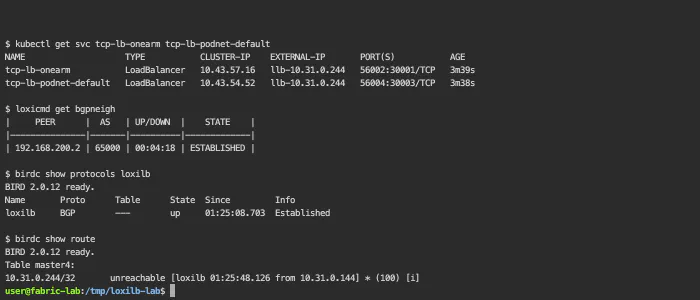
sudo k3s kubectl get svc tcp-lb-onearm
# NAME            TYPE           CLUSTER-IP    EXTERNAL-IP       PORT(S)           AGE
# tcp-lb-onearm   LoadBalancer   10.43.57.16   llb-10.31.0.244   56002:30001/TCP   12s
EXTERNAL-IP shows as llb-10.31.0.244; the actual VIP is the address after the prefix. Accessing it from another machine on the same subnet:
for i in $(seq 1 12); do
  curl -s http://10.31.0.244:56002/
done | sort | uniq -c
#   3 pod tcp-onearm-test-558d88cd5d-5v7xc
#   4 pod tcp-onearm-test-558d88cd5d-87ntv
#   5 pod tcp-onearm-test-558d88cd5d-ftp47
All three Pods received traffic. On the LoxiLB side the endpoint isn’t a PodIP but the node’s NodePort:
POD=$(sudo k3s kubectl -n kube-system get pod -l app=loxilb-app -o jsonpath='{.items[0].metadata.name}')
sudo k3s kubectl -n kube-system exec "$POD" -c loxilb-app -- \
  loxicmd get lb -o wide
# excerpt (SEC IPS, MARK, COUNTERS and other columns omitted)
# | 10.31.0.244 | 56002 | tcp | default_tcp-lb-onearm:llb-inst0 | rr | onearm | 10.31.0.144 | 30001 | active |
On this path LoxiLB only sends VIP traffic to 10.31.0.144:30001; distribution across Pods is left to kube-proxy. That’s fine on a single node, but with multiple nodes LoxiLB has no direct visibility into where the Pods run.
PodIP Endpoints and Round-Robin
If you want LoxiLB to distribute directly across Pods, add loxilb.io/usepodnetwork: "yes" and endpoints become PodIP + targetPort:
metadata:
  name: tcp-lb-podnet-default
  annotations:
    loxilb.io/liveness: "yes"
    loxilb.io/lbmode: "default"
    loxilb.io/usepodnetwork: "yes"
spec:
  externalTrafficPolicy: Local
  loadBalancerClass: loxilb.io/loxilb
  selector:
    what: tcp-onearm-test
  ports:
    - port: 56004
      targetPort: 80
      nodePort: 30003
  type: LoadBalancer
for i in $(seq 1 12); do
  curl -s http://10.31.0.244:56004/
done | sort | uniq -c
#   4 pod tcp-onearm-test-558d88cd5d-5v7xc
#   4 pod tcp-onearm-test-558d88cd5d-87ntv
#   4 pod tcp-onearm-test-558d88cd5d-ftp47
12 requests split exactly 4/4/4. loxicmd get lb shows three PodIP endpoints:
sudo k3s kubectl -n kube-system exec "$POD" -c loxilb-app -- \
  loxicmd get lb -o wide
# excerpt (some columns omitted)
# | 10.31.0.244 | 56004 | tcp | default_tcp-lb-podnet-default:llb-inst0 | rr | default |
# |             |       |     |                                                 |    |         | 10.42.0.3 | 80 |
# |             |       |     |                                                 |    |         | 10.42.0.4 | 80 |
# |             |       |     |                                                 |    |         | 10.42.0.6 | 80 |
Local Access Returns a 404
Running curl 10.31.0.244:56004 directly on the LoxiLB node returns Go’s default 404 page not found instead of the nginx page. From the symptoms, --localsockpolicy takes over locally originated connections, so in a single-node test, local access to a PodIP backend goes through the local socket policy.
From another machine on the same subnet it works normally. This is easy to misread as the VIP or the rules not taking effect; when troubleshooting, separate “local access” from “external access” first.
Results for the Four Combinations
| Backend | lbmode | External access | Notes |
|---|---|---|---|
| NodePort | onearm | Works | Official example, usable on a single node |
| PodIP | default | Works | 12 requests split 4/4/4 |
| PodIP | onearm | Fails | External connections time out; cause not identified |
| PodIP | fullnat | Fails | External connections time out; cause not identified |
The last two rows aren’t a config mistake: loxicmd get lb shows the rule and endpoints, and get ep reports ok, yet external connections simply don’t work. Single node plus the local socket policy is one possible cause; I didn’t dig further this time. If you want fullnat in production, validate it in a multi-node environment first, or just use the NodePort backend from the official example.
Endpoint Health and Scaling
loxilb.io/liveness: "yes" makes LoxiLB probe endpoints over TCP/HTTP. I didn’t inject faults here; I only checked whether rules follow changes to the EndpointSlice.
Scale replicas from 3 down to 2:
sudo k3s kubectl scale deploy tcp-onearm-test --replicas=2
sleep 8
sudo k3s kubectl -n kube-system exec "$POD" -c loxilb-app -- \
  loxicmd get ep
# excerpt
# | 10.42.0.3   | ... | ok |
# | 10.42.0.4   | ... | ok |
10.42.0.2 disappears from the endpoint list. Scale back to 3 and the new Pod 10.42.0.6 is added back automatically. The endpoint list updates within seconds after scaling; I didn’t measure the exact convergence time. That’s fast enough for short-lived HTTP connections; long-lived connections need session persistence and client reconnects. LoxiLB’s conntrack is maintained per instance, so existing connections most likely break on failover across instances, and I didn’t test failover this time.
Advertising the VIP with BGP
The VIP is only valid locally on the LoxiLB node; upstream routers don’t know where 10.31.0.244 is. Production environments usually advertise the VIP prefix to core routers over BGP; LoxiLB embeds goBGP and kube-loxilb handles the configuration.
kube-loxilb adds three BGP arguments on top of the existing ones:
args:
  - --cidrPools=defaultPool=10.31.0.244/32
  - --setRoles=0.0.0.0
  - --monitor
  - --setBGP=65100
  - --extBGPPeers=192.168.200.2:65000
  - --listenBGPPort=1791
| Parameter | Description |
|---|---|
--setBGP=65100 |
AS number for LoxiLB |
--extBGPPeers |
Peer address and AS number, in IP:AS format |
--listenBGPPort=1791 |
LoxiLB’s BGP listen port; change it when the peer occupies 179 |
Lab BGP Peer
The lab has no VyOS, so BIRD 2.0.12 plays the upstream router inside a network namespace. Use a separate /30 subnet for the veth, and don’t overlap the node’s /24, otherwise the kernel prefers the veth route and blackholes replies for the whole subnet. I actually hit this while debugging: the VM went completely unreachable and I had to get in through the PVE guest agent to delete the route.
sudo ip netns add bgpns
sudo ip link add veth-bgp type veth peer name veth-bgp-ns
sudo ip link set veth-bgp-ns netns bgpns
sudo ip addr add 192.168.200.1/30 dev veth-bgp
sudo ip link set veth-bgp up
sudo ip netns exec bgpns ip addr add 192.168.200.2/30 dev veth-bgp-ns
sudo ip netns exec bgpns ip link set veth-bgp-ns up
sudo ip netns exec bgpns ip link set lo up
sudo ip netns exec bgpns ip route add 10.31.0.144/32 via 192.168.200.1
BIRD configuration:
router id 192.168.200.2;
protocol device {}
protocol bgp loxilb {
  local as 65000;
  neighbor 10.31.0.144 as 65100 port 1791;
  multihop 2;
  ipv4 {
    import all;
    export none;
  };
}
Start BIRD so it only listens inside the netns:
sudo ip netns exec bgpns bird -c /etc/bird/bgpns.conf \
  -s /run/bird-bgpns.ctl -P /run/bird-bgpns.pid -u root
Route Advertisement and Withdrawal
First, the BGP neighbor:
sudo ip netns exec bgpns birdc -s /run/bird-bgpns.ctl \
  show protocols loxilb
# Name       Proto      Table      State  Since         Info
# loxilb     BGP        ---        up     01:25:08.703  Established
Now the neighbor on the LoxiLB side:
POD=$(sudo k3s kubectl -n kube-system get pod -l app=loxilb-app -o jsonpath='{.items[0].metadata.name}')
sudo k3s kubectl -n kube-system exec "$POD" -c loxilb-app -- loxicmd get bgpneigh
# |     PEER      |  AS   | UP/DOWN  |    STATE    |
# | 192.168.200.2 | 65000 | 00:04:18 | ESTABLISHED |
The route BIRD received:
sudo ip netns exec bgpns birdc -s /run/bird-bgpns.ctl \
  show route
# 10.31.0.244/32  unreachable [loxilb 01:25:48.126 from 10.31.0.144] * (100) [i]
unreachable is because BIRD hasn’t resolved a route to the next hop; it doesn’t affect the BGP advertisement itself. show route all shows BGP.as_path: 65100 and BGP.next_hop: 10.31.0.144.
Withdrawal test: delete every Service using the VIP and BIRD’s routing table goes empty; apply them again and the route comes back.
sudo k3s kubectl delete svc tcp-lb-onearm tcp-lb-podnet \
  tcp-lb-podnet-default tcp-lb-podnet-fullnat
sleep 6
sudo ip netns exec bgpns birdc -s /run/bird-bgpns.ctl \
  show route
# BIRD 2.0.12 ready.
# Table master4:

sudo k3s kubectl apply -f demo-onearm.yaml
sudo k3s kubectl apply -f demo-podnet-modes.yaml
sleep 8
sudo ip netns exec bgpns birdc -s /run/bird-bgpns.ctl \
  show route
# 10.31.0.244/32  unreachable [loxilb ...] * (100) [i]
This shows the VIP prefix is advertised and withdrawn with the Service lifecycle, not hardcoded.
loxicmd create bfd. This BGP session is a multihop one, and BFD’s single-hop and multihop modes need to match, so I didn’t take it further. Before using BFD in production, confirm loxicmd get bfd and the session state on the router side in a test environment.VyOS Configuration Reference
The VyOS configuration below comes from the official docs and common practice. I didn’t actually peer with VyOS; it’s for reference only:
configure
set protocols bgp system-as '65000'
set protocols bgp parameters router-id '10.31.0.1'
set protocols bgp neighbor 10.31.0.144 remote-as '65100'
set protocols bgp neighbor 10.31.0.144 description 'LoxiLB'
set protocols bgp neighbor 10.31.0.144 address-family ipv4-unicast
set protocols bgp address-family ipv4-unicast maximum-paths ebgp '2'
commit
save
In a real deployment, also add a prefix-list that accepts only the VIP subnet, so LoxiLB can’t leak other routes in.
Choosing a NAT Mode
LoxiLB supports several NAT modes, and picking the wrong one is a common reason a VIP doesn’t work. The table below describes the modes; the last column marks what was tested this time:
| Mode | Source rewrite | Destination rewrite | Tested this time |
|---|---|---|---|
| default | None | VIP -> PodIP | Works with PodIP backend |
| onearm | Rewritten to the LoxiLB interface IP | VIP -> PodIP / NodePort | Works with NodePort backend |
| fullnat | Rewritten to the VIP | VIP -> PodIP | Didn’t work |
| dsr | None | Carried in encapsulation | Not tested |
| fullproxy | L7 proxy | L7 proxy | Not tested |
Recommendations:
- Same subnet, want to preserve the client source IP:
default+ PodIP backend - Single node, or NodePort backends:
onearm - Across subnets, return path hard to control:
fullnat, but validate it in the target environment first - High bandwidth, return path shouldn’t go through the LB:
dsr, not validated here for lack of an environment
Production Considerations
Multi-node HA: at least two LoxiLB instances, with BGP ECMP and BFD. LoxiLB’s conntrack isn’t synced across instances, so existing connections break after failover. That barely matters for short HTTP connections; long-lived connections need client reconnects.
External mode: LoxiLB runs in Docker on a node outside the cluster, and kube-loxilb connects via --loxiURL. Official example:
docker run -d --restart unless-stopped \
  --name loxilb \
  --privileged --net=host \
  ghcr.io/loxilb-io/loxilb:v0.9.8.8 \
  --bgp --egr-hooks
kube-loxilb’s --loxiURL points at LoxiLB’s port 11111. External mode suits putting the LB node in a DMZ; not validated this time.
Security: LoxiLB’s REST API has no authentication by default, so allow only kube-loxilb’s subnet to reach port 11111. For BGP peers, configure MD5 and TTL Security, and let the prefix-list permit only the VIP subnet.
Monitoring: the official docs mention that LoxiLB exposes Prometheus metrics at /netlox/v1/config/metrics; I didn’t hook up Prometheus to verify. Watch the LB rule count, endpoint health and BGP neighbor state. Blackbox Exporter probing the VIP is worth adding too.
Troubleshooting Notes
1. kube-loxilb reports no loxilb instances
This is normal early after startup, and it clears once the LoxiLB Pod is ready. If it never clears, check whether loxilb-lb-service has addresses in its Endpoints, and whether kube-loxilb can reach 10.31.0.144:11111.
2. New Pod stuck in CrashLoopBackOff after deleting the loxilb Pod
The LoxiLB DaemonSet runs with hostPID: true, so when a Pod is deleted, gobgpd can stay behind as an orphan process on the host, still holding ports 1791 and 50052 and colliding with the new Pod at startup. Check:
pgrep -a gobgpd
# 356359 gobgpd --api-hosts=127.0.0.1:50052
sudo kill 356359
sudo k3s kubectl -n kube-system delete pod -l app=loxilb-app
After killing the orphan, the new Pod starts normally. Before manually deleting a LoxiLB Pod, check pgrep -a gobgpd first; it saves a lot of time.
3. VIP allocated but external access fails
Check in this order:
POD=$(sudo k3s kubectl -n kube-system get pod -l app=loxilb-app -o jsonpath='{.items[0].metadata.name}')

# are the rules pushed
sudo k3s kubectl -n kube-system exec "$POD" -c loxilb-app -- \
  loxicmd get lb -o wide

# are the endpoints healthy
sudo k3s kubectl -n kube-system exec "$POD" -c loxilb-app -- \
  loxicmd get ep

# service status
sudo k3s kubectl get svc <name>

# did the BGP peer receive the route
sudo ip netns exec bgpns birdc -s /run/bird-bgpns.ctl \
  show route

# packet capture
sudo tcpdump -i ens18 host 10.31.0.244 -nn -c 20
Common causes: a typo in loadBalancerClass, an exhausted VIP pool, BGP not established, lbmode not matching the network topology, endpoints marked inactive.
4. Local curl to the VIP returns 404
From the symptoms, --localsockpolicy takes over local connections, and a PodIP backend can return 404 for local access. Verify from an external machine, or use a NodePort backend for local tests.
5. Whole subnet unreachable after deployment
If you assign a veth or dummy interface an address in the node’s subnet, the kernel may prefer the new interface’s route and blackhole replies. Check ip route for entries in the main NIC’s subnet with a lower metric. While debugging BGP, using a separate /30 for the veth avoids this.
Comments