Introduction
While tinkering with Secure Boot a while back, I found that GRUB’s fonts and other files can’t be signed along with it, which makes the whole process awkward. Looking at other bootloaders, I saw that systemd itself can boot the kernel directly, so I switched to systemd-boot. This post covers the things to watch out for during configuration.
Partitions
There are just two partitions: an ESP and a LUKS-encrypted root. The ESP is mounted directly at /boot, and systemd-boot reads the kernel and initramfs from it.
| Partition | Type | Mount point |
|---|---|---|
| /dev/nvme0n1p1 | EFI System Partition (ef00) | /boot |
| /dev/nvme0n1p2 | LUKS container | / |
Initialize:
mkfs.fat -F32 /dev/nvme0n1p1
cryptsetup luksFormat /dev/nvme0n1p2
cryptsetup luksOpen /dev/nvme0n1p2 system
mkfs.ext4 -i 8192 /dev/mapper/system
Back up the LUKS header after formatting; if the header is damaged, the data is basically unrecoverable:
cryptsetup luksHeaderBackup /dev/nvme0n1p2 --header-backup-file luks-header.img
Mount the partitions:
mkdir -pv /mnt/gentoo
mount /dev/mapper/system /mnt/gentoo/
mkdir -pv /mnt/gentoo/boot
mount /dev/nvme0n1p1 /mnt/gentoo/boot/
Use gdisk to change the ESP partition type to ef00:
gdisk /dev/nvme0n1
Enable the systemd boot USE flag
Add this to /etc/portage/package.use/systemd:
sys-apps/systemd boot
Rebuild systemd:
emerge --oneshot systemd
Configuring systemd-boot
Install systemd-boot:
bootctl install
Use genkernel to build an initramfs with SSH support. dropbear reads /etc/dropbear/authorized_keys by default:
mkdir -pv /etc/dropbear
vi /etc/dropbear/authorized_keys # add your SSH public key
genkernel --luks --ssh initramfs
Write a boot entry at /boot/loader/entries/gentoo.conf:
# Boot Loader Specification type#1 entry
title      Gentoo Linux
options    crypt_root=UUID=<luks-uuid> root=/dev/mapper/root rw root_trim=yes ip=dhcp dosshd gk.sshd.port=2222
linux      /linux
initrd     /initramfs
crypt_root=UUID=...: the UUID of the LUKS partition, not the UUID of the mapper device after unlocking. genkernel maps it to/dev/mapper/rootwhen unlockingroot=/dev/mapper/root: the root filesystem after unlockingroot_trim=yes: enables TRIM on the root partition, useful on SSDsip=dhcp: get an address over DHCP during the initramfs stagedosshd: start dropbear inside the initramfsgk.sshd.port=2222: the port dropbear listens on
linux and initrd must point to files that actually exist under /boot. Run ls /boot to check, then change the paths in the entry to the real kernel and initramfs filenames, or create two copies or symlinks with fixed names.
Loader configuration in /boot/loader/loader.conf:
default gentoo
console-mode max
# uncomment this line to allow a few seconds for selection
# timeout 3
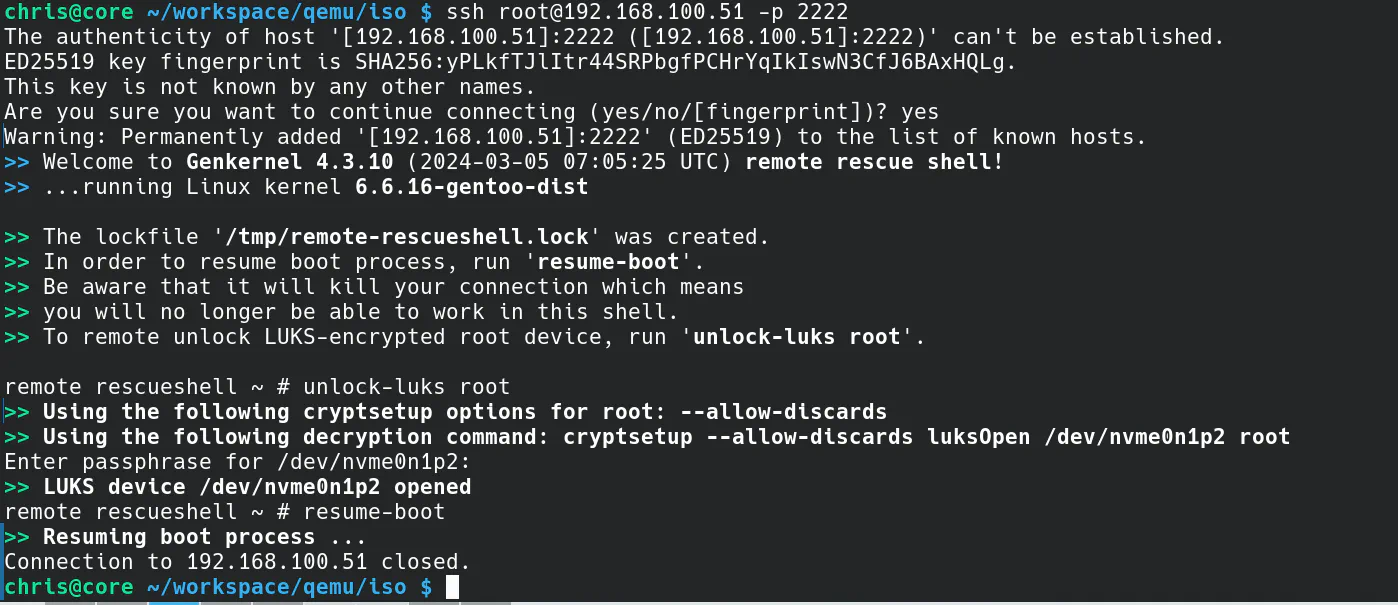
That’s the whole configuration. After a reboot, the initramfs gets an IP address automatically and waits for LUKS to be unlocked. You can enter the passphrase locally or SSH to port 2222 to unlock it remotely:
ssh root@<vps-ip> -p2222
unlock-luks
resume-boot
What You Can Do Next
This post doesn’t cover the Secure Boot signing process end to end. systemd-boot itself can be signed; the annoying part is that the kernel and initramfs have to be re-signed after every update, so that deserves a separate post later.
Comments