Most of my VPSs have been running Debian or similar, and I never got comfortable with them. Since I use Gentoo every day anyway, I just reinstalled these VPSs with Gentoo too, and encrypted the root partition while I was at it, so even if the cloud provider gets hold of the disk it can’t read anything (just kidding).
This is similar to the earlier Gentoo on OpenZFS post, except the VPS has little memory, so many steps are simplified. For the fine details, see the official Handbook.
Environment Setup
The VPS is from BuyVM, which supports custom ISOs and gives you VNC access, so it’s fairly convenient.
I did run into a problem uploading a custom ISO to BuyVM, though: the Gentoo ISO wouldn’t boot, while Arch Linux worked fine.
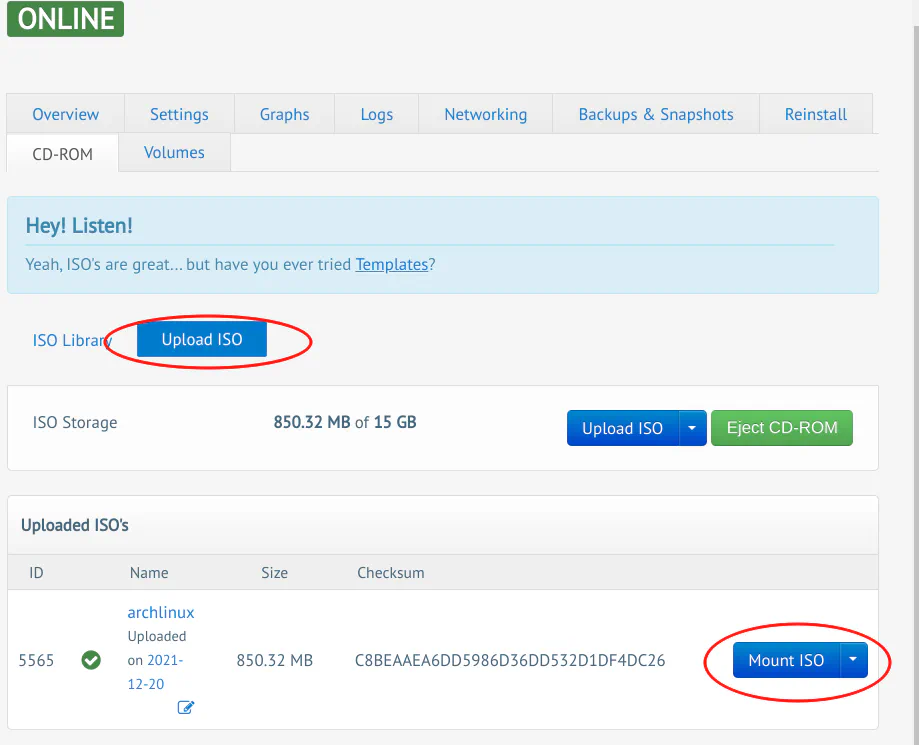
After mounting it and rebooting, you land in the Arch Linux live environment:
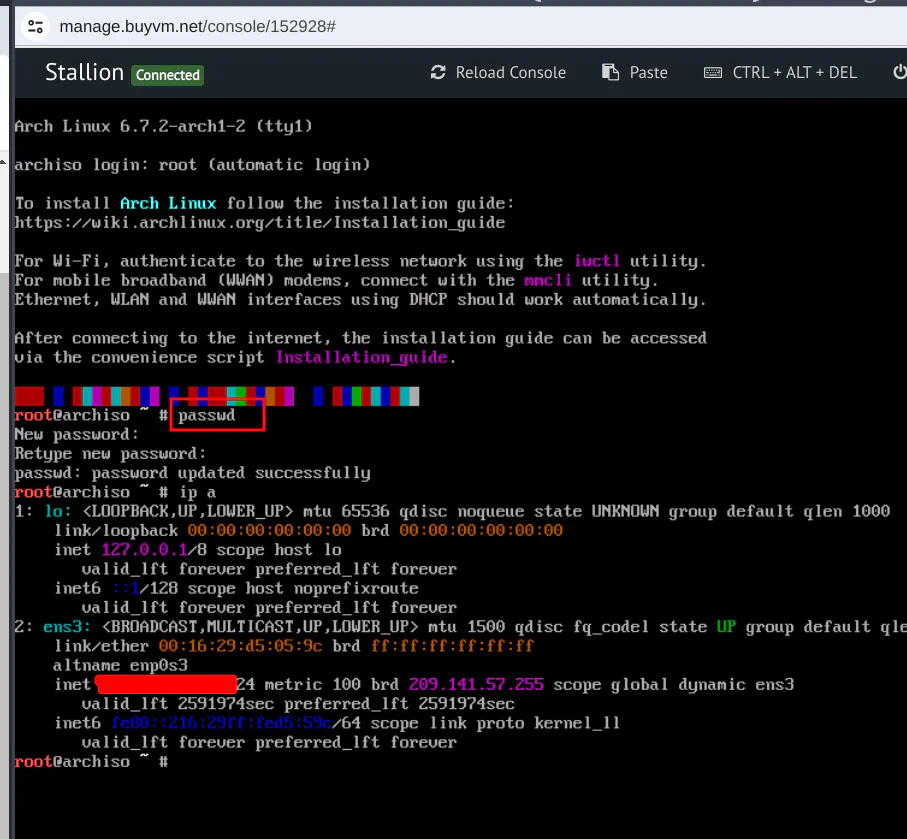
First set a root password in the live environment:
passwd
Then connect over SSH:
ssh root@<vps-ip>
Replace this with your VPS IP.
Installing Gentoo
Partitioning
I bought the cheapest BuyVM plan, which has only a 20G disk. Two partitions: a 200M /boot and the rest for the LUKS-encrypted /.
Partition with fdisk /dev/vda (MBR is fine):
| Partition | Size | Purpose |
|---|---|---|
| /dev/vda1 | 200M | /boot, ext4, marked bootable |
| /dev/vda2 | Remaining space | LUKS container holding the ext4 root filesystem |
Create the filesystem on /boot:
mkfs.ext4 /dev/vda1
Initialize LUKS:
cryptsetup luksFormat /dev/vda2
After formatting, back up the LUKS header to another machine first. If the header is damaged, the data is basically unrecoverable:
cryptsetup luksHeaderBackup /dev/vda2 --header-backup-file luks-header.img
Open the LUKS container:
cryptsetup luksOpen /dev/vda2 system
Create the filesystem. -i 8192 packs inodes more densely, which suits lots of small files on a small disk:
mkfs.ext4 -i 8192 /dev/mapper/system
Create the mount point:
mkdir -pv /mnt/gentoo
Mount the partition:
mount /dev/mapper/system /mnt/gentoo
Create the boot mount point:
mkdir -pv /mnt/gentoo/boot
Mount the boot partition:
mount /dev/vda1 /mnt/gentoo/boot
Check the current mounts:
lsblk
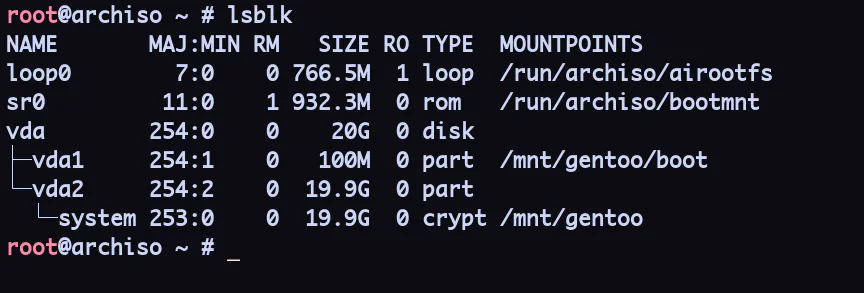
Download stage3. Don’t hardcode a dated snapshot; pull the current filename straight from latest-stage3.txt:
cd /mnt/gentoo
MIRROR=https://distfiles.gentoo.org/releases/amd64/autobuilds
FILE=$(curl -s "$MIRROR/latest-stage3.txt" | awk '/stage3-amd64-systemd-/ && /^[0-9]/ {print $1; exit}')
wget -c "$MIRROR/$FILE"
Extract it:
tar xpvf stage3-*.tar.xz --xattrs-include='*.*' --numeric-owner
Portage configuration is skipped here; see the official docs or my previous post.
Installing Software
This setup uses LUKS, not ZFS, so the contents of the filesystem set differ.
/etc/portage/sets/filesystem:
sys-fs/cryptsetup
/etc/portage/sets/kernel:
sys-kernel/gentoo-kernel-bin
sys-kernel/genkernel
/etc/portage/sets/bootloader:
sys-boot/grub
Kernel Installation
The kernel is the binary gentoo-kernel-bin. Its initramfs USE flag generates an initramfs with dracut by default, and here we want genkernel instead, so turn it off:
mkdir -p /etc/portage/package.use
echo 'sys-kernel/gentoo-kernel-bin -initramfs' > /etc/portage/package.use/gentoo-kernel-bin
Install the kernel:
emerge -av @kernel
Generate the initramfs. --luks pulls in cryptsetup, --ssh bundles dropbear, and dropbear reads /etc/dropbear/authorized_keys by default:
mkdir -pv /etc/dropbear/
vi /etc/dropbear/authorized_keys
genkernel --luks --ssh initramfs
This VPS has only 1G of RAM, which isn’t enough to generate the initramfs, so use a swapfile temporarily:
dd if=/dev/zero of=/swapfile bs=1M count=2048 status=progress
chmod 0600 /swapfile
mkswap -U clear /swapfile
swapon /swapfile
Run genkernel again and it builds.
This swapfile is only a stopgap and won’t be enabled automatically after a reboot. For long-term use, add /swapfile none swap sw 0 0 to fstab.
Bootloader Configuration
First use blkid to look up the UUIDs of the LUKS partition and the /boot partition:
blkid
Edit /etc/default/grub and change GRUB_CMDLINE_LINUX:
GRUB_CMDLINE_LINUX="crypt_root=UUID=<luks-uuid> root=/dev/mapper/root ip=dhcp dosshd gk.sshd.port=2222 init=/lib/systemd/systemd net.ifnames=0"
crypt_root=UUID=...: the UUID of the LUKS partition, not of the mapper device after unlocking. genkernel maps it to/dev/mapper/rootwhen unlockingroot=/dev/mapper/root: the root filesystem after unlockingip=dhcp: get an address over DHCP during the initramfs stagedosshd: start dropbear inside the initramfsgk.sshd.port=2222: the port dropbear listens oninit=/lib/systemd/systemd: the init used after switching to the real systemnet.ifnames=0: use traditional interface names likeeth0andeth1
Install GRUB (BIOS):
grub-install /dev/vda
Generate the config:
grub-mkconfig -o /boot/grub/grub.cfg
Add both root and /boot to /etc/fstab, replacing the UUIDs with the values from blkid:
UUID=<root-uuid>  /      ext4  rw,relatime      0 1
UUID=<boot-uuid>  /boot  ext4  defaults,noatime 0 2
If
/bootisn’t in fstab, it won’t be mounted automatically after boot, which causes problems when upgrading the kernel.
Cleanup
Remove the distfiles
VPS space is limited, so you can delete the distfiles to save some room:
rm -rf /var/cache/distfiles/*
Remove the stage3 files
rm -f /stage3*
Exit the chroot:
exit
Unmount the mount points and close LUKS:
umount -R /mnt/gentoo
cryptsetup luksClose system
Reboot:
reboot
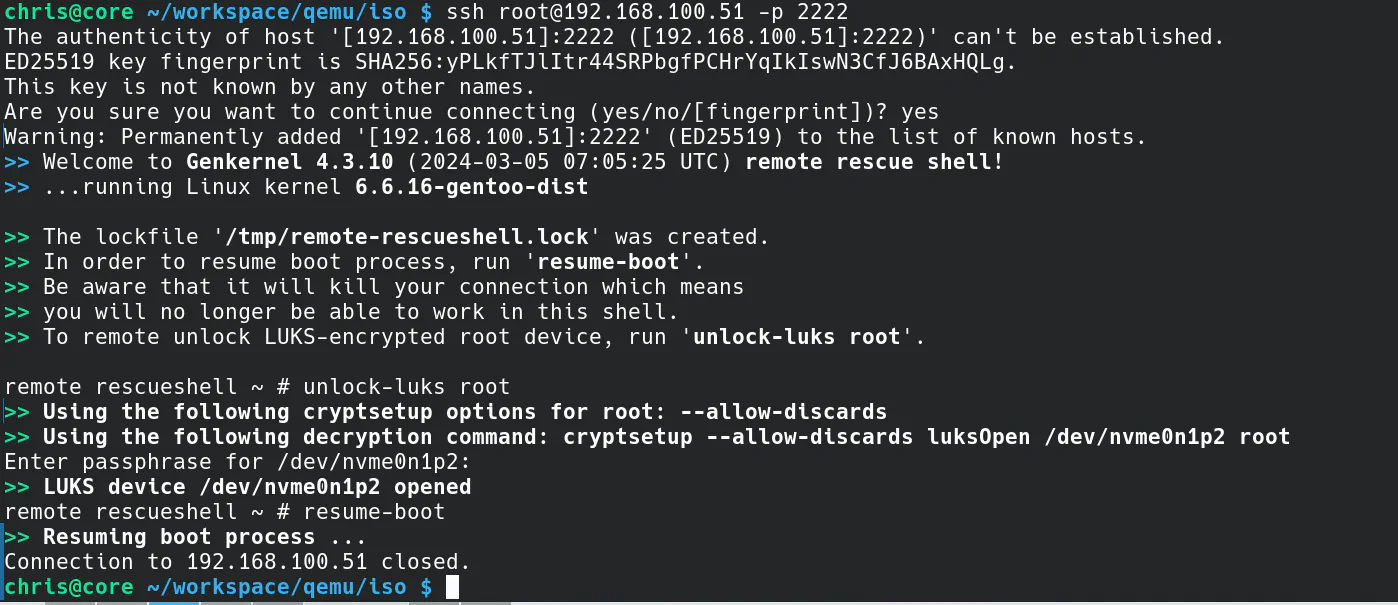
After rebooting, connect to dropbear in the initramfs first:
ssh root@<vps-ip> -p2222
Unlock LUKS:
unlock-luks
Enter the passphrase you set when formatting, then continue booting:
resume-boot
The SSH connection drops, which is expected. Once the system is up, log in as usual:
ssh root@<vps-ip>
What You Can Do Next
- Allow only key-based SSH logins, with fail2ban or nftables
- Back up the LUKS header and important data to another machine regularly
- Add swap or upgrade the plan when memory runs short; don’t try to power through compilation on a 1G machine
Comments