Introduction
When I first wrote about deploying OpenClaw, it was on an Ubuntu Desktop VM: install Node.js, Docker and LM Studio by hand, then set up the Gateway as a systemd service. It worked, but after a while I couldn’t say what had changed on that machine, and upgrades meant retracing the commands from memory.
Today the setup is completely different: Nix manages OpenClaw. The gateway runs on a Mac (keiki), the NixOS workstation taiki serves as the exec node, secrets go through sops, and Telegram handles approvals.
This post documents the current structure, not the old Ubuntu + LM Studio setup. I’ll say which parts I actually observed on the machine and which are just config evaluation or description.
Why Not Keep Installing by Hand
A hand-rolled OpenClaw deployment has a few problems you can’t avoid:
- Upgrades go through
npm install -g, versions drift, and rolling back is painful; - The Gateway and node must speak the same protocol version, and a manual install easily ends up new on one side and old on the other;
- Secrets are scattered across
.env, environment variables and shell history; - systemd/launchd services, config files and plugin versions aren’t under version control;
- Moving to a new machine means hitting the same pitfalls all over again.
Nix folds these problems into a flake: the OpenClaw version is pinned by the nix-openclaw input, runtime plugins are built with the package, the Gateway and node use the same package, sops-nix decrypts secrets at activation, and the service runs under home-manager launchd or NixOS systemd. Changing config means changing Nix files, and build, switch and rollback each have a clear entry point.
The costs are real too: you maintain nix-darwin and home-manager on the Mac; Nix evaluation and builds are slower than npm install; the gateway runs on the Mac, so when the lid closes the bot is offline; and the gateway runs as your user, which means it inherently has your gh, kubectl, gcloud, SSH and GPG permissions.
Current Architecture
There are two layers: the Mac gateway handles inference, Telegram, code edits and credentials; the NixOS node only runs the commands the gateway forwards.
graph TB
    subgraph Mac["Mac keiki"]
        GW["OpenClaw Gateway<br/>launchd :18789"]
        TG["Telegram Bot"]
        MODEL["Magpie / DeepSeek<br/>Grok / Codex fallback"]
        PROJ["Project workspaces<br/>existing working copy"]
        NODE_MAC["OpenClaw node<br/>keiki (screen/computer use)"]
    end

    subgraph Linux["NixOS taiki"]
        NODE_LINUX["openclaw node<br/>systemd<br/>exec only"]
    end

    TG -->|Bot API| GW
    GW --> MODEL
    GW --> PROJ
    GW <-->|WebSocket| NODE_MAC
    GW <-->|WebSocket| NODE_LINUX
| Machine | Role | Notes |
|---|---|---|
| keiki (Mac) | Gateway | Has the code, the GPG signing key, gh/kubectl/gcloud credentials and browser sessions; the agent’s working directory is the existing repo |
| taiki (NixOS) | Exec node | Only forwards exec (system.run / system.which); runs Linux builds, headless browsers and long tasks |
The gateway binds to the LAN rather than the loopback address because taiki has to connect to it. When bound to a non-loopback address, OpenClaw requires authentication; the token is read from a file decrypted by sops and never written into the Nix store.
Repository Layout
The current config splits flakes under nix/ by purpose; the OpenClaw-related pieces are:
nix/workstations/
├── flake.nix                       # Workstation and Mac flake inputs
├── darwin/agent-gateway.nix        # home-manager module for the Mac gateway
├── darwin/agent-node.nix           # launchd module for the Mac as a node
├── nixos/agent-node.nix            # systemd module for NixOS as a node
└── hosts/
    ├── keiki/default.nix           # Enables the gateway, declares projects/owners
    └── taiki/agent-node.nix        # taiki's node config
In the workstation flake, OpenClaw and sops are separate inputs:
{
  inputs = {
    nix-openclaw.url = "github:openclaw/nix-openclaw";

    sops-nix.url = "github:Mic92/sops-nix";
    preservation.url = "github:nix-community/preservation";

    home-manager = {
      url = "github:nix-community/home-manager/release-26.05";
      inputs.nixpkgs.follows = "nixpkgs";
    };

    nix-darwin = {
      url = "github:nix-darwin/nix-darwin/nix-darwin-26.05";
      inputs.nixpkgs.follows = "nixpkgs";
    };
  };
}
nix-openclaw’s nixpkgs doesn’t follow this repository, so the OpenClaw version can be upgraded separately from the rest of the system. The official package was 2026.9.4 when this was written; keiki and taiki actually run the 2026.9.5 package from the NUR, because 2026.9.5 already fixes the node protocol compatibility issue. Either way, the gateway and node must be the same version, or the node can’t connect.
The Mac Gateway
The gateway lives on keiki, an M3 Max MacBook Pro. Choosing the Mac over the always-on taiki comes down to simple reasons:
- Git commits need GPG signatures, and the only signing key is on the Mac;
- The gh, kubectl and gcloud credentials and browser sessions are all on the Mac;
- OpenClaw’s
read/write/edit/apply_patchonly see the gateway’s local filesystem, and the node only forwardsexec. Wherever the code is, that’s the only machine where the agent can edit files.
So the gateway moved to the machine with the code, credentials and signing key, and taiki became a pure exec node.
Host Configuration
Enable the gateway in nix/workstations/hosts/keiki/default.nix:
workstation.agentGateway = {
  enable = true;
  backend = "magpie";
  deepseekAccount = "us";

  # Replace with your numeric Telegram user ID; leaving it empty rejects everyone
  owners = [ 123456789 ];
  bind = "lan";
  # Chat ID of the forum group (a supergroup with Topics enabled)
  telegramGroup = "-1000000000000";

  projects = {
    homelab = {
      path = "/Users/chris/git/homelab/homelab-infra-as-code";
      topic = 10;
    };
    project-b = {
      path = "/Users/chris/git/project-b";
      topic = 12;
      model = "deepseek/deepseek-v4-flash";
    };
  };
};
What the fields actually mean:
owners: numeric Telegram user IDs, which decide who can message the bot, use owner commands and approve exec; leaving it empty rejects everyone;bind = "lan": listens on0.0.0.0:18789, because taiki needs to connect;telegramGroup: the forum group’s chat ID, used with each project’stopicfor routing;path: points straight at an existing working copy, so deployment doesn’t need to clone anything;model: per-project model override; omit it to follow the global default.
With multiple projects, the module generates a specific binding for each topic, then one channel-level fallback to main at the end. The fallback must come last; otherwise it routes every topic to main, the exact opposite of one agent per topic in the group.
What the home-manager Module Does
darwin/agent-gateway.nix doesn’t just write an openclaw.json; it wires several things together:
programs.openclaw = {
  enable = true;
  package = cfg.package;
  installApp = false;
  stateDir = "${homeDir}/.openclaw";

  runtimePlugins = lib.optional (!useMagpie) "deepseek";
  runtimePackages = [
    ow
    pkgs.git
    pkgs.gh
  ] ++ lib.optional (cfg.opencodePackage != null) cfg.opencodePackage;

  environment = secretEnv;
  config = settings;

  launchd.label = "org.nixos.openclaw-gateway";
};
A few details:
installApp = false: don’t install OpenClaw.app, which avoids pulling in a package flagged insecure in nixpkgs;runtimePlugins:deepseekis an external provider plugin, and the home-manager module injects its load path;acpxandworkboardare built-in plugins, enabled throughplugins.entriesin the config;runtimePackages: the gateway process needsgit,gh,opencodeandowon its PATH, or the agent’s PR workflow won’t run;environment: the secrets decrypted by sops are passed to the wrapper as file paths; the wrapper reads the contents at runtime and exports them, so no plaintext ever lands in the Nix store.
launchd runs the service under the label org.nixos.openclaw-gateway. The gateway log is at /tmp/openclaw/openclaw-gateway.log.
Actual Runtime State
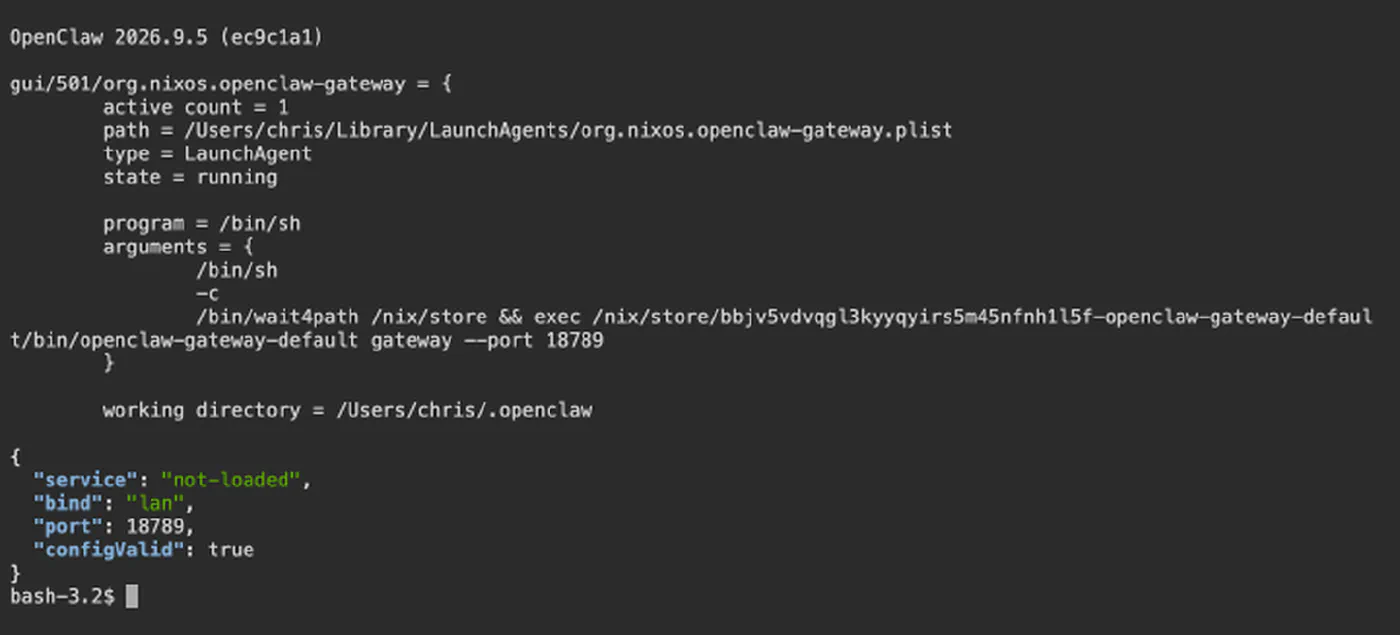
At the time of writing the machine runs OpenClaw 2026.9.5:
$ openclaw --version
OpenClaw 2026.9.5 (ec9c1a1)

$ launchctl print gui/$(id -u)/org.nixos.openclaw-gateway
state = running
...
gateway --port 18789
But openclaw gateway status --json reports something different:
{
  "service": "not-loaded",
  "bind": "lan",
  "port": 18789,
  "configValid": true
}
The gateway isn’t down; OpenClaw’s built-in service management just doesn’t recognize the launchd label home-manager generates and looks for the service name it installs itself. Use launchctl print for the real state; gateway status is still useful for checking the bind address, port and config validity.
sops and Secrets
The gateway’s secrets live in a sops file, decrypted by sops-nix at activation into ~/.config/sops-nix/secrets/:
| Key | Purpose |
|---|---|
deepseek-api-key |
Default DeepSeek account |
deepseek-cn-api-key |
China-region DeepSeek account (optional) |
gemini-api-key |
Gemini / Google AI Studio |
telegram-bot-token |
Telegram bot |
openclaw-gateway-token |
Shared gateway connection token; taiki uses the same one |
github-token |
Keeps gh/git off the macOS keychain |
The secrets file is decrypted with an age key; the private key is at ~/.config/sops/age/keys.txt and never enters the Nix store. To edit secrets:
cd nix/workstations
nix develop -c sops hosts/taiki/secrets.sops.yaml
The Mac gateway and the taiki node share this file, so the age recipients in .sops.yaml must include both keiki and taiki.
The NixOS Exec Node
taiki holds no OpenClaw sessions or model keys. It only runs openclaw node run and executes the exec requests forwarded by the gateway. Linux builds, headless browsers and long-running tasks live on taiki; the Mac handles code edits and credential operations, which suit it better.
The systemd Service
nix/workstations/nixos/agent-node.nix generates a systemd service:
systemd.services.openclaw-node = {
  description = "openclaw node host";
  wantedBy = [ "multi-user.target" ];
  after = [ "network-online.target" ];
  wants = [ "network-online.target" ];

  serviceConfig = {
    User = "openclaw";
    Group = "openclaw";
    Restart = "always";
    RestartSec = 5;
  };

  script = ''
    export OPENCLAW_GATEWAY_TOKEN=$(cat ${config.sops.secrets."openclaw-gateway-token".path})
    exec ${lib.getExe cfg.package} node run \
      --host ${cfg.gatewayHost} \
      --port ${toString cfg.gatewayPort} \
      --display-name ${lib.escapeShellArg cfg.displayName}
  '';
};
/var/lib/openclaw is preserved via preservation, so pairing records and node state survive restarts. The token is the same one the gateway uses, read from sops and never written into the systemd unit.
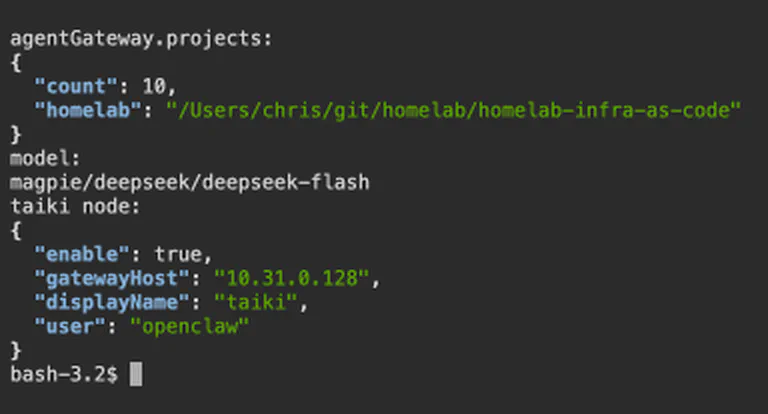
taiki’s host config:
workstation.agentNode = {
  enable = true;
  gatewayHost = "10.31.0.128";
  displayName = "taiki";
};
A Real Problem: the Gateway Address Changes
At the time of writing, the Mac’s LAN address is 10.31.0.192, while taiki’s gatewayHost is still 10.31.0.128. With this config, the node connects to an address the Mac no longer owns, so failing to connect is a certainty.
Hardcoded addresses like this are fragile in a Homelab. More robust options:
- Reserve an address for the Mac in DHCP;
- Or bind the gateway to a Tailscale/Headscale name and have the node connect over the tailnet;
- At minimum, keep
gatewayHostaligned with the Mac’s current address and check it before deploying.
# Check the current address on the Mac
ifconfig | grep 'inet 10.31.'

# Check the service state on taiki
systemctl status openclaw-node --no-pager
journalctl -u openclaw-node -n 50 --no-pager
The Mac Is a Node Too
keiki also runs a node pointing at 127.0.0.1, for screen capture and computer use later. Screen-related capabilities can only come from a node, and those tasks run locally, so having the Mac register as a node is the obvious fit:
workstation.agentNode = {
  enable = true;
  gatewayHost = "127.0.0.1";
  displayName = "keiki";
  tokenFile = "/Users/chris/.config/sops-nix/secrets/openclaw-gateway-token";
};
This is a separate config from taiki’s node: launchd on the Mac, systemd on taiki; both must use the same package version as the gateway.
Deployment and Upgrades
First Deployment
Switch the Mac gateway locally:
cd nix/workstations
sudo darwin-rebuild switch --flake .#keiki
taiki uses deploy-rs:
cd nix/workstations
nix develop -c deploy .#taiki
The gateway and node must be on the same version. To upgrade OpenClaw:
cd nix/workstations
nix flake update nix-openclaw

# Check first, then switch
nix build --dry-run --no-write-lock-file .#darwinConfigurations.keiki.system
sudo darwin-rebuild switch --flake .#keiki
nix develop -c deploy .#taiki
If the gateway moves to a new version and taiki doesn’t, the node can’t connect because the protocol doesn’t match. The reverse is equally true. Read the nix-openclaw release notes before upgrading, especially changes to the node protocol and config schema.
Rollback
cd nix/workstations
git checkout HEAD~1 -- flake.lock
sudo darwin-rebuild switch --flake .#keiki
nix develop -c deploy .#taiki
After a rollback, make sure both sides are on the same version again. Config and secrets live in git/sops, so rolling back doesn’t require restoring openclaw.json by hand.
Security Model
The core risk here isn’t OpenClaw itself, it’s that the gateway runs as your user. It inherently has your gh, kubectl, gcloud, SSH, GPG and browser sessions; if the model is taken over by prompt injection or a malicious Skill, the attacker gets those real permissions.
Approval Chain
The current config splits exec into three tiers:
tools.exec.mode = "auto": anything on the allowlist runs directly;- Anything else goes through OpenClaw’s built-in auto reviewer, which always uses
magpie/deepseek/deepseek-flash; - If the reviewer doesn’t approve either, a Telegram card goes to a human with allow-once / allow-always / deny buttons; no response within 30 minutes counts as a denial.
opencode’s ACP lane works differently: ACP has no TTY, only three settings, approve-all / approve-reads / deny-all, so the module renders a separate opencode config for ACP and marks sensitive commands as deny. opencode only edits code and runs tests in the working copy; touching external resources goes back through OpenClaw’s own exec, which is the path with Telegram approval.
The Actual Security Audit
I ran openclaw security audit --json against the local machine and got 3 critical, 7 warn and 1 info:
critical:
- gateway.bind_no_auth
- gateway.control_ui.allowed_origins_required
- gateway.http.no_auth

warn:
- config.insecure_or_dangerous_flags
- gateway.auth_no_rate_limit
- models.weak_tier
- security.trust_model.multi_user_heuristic
- security.trust_model.cross_agent_session_access_default
- fs.config.symlink
- plugins.installs_unpinned_npm_specs
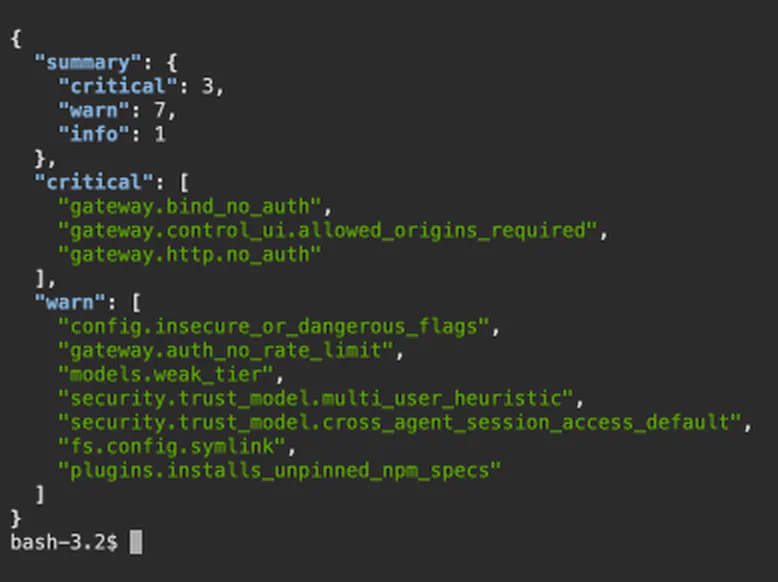
Each finding needs its own reading:
gateway.bind_no_authandgateway.http.no_auth: the audit ran in a shell withoutOPENCLAW_GATEWAY_TOKENexported, andgateway.auth.tokenin the config is a secret ref the audit can’t resolve. The running gateway gets its token from the home-manager wrapper; the audit command itself didn’t, so these three can’t be taken as statements about the running system. For accurate results, pass the token to the audit command through an environment variable or--token, but don’t put it in your shell history.gateway.control_ui.allowed_origins_required: this one looks like a real problem. The gateway binds to the LAN and Control UI’sallowedOriginsisn’t set explicitly, so origin checks fall back to the Host header. Add trusted origins to the config, or turn off the Control UI if you don’t need it.config.insecure_or_dangerous_flags: the ACP sub-config usespermissionMode=approve-all. That’s what lets ACP run inside a controlled worktree, but it does loosen permissions; tighten it when you don’t need it.gateway.auth_no_rate_limit: no auth rate limit with a LAN binding; setgateway.auth.rateLimit.security.trust_model.multi_user_heuristicandcross_agent_session_access_default: multiple agents share the Gateway and by default can see each other’s sessions and message each other. My group currently only has owners, but this is real exposure in the config; if you don’t need cross-agent collaboration, narrowtools.sessions.visibilitytoagentand restricttools.agentToAgent.allow.fs.config.symlink: the config home-manager generates is a symlink, and the audit reminds you to make sure the target is trustworthy. Nix store paths are read-only, so this one is acceptable, but make sure no other process rewrites the symlink.plugins.installs_unpinned_npm_specs: check whether any plugin installs npm packages outside Nix; if so, switch it to anix-openclawruntime plugin.
Nix solves version drift, but that doesn’t make the security config automatically correct. Audit results belong in the deployment checklist, not a one-off run you forget.
Skills and Plugins
The skills in the current config are inline skills in the Nix module, and runtime plugins are packaged by nix-openclaw, pinned together with the OpenClaw version. Don’t run openclaw plugins install by hand on the gateway; Nix won’t manage it, and security audit will report unpinned npm specs.
If you really need to install a Skill from ClawHub, do at least these four steps first:
- Download it to a temporary directory; don’t enable it yet;
- Read
SKILL.mdand check the bins, environment variables and shell command templates it asks for; - Confirm it doesn’t modify the agent’s system prompt or bypass approvals;
- Pin the version, fold it into Nix or at least record where it came from, then enable it.
# With multiple agents, skills must specify an agent; this subcommand needs the gateway token
openclaw skills list --agent main

# The plugin index and local security audit don't need the token
openclaw plugins list
openclaw security audit --json
When skills list reports gateway.auth.token is configured as a secret reference but is unavailable, it doesn’t mean there are no skills; the current shell can’t get the token. Set OPENCLAW_GATEWAY_TOKEN from the sops-decrypted file first.
Certificates, Keys and Incident Response
The gateway authenticates with a token and doesn’t depend on a public certificate; if you later put HTTPS in front of the Control UI, handle TLS separately.
If secrets leak or the agent is compromised, work through this order:
- Stop the services:
launchctl bootout gui/$(id -u)/org.nixos.openclaw-gateway, and stopopenclaw-nodeon taiki too if needed. - Revoke and rotate: revoke the Telegram bot token in BotFather; regenerate
openclaw-gateway-token; rotate the DeepSeek, Gemini and GitHub tokens; re-encrypt withsopsand deploy. - Isolate nodes: remove the taiki/keiki node pairings from the gateway, check
openclaw nodes pendingandopenclaw nodes status, and confirm there are no unknown nodes. - Audit: review
~/.openclaw/openclaw-gateway.log, session history,approvalsrecords and Telegram approval records to see whether any sensitive commands ran. - Clean up credentials: if you suspect the Mac user session was controlled, rotate gh, kubectl, gcloud, SSH, GPG and browser sessions through their own processes; rotating only the OpenClaw token isn’t enough.
- Fix the config: add the allowlist, session visibility, model fallback and approval policy this exposed to the Nix module, then audit again.
Operations
Status and Logs
# Mac gateway: launchd is the source of truth
launchctl print gui/$(id -u)/org.nixos.openclaw-gateway

# Config, port and bind (the service field may falsely report not-loaded)
openclaw gateway status --json

# Runtime health check
openclaw gateway health

# Node list (needs the gateway token)
openclaw nodes status

# Gateway log
tail -f /tmp/openclaw/openclaw-gateway.log

# taiki node log
ssh taiki 'journalctl -u openclaw-node -f'
When openclaw nodes status reports gateway.auth.token is configured as a secret reference but is unavailable, the node isn’t broken; the current shell just doesn’t have the token. Set OPENCLAW_GATEWAY_TOKEN from the sops-decrypted file, or run it somewhere on the gateway command path that supports secret refs.
Backups
Only three things need backing up:
- Nix config and
flake.lock: in git; - sops-encrypted files: in a private repository, with the decryption key at
~/.config/sops/age/keys.txton each machine; - Runtime data:
~/.openclaw/on the Mac (sessions, workspace, credentials, approvals) and/var/lib/openclaw/on taiki.
Runtime data contains credentials and session history, so encrypt backups and don’t drop them into a public repository. OpenClaw ships an openclaw backup subcommand; check the archive options for your version with openclaw backup --help, then decide whether to put it on a schedule.
Cost and Models
The default model is magpie/deepseek/deepseek-flash, with fallback to magpie/grok/grok-4.7 and magpie/codex/gpt-6-astra. Magpie is a local subscription router that puts the DeepSeek, Grok and Codex quotas behind one endpoint; the gateway doesn’t hold the upstream keys directly.
To drop Magpie, set backend to "deepseek" and the gateway uses the DeepSeek provider. The current config doesn’t make LM Studio or Ollama a default provider; local models can still be attached through an OpenAI-compatible API, but they aren’t on the default path. Stronger models lower the risk of prompt injection and tool misuse but cost more; that’s a direct security-versus-cost tradeoff, not just a matter of saving money.
Network Addresses
gatewayHost is the most fragile part of this setup. Switch Wi-Fi networks, change subnets, get a new DHCP lease, and the address changes. A DHCP reservation for the Mac, or binding the gateway to a Tailscale/Headscale name, saves a lot of “why is the node gone” debugging.
Test Notes
Environment
| Item | Value |
|---|---|
| Gateway host | Mac keiki, M3 Max, macOS 27.2 |
| OpenClaw | 2026.9.5 (ec9c1a1) |
| Nix | 2.34.9 |
| Gateway service | launchd org.nixos.openclaw-gateway, port 18789 |
| node | taiki configured with gatewayHost=10.31.0.128, user=openclaw |
Verified
openclaw --versionreturns 2026.9.5;launchctl printshows the gatewaystate = running, listening on 18789;nix evalresolves the gateway’s 10 projects and the default modelmagpie/deepseek/deepseek-flash;nix evalresolves the taiki node’senable/gatewayHost/displayName/user;security audit --jsonoutputs the full 3 critical / 7 warn / 1 info result.
Not Verified
- taiki was offline, so there was no live node connection test;
- no end-to-end Telegram message test using the sops token, to keep credentials out of shell history;
darwin-rebuild switchand deploy were not run; they change production workstations, so they’re left for a human.
Anything in this post not marked as tested is a config example; don’t treat it as a conclusion already validated in production.
Troubleshooting
gateway status Says not-loaded
Check launchctl first:
launchctl print gui/$(id -u)/org.nixos.openclaw-gateway | grep -E 'state|arguments|port'
If state = running, the gateway is alive. The service field in gateway status comes from OpenClaw’s own service discovery, which doesn’t recognize home-manager’s custom label. Use gateway status for bind, port and config, and launchctl for the service.
taiki node Won’t Connect
Check these in order:
# Mac's current address
ifconfig | grep 'inet 10.31.'

# gatewayHost in taiki's config
nix eval --raw .#nixosConfigurations.taiki.config.workstation.agentNode.gatewayHost

# node logs on taiki
ssh taiki 'journalctl -u openclaw-node -n 100 --no-pager'
The most common causes are a changed address, the Mac firewall blocking 18789, or mismatched gateway and node versions.
The Audit Reports auth as none
security audit assumes there’s no auth when it can’t resolve a secret ref. Run it with the token, or point OPENCLAW_GATEWAY_TOKEN at the sops-decrypted file:
export OPENCLAW_GATEWAY_TOKEN="$(cat ~/.config/sops-nix/secrets/openclaw-gateway-token)"
openclaw security audit --json
unset OPENCLAW_GATEWAY_TOKEN
Don’t put the token directly in a command-line argument; it ends up in shell history and the process list.
Nix Config Changed but the Gateway Doesn’t Pick It Up
home-manager swaps the config symlink, but launchd doesn’t necessarily restart. The module watches openclaw.json with WatchPaths and compares the symlink target during activation, calling launchctl kickstart -k when it changes. If it’s still on the old config, restart by hand:
launchctl kickstart -k gui/$(id -u)/org.nixos.openclaw-gateway
sops Activation Fails
sops-nix’s launchd activation bootstraps right after bootout and occasionally hits Bootstrap failed: 5: Input/output error. The module already retries. If it still fails, check:
ls -l ~/.config/sops/age/keys.txt
ls -l ~/.config/sops-nix/secrets/
launchctl print gui/$(id -u)/org.nix-community.home.sops-nix
Version Mismatch
openclaw --version
ssh taiki 'openclaw --version'
Both sides must match. When upgrading, run nix flake update nix-openclaw first, then switch the Mac and taiki together; never upgrade only one side.
Conclusion
Compared with the old manual deployment, the biggest change in this Nix-managed OpenClaw setup isn’t that using Nix is cool; it’s that versions, secrets, services and config all ended up in reviewable files:
- The Mac gateway handles models, Telegram, code and credentials;
- taiki is only a Linux exec node, reducing credential exposure;
- sops manages secrets, launchd/systemd manage services, and
security auditfinds config risks.
It has clear costs too: the gateway is on the Mac, so closing the lid takes it offline; it runs as the user with broad permissions; hardcoded addresses break when the network changes; and several audit findings still need work. Writing these realities down plainly is more useful than piling on another layer of zero-trust slogans.
References
Comments