k0s to Kubernetes: Velero Migration Guide
Recently my Ceph cluster hit 70% utilization. After checking, most of it was due to improper usage causing resource multiplication. To clean it up properly, I needed to do a migration.
This article records how I migrated from a k0s cluster to a k8s cluster. This migration guide also works for other k8s distros.
Requirements
The original k0s cluster was a single node deployment for lightweight purposes. But in actual use, I found CPU utilization was very low and CPU overcommitment would be complicated - resource waste was pretty serious.
To improve utilization, I used Clonezilla to migrate to a PVE VM. After migration, the freed-up node was reinstalled and joined the current PVE cluster.
But this brought a new problem - unlike rsync backups, Clonezilla requires the target disk to be larger than the original 480G disk; rsync doesn’t have this problem and can use the actual size.
Since the original k0s cluster used OpenEBS’s hostpath StorageClass, node expansion and future usage would be problematic. Rather than patching things up, better to migrate all services to a new k8s cluster.
Core requirements:
- Get more resources
- Services work normally after migration
- No data loss after migration
Velero Overview
Velero is an open-source tool for securely backing up and restoring, migrating k8s cluster resources and PVCs.
Architecture and Workflow
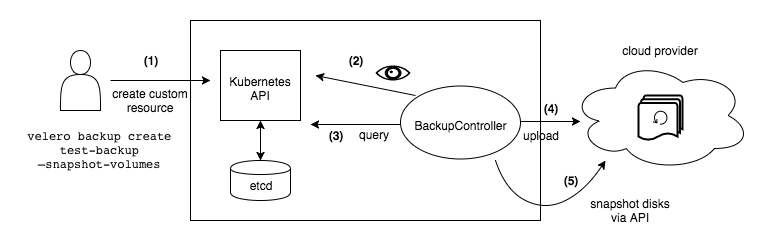
Velero is a typical client/server architecture. The server runs in the target k8s cluster, the client is the local CLI tool.
Velero’s architecture includes a server component running in the Kubernetes cluster and a command-line client (CLI). It uses Custom Resource Definitions (CRDs) like Backup, Restore, BackupStorageLocation, VolumeSnapshotLocation, Schedule, PodVolumeBackup, PodVolumeRestore and BackupRepository to manage operations. Controllers within the Velero server monitor these CRD objects and execute actual backup and restore logic. During this process, Velero interacts with the Kubernetes API server to discover resources and communicates with object storage backends to store backup data.
Environment
Current k0s node resources: 4c (vCPU) 8g (RAM) 500G (Disk), version: v1.32.2+k0s. New k8s cluster: 3 master + 5 worker combination.
Current k0s services:
| Service | Description | Notes |
|---|---|---|
| Authentik | Auth service | |
| cert-manager | Certificate management | |
| harbor | Image registry | |
| ingress-nginx | Ingress | |
| metallb | LB | |
| outline | Documentation | |
| mirrors | Homelab offline mirror | Uses local-path, need to rebuild on new node then copy original content to this PVC |
| pve | PVE cluster reverse proxy | |
| haproxy | Ceph rados load balancing | |
| pihole | Homelab DNS | Not included in migration, using CoreDNS instead |
| externaldns | Homelab internal DNS communication and resolution | Connect to CoreDNS after migration |
| cloudflared | Cloudflare tunnel | After services migrate |
All these services need complete migration to the new k8s cluster and must work normally after migration.
⚠️ Migration Notes MetalLB assigned IPs affect internal DNS calls causing business interruption and unavailability before recovery.
- Cluster name is different - need separate handling after PVC migration for cluster name changes
- Velero backups require an S3 bucket to store backups and retrieve files for recovery
- Cluster StorageClass is also different - pay special attention during migration
For S3 I’m using Ceph’s RGW. Deployment reference: https://blog.plz.ac/posts/cephadm-deploy/
Create buckets:
s3cmd mb s3://homelab-bootstrap-backup
s3cmd mb s3://k8s-backup
Migration Preparation
Migration flow:
flowchart TD
  A[Preparation Phase]
  A1[Verify target K8s cluster available]
  A2[Deploy and configure Velero
Using Ceph RGW as backup storage]
  A3[Prepare target cluster infrastructure
MetalLB, Ingress, Cert-Manager]
  A --> A1 --> A2 --> A3

  B[Backup Phase - k0s cluster]
  B1[Pause critical business writes
like Harbor, Outline]
  B2[Use Velero to backup namespaces
Execute velero backup create per service]
  B3[Confirm backup success
Use velero backup get/describe]
  B --> B1 --> B2 --> B3

  C[Migration Phase - K8s cluster]
  C1[Deploy Velero and configure RGW storage]
  C2[Restore base services in order
MetalLB -> Ingress -> Cert-Manager -> ExternalDNS]
  C3[Execute velero restore create to restore all services]
  C --> C1 --> C2 --> C3

  D[Post-Migration Configuration]
  D1[Check MetalLB IP allocation and DNS consistency]
  D2[Verify service status kubectl get pods/services]
  D3[Manually verify each service
like Outline / Harbor / Authentik]
  D --> D1 --> D2 --> D3

  E[Cleanup Phase]
  E1[Clean unused Velero backups]
  E2[Restore formal business traffic]
  E3[Update internal docs to record changes]
  E --> E1 --> E2 --> E3

  A --> B --> C --> D --> E
K8s Cluster Deployment
New k8s cluster:
| hostname | vcpu | memory | disk | ip | role |
|---|---|---|---|---|---|
| infra-master-1 | 4 | 4 | 40 | 10.31.0.110 | master |
| infra-master-2 | 4 | 4 | 40 | 10.31.0.111 | master |
| infra-master-3 | 4 | 4 | 40 | 10.31.0.112 | master |
| infra-worker-1 | 4 | 8 | 40 | 10.31.0.113 | worker |
| infra-worker-2 | 4 | 8 | 40 | 10.31.0.114 | worker |
| infra-worker-3 | 4 | 8 | 40 | 10.31.0.115 | worker |
| infra-worker-4 | 4 | 8 | 40 | 10.31.0.116 | worker |
| infra-worker-5 | 4 | 8 | 40 | 10.31.0.117 | worker |
Installation docs reference: Deploy Kubernetes Offline with Kubespray
Required plugins:
- ingress-nginx
- cert-manager
- metallb
This cluster also uses two additional IPs:
- 10.31.0.252 DNS
- 10.31.0.253 ingress LB entry
Velero Deployment
Install Velero CLI using Homebrew (use your preferred method):
brew install veleroCreate credentials file ceph-credentials-velero with AK and SK:
[default]
aws_access_key_id = xxx
aws_secret_access_key = xxxxx
Pull required images locally:
docker pull hub.infra.plz.ac/velero/velero:v1.16.1
docker tag hub.infra.plz.ac/velero/velero:v1.16.1 harbor.infra.plz.ac/velero/velero:v1.16.1
docker push  harbor.infra.plz.ac/velero/velero:v1.16.1
docker pull hub.infra.plz.ac/velero/velero-plugin-for-aws:v1.12.1
docker tag hub.infra.plz.ac/velero/velero-plugin-for-aws:v1.12.1 harbor.infra.plz.ac/velero/velero-plugin-for-aws:v1.12.1
docker push  harbor.infra.plz.ac/velero/velero-plugin-for-aws:v1.12.1
Install Velero to bootstrap cluster:
velero install \
  --provider aws \
  --image harbor.infra.plz.ac/velero/velero:v1.16.1 \
  --plugins harbor.infra.plz.ac/velero/velero-plugin-for-aws:v1.12.1 \
  --bucket homelab-bootstrap-backup \
  --secret-file ./ceph-credentials-velero \
  --use-volume-snapshots=false \
  --backup-location-config \
  checksumAlgorithm="",region=us-east-1,s3ForcePathStyle=true,s3Url=https://s3.infra.plz.ac \
  --use-node-agent
For MinIO, use this config:
velero install \
  --provider aws \
  --image harbor.infra.plz.ac/velero/velero:v1.16.1 \
  --plugins harbor.infra.plz.ac/velero/velero-plugin-for-aws:v1.12.1 \
  --bucket velero \
  --secret-file ./minio-credentials-velero \
  --use-volume-snapshots=false \
  --backup-location-config \
  region=us-east-1,s3ForcePathStyle=true,s3Url=http://10.31.0.5:9000 \
  --use-node-agent
Parameter explanation:
--providerUsing AWS, compatible with S3 interfaces like Ceph RGW, MinIO--imageUsing Cloudflare worker proxy registry due to GFW--pluginsAWS plugin also from proxy registry--bucketPreviously created bucket--secret-fileAuthentication credentials--use-volume-snapshots=falseDisable volume snapshots--backup-location-configBackup detailed configchecksumAlgorithm=""Disable checksum to avoidXAmzContentSHA256Mismatchthrough proxy/LB (not needed if s3Url directly connects to RGW)region=us-east-1RGW can use any regions3ForcePathStyle=trueForce path-style access (https://s3.infra.plz.ac/bucket), virtual host style (bucket.s3.infra.plz.ac) not supported in private deploymentss3Url=https://s3.infra.plz.acSelf-hosted S3 URL, using proxied URL--use-node-agentVelero node agent for CSI volume backup support
⚠️ This is a k0s distro issue - verify kubelet directory location for other distros
After deployment, node agent fails - need manual patch:
kubectl -n velero patch daemonset node-agent \
  --type='json' \
  -p='[
    {
      "op": "replace",
      "path": "/spec/template/spec/volumes/0/hostPath/path",
      "value": "/var/lib/k0s/kubelet/pods"
    },
    {
      "op": "replace",
      "path": "/spec/template/spec/containers/0/volumeMounts/0/mountPath",
      "value": "/host_pods"
    }
  ]'
Restart pods:
kubectl -n velero delete pod -l name=node-agent
kubectl get pods -n velero
Patched pods should be normal:
NAME                      READY   STATUS    RESTARTS   AGE
node-agent-kchfj          1/1     Running   0          51s
velero-7756dd8bc6-8phvc   1/1     Running   0          10m
Create a test backup:
velero backup create test-backup --include-namespaces defaultCheck status:
velero backup describe test-backup --detailsView backup logs:
velero backup logs test-backupExecution status:
kubectl logs -f deployment/velero -n veleroDelete backup:
velero backup delete test-backupConfirm deletion:
velero backup getTo also delete S3 contents, add --confirm:
velero backup delete test-backup --confirmMigration
StorageClass Configuration
Different storage requires a separate ConfigMap to let Velero know which StorageClass to use for PVCs.
⚠️ Apply this in the NEW cluster, not the original
vi change-sc-config.yamlContent:
apiVersion: v1
kind: ConfigMap
metadata:
  # ConfigMap name, customizable
  name: change-sc-config
  # Must be Velero's namespace, usually 'velero'
  namespace: velero
  # Key label tells Velero this ConfigMap is for plugin config
  labels:
    velero.io/plugin-config: ""
    # Specifies which built-in restore operation plugin to use
    velero.io/change-storage-class: RestoreItemAction
data:
  # Key is old StorageClass name
  openebs-hostpath: csi-rbd-sc # Value is new StorageClass name
  # Add more mappings if needed:
  # another-old-sc: another-new-sc
Apply:
kubectl apply -f change-sc-config.yamlMigrate Services
Due to article length, I’ll provide key commands for migrating each service:
Backup authentik:
velero backup create authentik-backup --default-volumes-to-fs-backup --include-namespaces authentikRestore authentik:
velero restore create authentik-restore --from-backup authentik-backup
kubectl get pvc -n authentik  # Check PVC bind status
kubectl get pod,svc,ing -n authentik  # Check service status
Backup harbor:
velero backup create harbor-backup --default-volumes-to-fs-backup --include-namespaces harborRestore harbor (needs PVC expansion):
velero restore create harbor-restore --from-backup harbor-backup
kubectl edit pvc harbor-registry -n harbor  # Expand to 100G
kubectl get pvc -n harbor
kubectl get pods,svc,ing -n harbor
Backup outline:
velero backup create outline-backup --default-volumes-to-fs-backup --include-namespaces outlineRestore outline:
velero restore create outline-restore --from-backup outline-backup
kubectl get pvc -n outline
kubectl get pods,svc,ing -n outline
After migration, fix permission issues for outline uploads.
Backup cloudflared:
velero backup create vpn-backup --default-volumes-to-fs-backup --include-namespaces vpnRestore cloudflared:
velero restore create vpn-restore --from-backup vpn-backup
kubectl get pvc -n vpn
kubectl get pods,svc,ing -n vpn
DNS Rebuild
After rebuild, DNS won’t work since pi-hole isn’t in recovery plan. Using a lighter DNS stack instead.
New DNS combination: CoreDNS + etcd + external-dns
Create namespace:
kubectl create ns dnsAdd Helm repos:
helm repo add coredns https://coredns.github.io/helm
helm repo add bitnami https://charts.bitnami.com/bitnami
helm repo update
MetalLB IP Pool
New cluster only enabled plugin without configuring available IP pool:
apiVersion: metallb.io/v1beta1
kind: IPAddressPool
metadata:
  name: default-pool
  namespace: metallb
spec:
  addresses:
  - 10.31.0.253/32
  - 10.31.0.252/32

---
apiVersion: metallb.io/v1beta1
kind: L2Advertisement
metadata:
  name: default-pool
  namespace: metallb
spec:
  ipAddressPools:
  - default-pool
⚠️ These IPs were used in k0s cluster - will conflict. Shutdown k0s node before applying.
Apply:
kubectl apply -f pool.yamlDeploy etcd, CoreDNS, external-dns
Deploy etcd:
helm install etcd bitnami/etcd -f values/etcd.values.yaml -n dnsDeploy CoreDNS:
helm install coredns coredns/coredns -f values/coredns.values.yaml -n dnsDeploy external-dns:
helm install external-dns bitnami/external-dns -f values/external-dns.values.yaml -n dnsVerify DNS
Run temp container to test resolution:
kubectl run -it --rm --restart=Never --image=harbor.infra.plz.ac/infoblox/dnstools:latest dnstoolsVerification
After verification, all services work normally without issues. Original cluster can be destroyed.
Redeploy Velero
Using different bucket:
velero install \
  --provider aws \
  --image harbor.infra.plz.ac/velero/velero:v1.16.1 \
  --plugins harbor.infra.plz.ac/velero/velero-plugin-for-aws:v1.12.1 \
  --bucket k8s-backup \
  --secret-file ./ceph-credentials-velero \
  --use-volume-snapshots=false \
  --backup-location-config \
  checksumAlgorithm="",region=us-east-1,s3ForcePathStyle=true,s3Url=https://s3.infra.plz.ac \
  --use-node-agent
Scheduled Backups
Create daily backup schedule at 7 AM:
velero schedule create infra-cluster --schedule "0 7 * * *"
Check schedule:
velero schedule get
Multi-Location Backups
Can set different backup paths to backup to different servers - one local, one cloud, one other storage for redundancy.
Backup to AWS S3
Create S3 bucket slchris-homelab-backup-hk, no anonymous access.
In IAM console, create separate IAM access policy with appropriate S3 permissions.
Create velero-aws-credentials file for AK/SK:
[aws-s3]
aws_access_key_id=<Your-AWS-Access-Key-ID>
aws_secret_access_key=<Your-AWS-Secret-Access-Key>
Combine configs:
cat ceph-credentials-velero velero-aws-credentials >> credentials-combined
Update config:
kubectl create secret generic cloud-credentials \
  --namespace velero \
  --from-file=cloud=./credentials-combined \
  --dry-run=client -o yaml | kubectl apply -f -
Restart service:
kubectl rollout restart deployment/velero -n velero
Create BSL:
velero backup-location create aws-s3-remote \
  --provider aws \
  --bucket slchris-homelab-backup-hk \
  --config region=ap-east-1,profile=aws-s3
Verify:
velero backup-location get
Create backup:
velero backup create test-backup-to-hk \
  --include-namespaces default \
  --storage-location aws-s3-remote \
  --wait
Check backup:
velero backup get
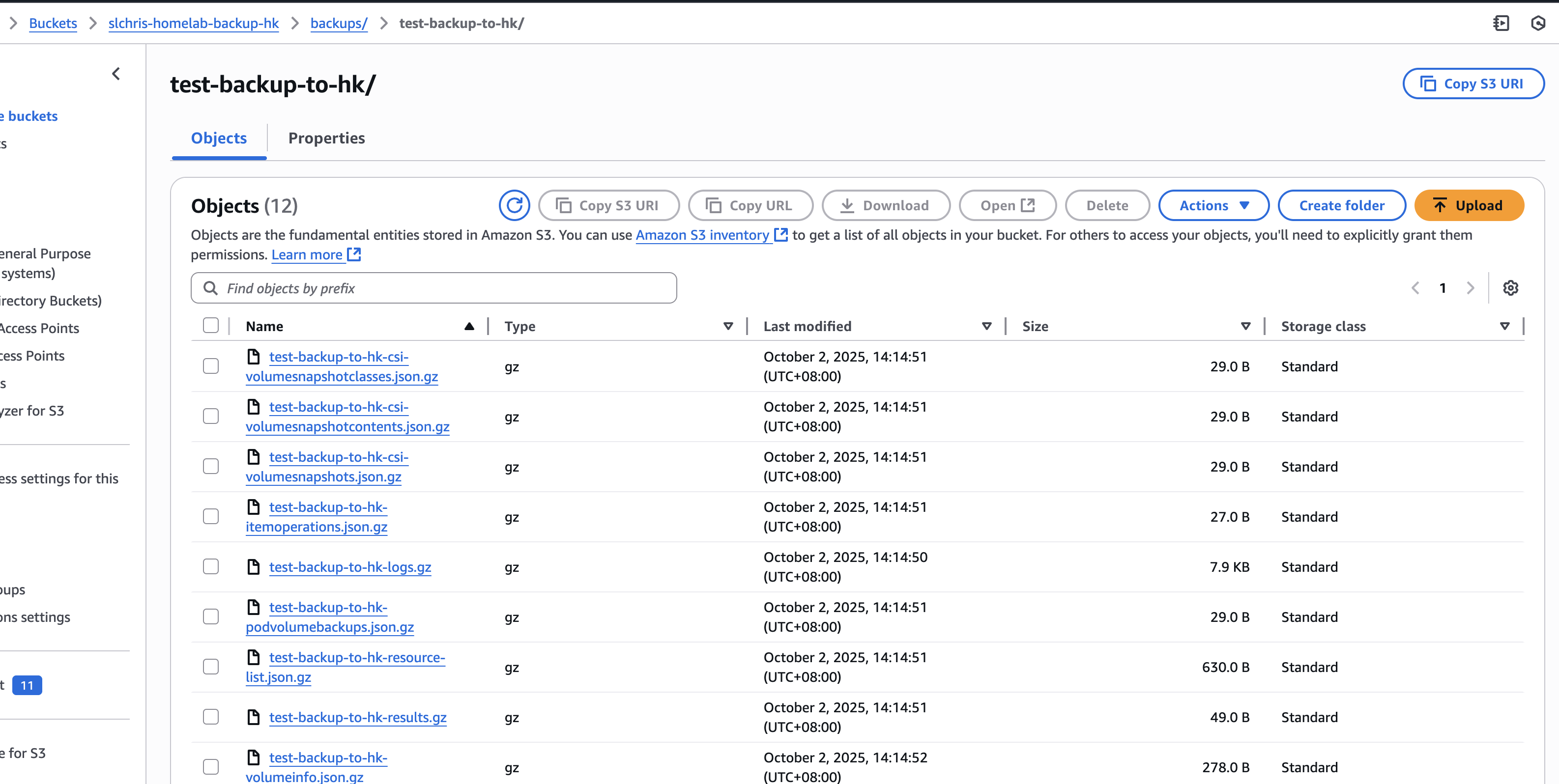
Also visible in S3 web console:
Other
Force Delete
Force delete (doesn’t delete bucket contents):
kubectl delete backup test-backup -n velero --force --grace-period=0Force delete restore task:
kubectl delete restore authentik-backup-20250607214953 -n velero --grace-period=0 --forceOr use patch:
kubectl patch restore harbor-restore -n velero -p '{"metadata":{"finalizers":null}}' --type=mergeUninstall
velero uninstallSummary
Velero is a great tool, but for enterprises doing this manually still has risks. Need more testing and product integration.
如果你觉得这篇文章对你有所帮助,欢迎赞赏~
Sponsor